
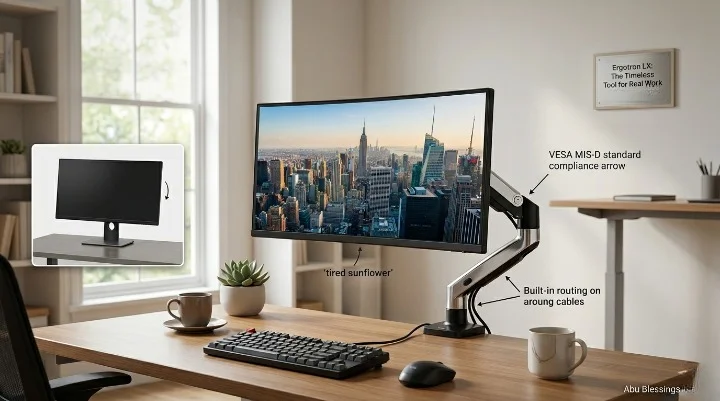

Ergotron LX monitor arm review time: yes, this arm is still worth talking about in 2026, because most cheap arms look good for a week, then sag, wobble, or make your screen droop like a tired sunflower, while the LX still feels like a proper tool built for real desks, real work, and real neck pain.
What you’ll learn in this article
- Why the Ergotron LX still beats most budget clones
- How its Constant Force™ design changes daily use
- Which monitor sizes and weights work best
- Why desk depth, wall space, and cable length matter more than most people think
- When to skip the LX and buy the Ergotron HX
- Which real Amazon products fit this setup
- The main pros, cons
Quick Answer for Skimmers
The LX is still the gold-standard workhorse. It is not the cheapest. It is not the flashiest. It is the arm people buy when they are done gambling with crunchy, stiff, no-name arms.
If your monitor weighs 7 to 25 pounds and is up to 34 inches, the LX still makes sense. If your screen is much heavier, go straight to the HX. If your screen is tiny and you barely move it, the MXV or even a simpler arm may be enough.
Buy the LX for motion, not for vanity. The magic is not how it looks. The magic is that it keeps working.
And yes, this Ergotron LX monitor arm review lands on a simple answer: buy it if you move your monitor often, care about posture, and want one arm to last for years.
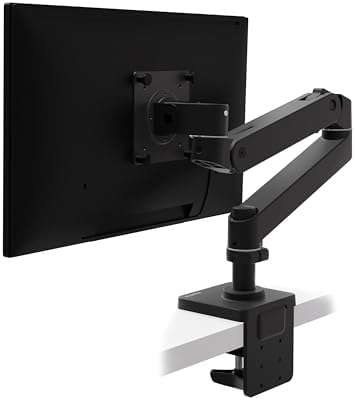
1) Ergotron LX Monitor Arm, Single Monitor Desk Mount, Matte Black

- Broad compatibility: Fits single screens up to 34 inches diagonal and 7 to 25 pounds; compatible with VESA patterns 75×7…
- Versatile mounting options: Includes two-piece desk clamp and grommet mount to fit a variety of desk types; desk clamp a…
- Improved comfort: Easily raise your monitor up to 17.3 inches above your worksurface with 13 inches of lift; find your b…
- Sleek and modular design: Designed with aesthetics in mind to enhance your workspace, built-in cable management creates …
- Built to last: Extensive quality testing ensures your monitor stays stable and secure; Ergotron products set the standar…
Ergotron LX Monitor Arm, Single Monitor Desk Mount, fits flat or curved ultrawide monitors up to 34 inches, 7 to 25 lbs, VESA 75x75mm or 100x100mm
Pros
- Smooth motion
- Strong build
- Great for daily repositioning
- Long 10-year warranty
- Works with many 27-inch to 34-inch screens
Cons
- Costs more than clone arms
- Needs setup time
- Needs wall clearance behind the desk
- Overkill for very light screens
2) Ergotron Upgraded LX Pro Premium Monitor Arm
- Broad compatibility: Fits single screens up to 34 inches diagonal, 4 to 22 pounds and up to 3.6 inches deep; compatible …
- Versatile mounting options: Includes two-piece desk clamp to fit a variety of desk types; desk clamp attaches to desks 0…
- Elevate comfort: Easily raise your monitor up to 18.3 inches above your worksurface with 13 inches of lift; find your be…
- Sleek and modular design: Designed with aesthetics in mind to enhance your workspace, improved built-in cable management…
- Built to last: Extensive quality testing ensures your monitor stays stable and secure; Ergotron products set the standar…
Ergotron Upgraded LX Pro Premium Monitor Arm, Single Monitor Desk Mount, fits flat or curved ultrawide computer monitors up to 34 inches, 4 to 22 lbs
Pros
- Cleaner look
- Nice upgrade path
- Premium fit and finish
- Good for modern setups
Cons
- Lower top weight than classic LX
- Costs more
- Less proven over long years
3) Ergotron HX Premium Heavy Duty Monitor Arm

- Support ultrawides: To use with the Samsung 49-inch Odyssey G9, the separate accessory HX Heavy Duty Tilt Pivot (98-540-…
- Broad compatibility: Fits large, single screens up to 49 inches diagonal and 20 to 42 pounds; compatible with VESA patte…
- Multiple mounting options: Includes arm, extension, monitor pivot, mounting hardware; two-piece desk clamp for surface e…
- Comfortable working: Offers full monitor motion with 11.5 inches of lift, screen rises 17.8 inches above your desktop; c…
- Stylish and functional: Sleek design with heavy duty capacity allows easy positioning of large monitors; low-profile cla…
Ergotron HX Premium Heavy Duty Monitor Arm, Single Monitor VESA Desk Mount, for flat or slight curved ultrawide monitors up to 49 inches, 20 to 42 lbs
Pros
- Best for heavy ultrawides
- Better fit for 49-inch displays
- Very stable
- High weight range
Cons
- Much pricier
- Bigger look on the desk
- Too much arm for many normal screens
4) Ergotron Notebook Tray

- Supports most laptops: Works with laptops or convertible notebooks up to 17.3 inches diagonal and 12 pounds; compatible …
- Stable fit: Includes tray, adjustable rails, attachment hardware and multiple secure options for attaching your laptop, …
- Ergonomic workspace: Allows you to add a laptop or convertible notebook in tablet or laptop mode to your monitor arm or …
- Easy attachment: Durable design quickly attaches to most monitor mounts and works with or without docking stations
- Built to last: Extensive quality testing ensures your laptop stays secure; Ergotron products set the standard for qualit…
Ergotron Notebook Tray for laptop, notebook, and tablet, supports most laptops up to 17.3 inches
Pros
- Turns the arm into a hybrid setup
- Good for laptop-plus-desk users
- Official fit with Ergotron gear
- Holds laptops up to 17.3 inches
Cons
- Not a standalone arm
- Adds cost
- Not as tidy as a full monitor-only setup
Why We Are Still Talking About the LX in 2026
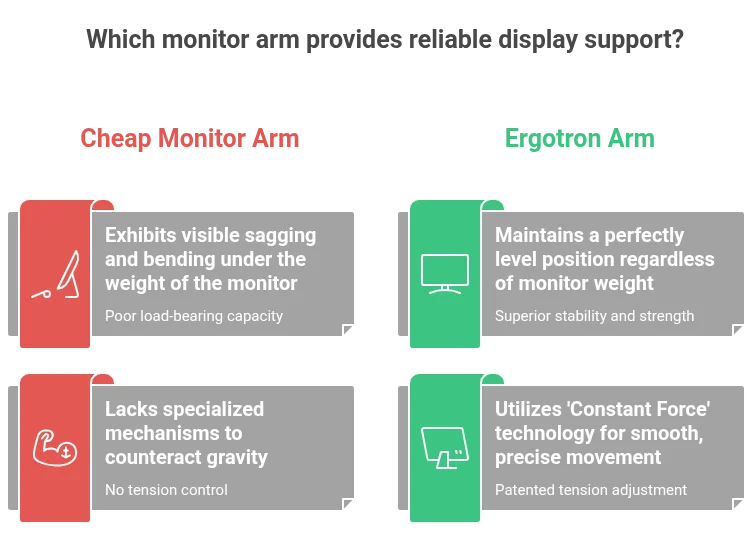
I have seen this story too many times. A cheap arm shows up in a nice box. It looks sleek in photos. The first week feels fine. Then the screen starts to nod. Then it drifts. Then you tighten a bolt. Then you tighten another bolt. Two months later you stop moving it at all, because every move feels like a minor wrestling match.
That is the real value question. Is the Ergotron LX worth far more than the pile of low-cost arms on Amazon? For many people, yes. The LX is not sold as a desk decoration. It is sold as a daily-use tool, built around movement, tension, balance, and repeat use. Ergotron says the LX uses Constant Force™ technology, supports monitors up to 34 inches and 7 to 25 pounds, and passes a 10,000-cycle motion test. That matters because a monitor arm lives or dies by what happens after month six, not day six. Ergotron LX Specs
A lot of arms win on price. Very few win on trust. That is why the LX still gets talked about like an old favorite wrench. It is not exciting in the way new gear is exciting. It is exciting in the way a thing feels when it keeps doing its job year after year.
If you work long hours, switch between sitting and standing, share a desk, code in portrait mode, or move a screen out of the way for writing, drawing, or meetings, the LX solves a real problem. It frees desk space, raises the screen to eye level, and lets you move the display with one hand instead of two anxious hands and a prayer.
This is where many reviews miss the point. They talk about the LX like it is just a mount. It is not. It is part posture tool, part space saver, part vibration control, and part sanity saver. That mix is why it still has a strong case in 2026.
The Physics of the Problem: The Fishing Pole Effect
Think of a high-end fishing rod and a cheap plastic one. Put a heavy fish at the end. One bends in a calm, controlled way. The other wobbles, flexes, and feels one bad move away from failure. A monitor arm works the same way.
A screen is not just weight. It is weight hanging out in space. The farther that weight sits from the base, the more force the arm has to manage. That is why weak arms shake when you type, bounce when you bump the desk, and sag over time. It is also why “same weight rating” on paper does not mean “same real use” in your room.
The LX uses polished aluminum construction and a mechanical feel that is closer to a firm spine than a hollow stick. Ergotron also states that heavier monitors above 20 pounds can reduce vertical travel, which is a smart clue that this arm is honest about physics, not just marketing numbers. Ergotron LX Specs
Why cheap arms start to “nod”
Most cheap arms feel fine in a fixed pose. The problem starts when you move them often. Over time, joints loosen, gas springs lose strength, or the head starts to dip. That dip is what many users call screen “nod.” It feels small at first. Then it becomes the thing you notice every day.
The LX avoids a lot of that pain because it is built around controlled counterbalance. Ergotron frames this as Constant Force™ technology, which is the core reason the arm stays so easy to move while still holding position. Ergotron LX Specs
The human result is simple. Less shake. Less fuss. Less tightening. Less “why is my screen looking at my keyboard again?”
The “So What?” Technical Breakdown
Specs are only useful when they change your day. So let’s turn the numbers into plain life.
Constant Force™ Technology
This is the heart of the LX. Ergotron calls it Constant Force™ technology. In use, that means the arm feels balanced through movement instead of fighting you. You push it up, down, in, or out, and it goes there without the stiff jerk that cheaper arms often have. Ergotron LX Desk Mount Technical Specifications (PDF)
So what? It means you will actually use the arm. That matters. A good ergonomic tool only helps if moving it feels easy enough to do ten times a day. If an arm feels annoying, people stop adjusting it. Then the “ergonomic” arm becomes a fixed metal stick.
13 inches of lift
The LX gives up to 13 inches of height adjustment. For most users, that is enough to move from seated work to a higher standing position, or to set the top of the screen near eye level without stacking books, risers, or random office junk. Ergotron LX Specs
So what? Neck angle changes. Shoulder tension drops. Your desk looks cleaner. Your webcam gets a better angle. It is one of those boring wins that adds up.
360-degree pan and 360-degree rotation
The LX supports 360° pan and 360° rotation, with tilt range listed as 70° back and 5° forward on the official product page. That gives you easy landscape-to-portrait switching for coding, editing, long docs, spreadsheets, and chat windows. Ergotron LX Specs
So what? You can go from wide monitor mode to tall reading mode in seconds. That is a real quality-of-life jump if you do text-heavy work.
7 to 25 pound weight range
This is the number that should decide most purchases. If your screen sits in the 7 to 25 pound range, the LX is built for it. If it is heavier, stop forcing the issue and buy the HX. The HX is rated for 20 to 42 pounds and up to 49-inch large displays, which makes it the better pick for monster ultrawides. Ergotron LX Desk Mount Technical Specifications (PDF)
So what? Matching weight matters more than brand loyalty. A great arm used outside its comfort zone becomes a bad buy.
VESA support and real-world fit
The LX supports VESA 75x75mm and 100x100mm mounting. That covers most modern monitors. It also ships with clamp and grommet options on the main matte black LX model. Ergotron LX Specs
So what? Setup is easier, adapter hunting is less likely, and you are not stuck with weird extra parts.
Authority, Standards, and Why They Matter
A premium arm should protect a premium screen. That means more than smooth movement.
Ergotron states that the LX meets VESA FDMI MIS-D mounting standards, carries a 10-year warranty, and has passed a 10,000-cycle motion test. It also notes compliance with ANSI/BIFMA indoor air quality standards for emissions. Those are not sexy details, but they point to a product made for long-term office use, not just quick online sales. Ergotron LX Specs
When you clamp metal to a desk and hang an expensive monitor from it, boring details are the good details. You want standards. You want repeat testing. You want warranty length. You want the brand to talk plainly about desk thickness, hole size, and reduced motion with heavy screens.
That is another reason the LX keeps its place. It feels like office gear, not toy gear.
BIFMA and the long game
BIFMA matters because it points to commercial-grade thinking ANSI/BIFMA indoor air quality standards. Offices, call centers, studios, and shared desks are rough on hardware. A product built for that kind of life usually ages better at home too. That is why so many people buy the LX once and never look back.
VESA and monitor safety
VESA is the quiet hero here. If your monitor has standard 75×75 or 100×100 mounting holes, odds are the LX fits without drama. Less drama is good when the thing you are mounting costs hundreds, or thousands.
Design, Feel, and Daily Use
There is a vibe to the LX. It feels industrial, a little old-school, and very sure of itself. Not flashy. Not hidden. Not trying to disappear. Just solid.
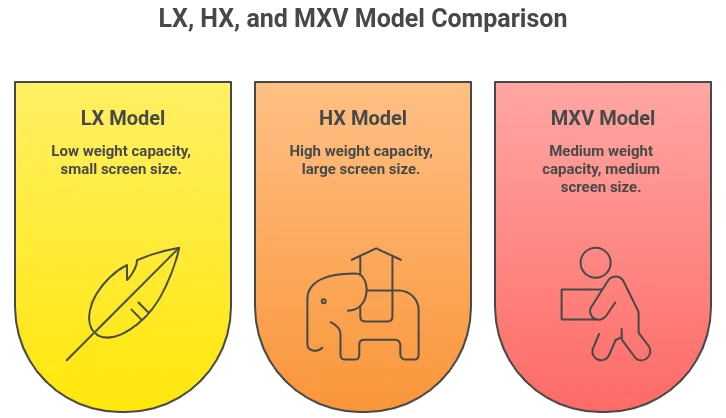
That feel is part of the charm. Some people want a cleaner, lighter, more sculpted arm. If that is you, the MXV may speak your language. Ergotron says the MXV supports monitors up to 34 inches and 7 to 20 pounds, with 13 inches of lift, a lower-profile look, and a built-in rotation stop to help protect nearby walls. Ergotron MXV Specs
But the LX still wins on that “use me all day” feel. It feels ready for abuse. It feels like something built by people who assumed you would move it again in five minutes.
Comparison Table
| Feature | Ergotron LX | Ergotron HX | Ergotron MXV | Budget Clones |
|---|---|---|---|---|
| Best feel | Industrial and fluid | Tank-like strength | Clean and light | Often stiff and crunchy |
| Best for | 9-to-5 pros | Heavy ultrawides | Minimalist desks | Short-term setups |
| Weight range | 7 to 25 lbs | 20 to 42 lbs | 7 to 20 lbs | Varies wildly |
| Screen size | Up to 34″ | Up to 49″ | Up to 34″ | Often overstated |
| Motion quality | Excellent | Excellent | Very good | Mixed |
| Desk demand | Normal clamp setup | Strong desk preferred | Tight-space friendly | Can leave dents or slip |
| Who should skip | 49″ ultrawide owners | Tiny screen owners | Heavy monitor users | Anyone with an expensive monitor |
The table tells the whole story. The LX is the best middle path. The HX is the beast. The MXV is the cleaner style choice. Cheap clones are a gamble.
The 3 Things I Wish I Knew Before Buying
1) The wall-gap problem is real
If your desk sits flush against a wall, the LX needs space to bend back. The elbow needs room. If you have zero gap, the arm can still work, but your range may feel cramped. Give it around 4 to 6 inches of breathing room if you can.
This catches many people by surprise. They picture the arm moving in a clean arc. Then the wall says no.
2) Tension setup matters more than people think
A lot of new users think the arm is broken because the monitor shoots up or slowly sinks. That is often just tension mismatch. The LX needs to be tuned to your monitor weight. Once dialed in, it feels calm. Before that, it can feel weird.
So if your first ten minutes feel bad, do not panic. Adjust first. Judge second.
3) Cable length can ruin a great arm
The LX has built-in cable routing, which is good. But if your HDMI, DisplayPort, USB-C, or power cable is too short, the arm will feel “stiff” when the real problem is cable drag. Use long enough cables. Six feet is often the safe floor for flexible movement, sometimes more depending on desk width and route.
This sounds minor. It is not. Bad cable length can make a premium arm feel cheap.
Who Should Buy the LX
Buy the LX if you are the kind of person who moves the screen often. That includes writers, coders, editors, remote workers, traders, home office users, and anyone who flips between focus work and open desk space.
Buy it if you want one arm for a decade, not three arms across six years.
Buy it if screen shake bugs you. Buy it if posture bugs you. Buy it if desk clutter bugs you.
Buy it if your monitor is in the safe zone. That means under 34 inches and inside the 7 to 25 pound range. For many 27-inch and 32-inch screens, that is a sweet spot. Ergotron LX Specs
This part of the Ergotron LX monitor arm review is easy: the arm makes the most sense for people who want motion, not just mounting.
Who Should Skip the LX
Skip it if you have a 49-inch ultrawide. That is HX land.
Skip it if your monitor is too light or tiny and you almost never move it. You may be paying for motion you will not use.
Skip it if your desk is weak, brittle, or not friendly to clamps.
Skip it if your setup is against a wall and you cannot make room for the arm to move.
Skip it if you want the most hidden, low-visual setup possible. The MXV may fit that goal better. Ergotron MXV Specs
Choose in 60 Seconds
Here is the fast logic.
- Check monitor weight.
If it is 7 to 25 lbs, look at the LX.
If it is 20 to 42 lbs, look at the HX. Ergotron LX Specs Ergotron HX Specs - Check your desk layout.
If you have wall space and normal clamp room, the LX works well.
If your desk setup is very tight, look harder at clamp style and arm depth. - Check your use style.
If you move your screen 5+ times a day, the LX earns its price.
If you set it once and forget it, you may not need this much arm. - Check for laptop plans.
If you want a hybrid monitor-and-laptop setup, Ergotron’s official Notebook Tray gives the LX a clean upgrade path for laptops up to 17.3 inches and 2.5 to 12 pounds when paired with an LX arm. Ergotron Notebook Tray
That is the logic. Short. Clean. No guessing.
My Final Verdict
The LX wins because it solves a dull problem in a very satisfying way. It holds a screen where you want it, moves when you want it to move, and stops when you want it to stop. That sounds basic. It is not basic. That is rare.
A lot of monitor arms are built to sell. The LX feels built to stay.
If you are a power user who moves the screen all day, this is close to a no-brainer. If you are a minimalist who just wants the monitor off the desk, you can save money with a simpler option. If you are a value seeker, the LX still makes a strange kind of perfect sense: spend more once, stop replacing junk, and keep your desk stable for years.
So, is it still worth it in 2026? Yes. Very much so. And if you fit the weight range, this Ergotron LX monitor arm review ends where it started: the old favorite is still one of the smartest buys in the category.
Related reads:
- Best Monitor Arms 2026
- Ergotron Monitor Arm Buying Guide: LX vs. LX Pro vs. HX
- 7 Benefits of the Ergotron LX: Why This Ergonomic Arm is Worth the Money
- Best Monitor Stand for Desk 2026: 11 Top-Rated Risers for Better Posture
- Best Dual Monitor Arms for Desk
- 14 Best Home Office Tech Accessories 2026: Gadgets That Boost Productivity