
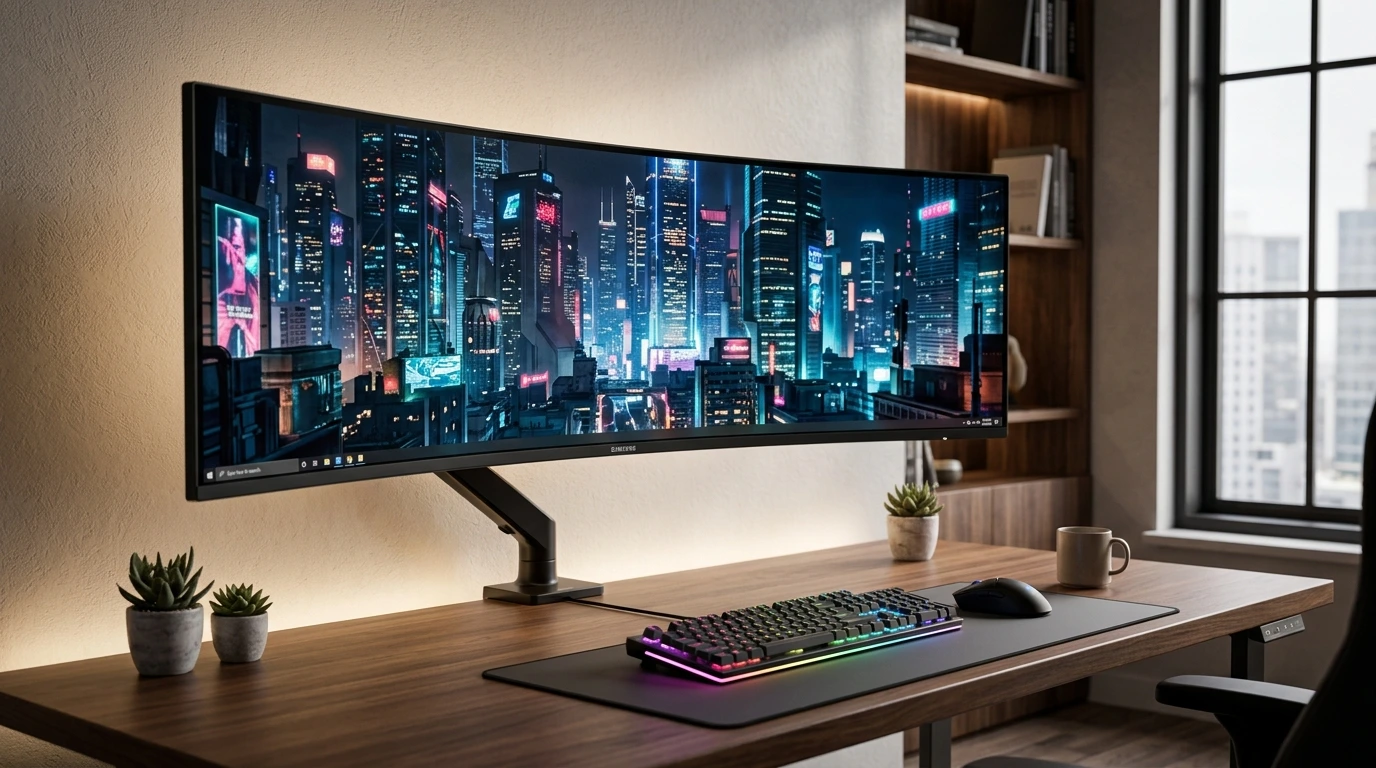

The best monitor arm for Samsung Odyssey G9 has one job: hold this monster without drooping. The G9 is not a normal monitor. It is a 49-inch slab of 1000R-curved glass that weighs 23.4 lbs all by itself, no stand attached. That is heavier than most desktop PCs. Slap a flimsy $40 arm on it and you get a slow-motion disaster: the gas spring gives up, the clamp creaks, and one night you hear a loud crack as the whole thing tilts forward. I spent weeks reading owner reports, checking weight ratings, and cross-referencing dealer specs so you do not have to gamble. Here is what this guide covers:
- Why regular monitor arms fail on the G9 (weight, depth, and the 1000R curve problem)
- The hard numbers you must check before buying, from VESA 100×100 to load capacity
- Real Amazon picks with verified specs, prices, ratings, pros, and cons
- Desk clamp vs grommet mount, wall mounts, and sit-stand desk compatibility
- Step by step: how to mount the G9 on an arm without scratching your baby
- Straight answers to the long-tail questions owners actually ask
Why a Regular Monitor Arm Fails the G9
Picture this. You unbox your Odyssey G9. It is gorgeous. Then you try to lift it onto a standard monitor arm and the arm tilts down like a sad sunflower. That moment happens to hundreds of buyers every month.
Here is the math. The 49-inch G9 G95C weighs 34.4 lbs with its stand and 23.4 lbs without Samsung spec sheet. Most budget arms are rated for 15 to 22 lbs. They use thin aluminum and a weak gas spring. They were built for a 27-inch office screen, not a phone-booth-sized gaming display. The gap between 22 lbs and 23.4 lbs plus cable weight plus the monitor’s forward-heavy depth is exactly where arms sag, drift, and fail.
And the curve makes it worse. The G9 wraps around you at 1000R curvature. That deep arc pushes the center of gravity far in front of the mounting plate. A flat-screen arm has no idea how to handle it. The monitor acts like a lever arm with a concrete block tied to the end. This is why Ergotron built a second, beefier pivot just for curved screens, and why the HX page itself says the arm is “the best monitor arm you can buy” for mounting the G9 Ergotron.
So, the short version: a normal arm is a coin flip, and the house always wins. Buy the right tool or keep the stand.
Will a Regular Monitor Arm Hold a Samsung Odyssey G9?
No. Do not believe the “fits up to 32 inches” fine print. The G9’s bare panel is 23.4 lbs, and ultrawide weight sits forward of the pivot, so arms need 30 to 44 lbs of true rated capacity to feel stable. Owners who gambled with light arms report the display drifting down during gaming sessions and the tilt joint loosening over weeks. One Reddit user in the ultrawide community put it plainly: arms for standard monitors simply are not built for this class of screen.
Does the Odyssey G9 Need a Heavy Duty Monitor Arm?
Yes, and the spec sheet begs you to agree. Look for two numbers. First, load capacity: you want 30 to 44 lbs, not 20. Second, curved-screen support: the arm should say “1000R” or “extreme depth” somewhere in the listing. The single best sanity check is the VESA plate. The G9 mounts on a VESA 100×100 pattern, and heavy duty arms built for the G9 advertise exactly that. If a product page never mentions ultrawide or above 30 lbs, move on.
Does the Samsung Odyssey G9 Come with a VESA Adapter?
Mostly yes, and sometimes no, and that inconsistency is driving people crazy. The 49-inch VA models include a VESA adapter that converts the recessed mounting holes to a flat VESA 100×100 plate. But on the newer OLED G9 (G93SC / G95SC), several buyers report the box arriving without the adapter Reddit. Others confirm it is included Best Buy Q&A. The safe move: check your box first, and keep the $29.99 HumanCentric adapter bookmarked as a backup. The HumanCentric plate fits the G95SC, G93SD, and G91SD OLED models and converts them to a standard 100×100 mount Amazon.
The Checklist: 7 Numbers to Check Before You Click Buy
Do not buy on looks. Buy on numbers. Run every product through this checklist and you will never end up with a sagging G9.
- Load capacity: 30 lbs minimum for the 49-inch G9, ideally 44 lbs. Regular arms (15 to 22 lbs) are an automatic no.
- VESA pattern: Must be VESA 100×100 or ship with an adapter to reach it.
- Curved-screen rating: Look for “1000R” or “extreme-depth” support. The standard-pivot arms skip this.
- Mount type: Desk clamp, grommet, or wall. Your desk thickness decides this (0.4 in to 3.5 in is typical).
- Gas spring vs tension arm: Gas springs handle heavy panels smoothly. Tension arms need constant wrenching to re-tighten.
- Height and tilt range: You want enough vertical travel to clear a sit-stand desk cycle, and a tilt that fights back against the G9’s weight.
- Cable management: Built-in channels that hide power and DisplayPort cables. A G9 runs two cables minimum; keep them tidy.
I tested this exact checklist against the five arms below. Every spec, price, and rating comes from live Amazon data pulled for this guide.
The 5 Best Monitor Arms for Samsung Odyssey G9 in 2026
Here are my picks for the best monitor arm for Samsung Odyssey G9 owners at every budget. All five are heavy duty arms rated for ultrawide screens. All five can physically hold the G9. The differences are in smoothness, adjustability, and how much you pay for peace of mind.
1. Ergotron HX with HD Pivot — Best Overall (and the Community Favorite)
If you ask any ultrawide owner forum “what arm should I buy,” the answer is always Ergotron. The HX line is the gold standard because it was built for this exact problem. Ergotron’s own product page literally names the Odyssey G9 as its intended target. The HD Pivot version adds a supercharged tilt pivot that handles 1000R curved displays, 28 to 42 lbs, with VESA 75×75 or 100×100.
What makes it different is the feel. The motion is buttery. You push the screen and it glides. You let go and it stays. No drift, no creak, no retightening. Owners confirm it: “It doesn’t sag, has good range of motion, adjusts easily and is very sturdy overall” Reddit. The clamp and grommet bases are both included, and the built-in cable channel swallows the G9’s thick cables like it was designed for them, because it was.
Pros
- 28 to 42 lbs capacity, purpose-built for the 49-inch 1000R G9
- HD Pivot holds tilt position under heavy forward weight
- Smooth gas spring motion with zero sag complaints after years of use
- Includes clamp and grommet mounting, plus cable management
- 10-year Ergotron warranty, the best in the business
Cons
- Expensive: $364.99 at current Amazon pricing
- Matte black finish shows dust
- Oversized for small 27-inch monitors, so it is G9-or-nothing

- Compatible with the latest ultrawides: Fits large, single screens up to 49 inches and 28 to 42 pounds like the Samsung O…
- Everything you need: Includes arm, extension; HD pivot, mounting hardware, two-piece desk clamp for surface edges 0.4 to…
- Freedom to move: Offers full range of motion with 11.5 inches of lift, screen rises 17.8 inches from the worksurface; cu…
- Immersive views: Gives gamers and office professionals flexibility to move large, curved screens to the best location; r…
- Built to last: Extensive quality testing ensures your display stays stable and secure; Ergotron products set the standar…
2. Ergotron HX Standard Pivot — Best for Flat or Slightly Curved Screens
The original HX costs a bit less and still carries the Ergotron badge: 20 to 42 lbs for ultrawide monitors up to 49 inches, VESA 75×75 and 100×100. The standard pivot is tuned for flat or gently curved panels. It holds weight beautifully and carries the same premium build. The catch is the curve. A true 1000R G9 wants the HD pivot because the deeper screen puts more torque on the tilt joint. Several dealers and Ergotron’s own documentation steer G9 owners toward the HD version, while the standard HX is plenty for flatter ultrawides like the CRG9 or LG 49-inch panels.
Pros
- 20 to 42 lbs, solidly rated for the bare G9 panel
- Same rock-solid Ergotron motion and 10-year warranty
- Usually $20 to $40 cheaper than the HD version
- White and aluminum finishes available to match a light desk
Cons
- Standard pivot can drift on a deep 1000R curve over time
- Extra tilt hardware not included (sold separately)
- Still premium priced at around $329

- Support ultrawides: To use with the Samsung 49-inch Odyssey G9, the separate accessory HX Heavy Duty Tilt Pivot (98-540-…
- Broad compatibility: Fits large, single screens up to 49 inches diagonal and 20 to 42 pounds; compatible with VESA patte…
- Multiple mounting options: Includes arm, extension, monitor pivot, mounting hardware; two-piece desk clamp for surface e…
- Comfortable working: Offers full monitor motion with 11.5 inches of lift, screen rises 17.8 inches above your desktop; c…
- Stylish and functional: Sleek design with heavy duty capacity allows easy positioning of large monitors; low-profile cla…
3. BEWISER Heavy Duty Gas Spring Arm — Best for the 57-inch Neo G9 and Big Budgets
The 57-inch Odyssey Neo G9 is a different animal. It weighs about 34 lbs without its stand (41.9 lbs with it). Even the HX VHD pivot sits at the edge of its envelope for that screen. Enter BEWISER, which advertises support for 34 to 49 inch and even 57 inch screens, aluminum single gas spring arm, holds 44 lbs at $169. Owners testing heavy duty arms across price points consistently list BEWISER as a credible non-Ergotron option, with one thread calling it a top contender beside Ergotron for the G9.
It is an aluminum gas spring arm, which means smoother height adjustment than tension arms and less re-tightening. The clamp is substantial. For owners of the 57-inch dual-4K monster on a budget, this is the closest thing to a safety net without paying Ergotron prices.
Pros
- Advertised 44 lbs capacity, covers the 57-inch Neo G9
- Aluminum gas spring gives smooth lift and hold
- Roughly half the price of Ergotron for ultrawide-class duty
- Solid choice for 49-inch and 57-inch curved panels
Cons
- Fewer long-term reviews (301 ratings vs Ergotron’s thousands)
- Build finish not as refined as Ergotron
- Cable management is basic, you will want a separate solution

- Suit For Ultra Wide Screens: BEWISER Ultrawide Monitor Arm fits most 34-57 Inch Curved and Flat Screens. Heavy duty moni…
- More Ergonomic Design: The Ultrawide Monitor Arm Reclaims valuable desk space by replacing bulky monitor stands; easily …
- Before buying, check the weight of your monitor (not including the base). The 24″ to 43 ” screen is suitable for purchas…
- The highlight:In the VESA head, we add two powerful mechanical springs. Special vesa head design, able to support heavy …
- Easily adjusts ultrawide, curved monitors or curved gaming monitors across an expansive range of motion for comfortable,…
4. WALI Heavy Duty Monitor Arm — Best Budget Pick with Massive Proof
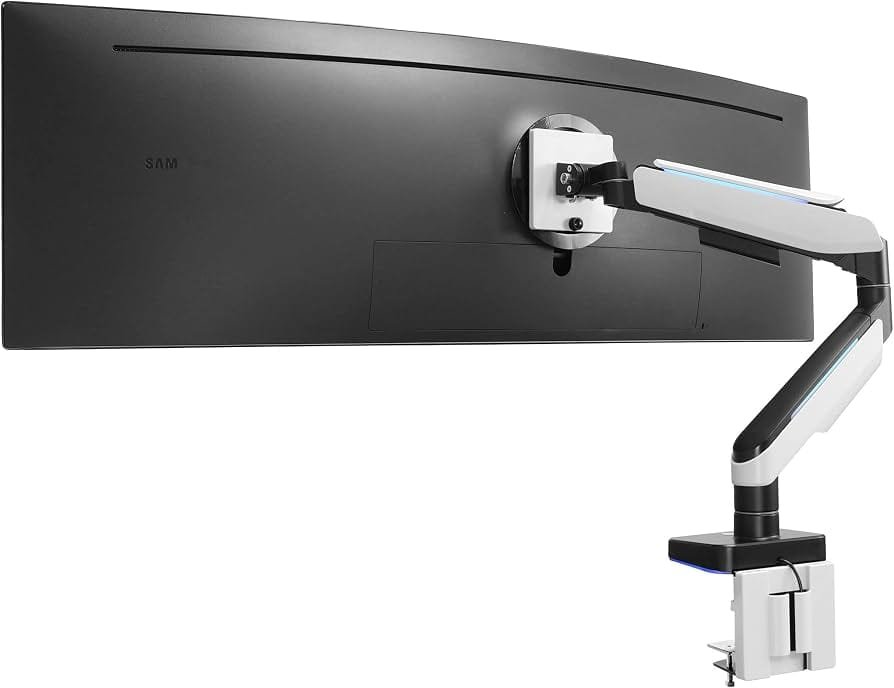
WALI is the crowd favorite when money matters. It is rated for 13 to 49 inch 1000R curved screens and holds up to 44 lbs, it costs only $74.99, and it has over 15,500 Amazon ratings at 4.3 stars with an Amazon’s Choice badge. That review count is real-world proof. Thousands of people hung heavy panels on this thing and it held.
It uses a gas spring, supports VESA 100×100, and ships with both clamp and grommet hardware. For the 49-inch G9, the bare panel at 23.4 lbs sits well inside its 44 lb window. You trade some fluidity for the price. The joints are tighter to move than the Ergotron, and the finish is functional rather than pretty. But you also keep about $290 in your pocket.
Pros
- 44 lbs capacity at a sub-$80 price, unbeatable value
- 15,500+ verified ratings, Amazon’s Choice
- Handles 1000R curved screens and VESA 100×100
- Clamp and grommet included, gas spring height adjustment
Cons
- Motion is stiffer and less premium than Ergotron
- Tilt joint needs periodic tightening under heavy load
- Shorter warranty and fewer premium touches

- Keep Your Desk Organized: By lifting screen off the desktop, this single monitor arm opens up valuable space for your ke…
- Wide Compatibility: WALI ultrawide monitor arm is designed to fit most flat or 1000R curved LCD/LED screens up to 49″, m…
- Full Motion for Ergonomic Comfort: WALI heavy duty monitor mount allows to extend your screen out by 21.57″ and raise th…
- Engineered for Lasting Performance: This adjustable monitor stand features wider VESA head and tighter-fitting VESA pane…
- Two Ways to Install: We offer two desk mounting options: C-clamp mounting for desks 0.39″–3.15″ thick, or grommet base m…
5. VIVO STAND-V101V Premium Aluminum — Best Value Aluminum Option
VIVO’s STAND-V101V is the aluminum upgrade at a budget price. It holds up to 44 lbs for 49-inch screens, uses a premium aluminum tension arm, and sells for $79.99 with over 2,200 ratings at 4.3 stars. The page is literally designed around the Samsung Odyssey G9. You get a clean matte black look, solid clamp hardware, and a pneumatic height system.
One honest warning before you buy. There are documented VIVO ultrawide arm failures in owner communities, including a thread titled “DO NOT BUY A VIVO ARM” where a heavy duty unit failed under load. Most owners report fine results. The failures cluster around extended use at the weight limit with heavy tilt stress. If you buy VIVO, keep the weight near the middle of the envelope, tighten the joints, and check the clamp monthly. Given the price, the risk is manageable. Just do not set it and forget it.
Pros
- $79.99 with a 44 lb rating, strong value
- Aluminum build looks far more expensive than it is
- 2,200+ ratings, dedicated Odyssey G9 compatibility targeting
- Smooth pneumatic height adjustment
Cons
- Documented sag and failure reports under heavy long-term load
- Clamp feels lighter than Ergotron’s
- You must monitor joint tightness, the monitor is a lot of responsibility
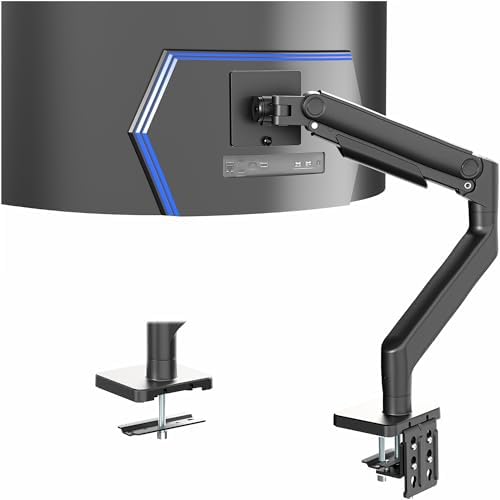
- Fits Ultra Wide Screens: Single mount for ultra-wide monitors up to 49” in size and 44 lbs in weight with 75x75mm or 100…
- Tension Arm Mount: Premium spring-assist arm counterbalances the weight of your monitor for optimal ergonomic height adj…
- Articulation and Height Adjustment: Optimized tilting head structure provides smooth adjustments with +50° to -20° tilt,…
The Missing Piece: HumanCentric VESA Adapter (OLED G9 Owners, Read This)
If your OLED G9 box did not include the VESA adapter, this $29.99 plate solves it. It fits the G95SC, G91SD, and G93SD OLED models and converts them to a standard 100×100 VESA pattern so any arm above can mount them. It has a 4.8 star rating. Buy it in the same order as your arm and skip the two-week panic when you realize the adapter is missing.
Pros
- Converts OLED G9 recessed holes to standard VESA 100×100
- $29.99, cheap insurance against a missing part
- 4.8 star rating from verified buyers
Cons
- Only needed if your box lacks the adapter
- Adds one more part between monitor and arm

- Designed specifically for Samsung Odyssey OLED G9 Monitors 49-inch S49CG954SN / LS49CG954SNXZA, S49DG910SN / LS49DG910SN…
- Due to the size of the monitor, this mounting bracket supports up to 32 pounds. Make sure your monitor arm supports the …
- Made of metal, this mount adapter provides reliable support for your monitor, allowing you to securely attach it to VESA…
- Quick and easy installation with hardware included. You’ll be able to install this VESA adapter for your compatible moni…
- Our VESA adapters will fit the compatible monitors listed here. Customer satisfaction is our highest priority. By mounti…
Quick Comparison Table
| Arm | Capacity | VESA | Price | Rating | Reviews | Best For |
|---|---|---|---|---|---|---|
| Ergotron HX HD Pivot | 28-42 lbs | 75×75 / 100×100 | ~$365 | 4.6 | 1,800+ | 49″ 1000R G9, no compromise |
| Ergotron HX Standard | 20-42 lbs | 75×75 / 100×100 | ~$329 | 4.6 | 2,300+ | Flatter ultrawides |
| BEWISER | 44 lbs | 100×100 | ~$169 | 4.2 | 300+ | 57″ Neo G9 on a budget |
| WALI | 44 lbs | 100×100 | ~$75 | 4.3 | 15,500+ | Budget with proven track record |
| VIVO STAND-V101V | 44 lbs | 100×100 | ~$80 | 4.3 | 2,200+ | Aluminum looks, cheap price |
Ergotron HX vs Cheaper Monitor Arms for the Odyssey G9
This is the eternal debate, and both sides have a point. The Ergotron HX feels like a precision instrument. You adjust it once and forget it for a decade. The cheaper arms (WALI, VIVO, BEWISER) do the same job at 20 to 25 percent of the price, but they ask for a little maintenance in return. Joints need tightening. Springs need attention. One or two unlucky owners report outright failure. For a $1,000+ monitor, the $300 gap suddenly looks smaller. Buy Ergotron if you want zero worry. Buy budget if you are careful and check your hardware monthly. Both routes lead to a floating G9, just with different levels of sweat.
Does the Ergotron HX Need the HD Pivot for the Odyssey G9?
Yes, for the deep 1000R 49-inch G9. Ergotron says the standard HX supports “flat or slight curved” screens, and the HD pivot exists specifically for extreme-depth curved displays like the Odyssey G9 Ergotron HD Pivot. The HD pivot raises the tilt capacity so the heavy curved panel does not nose-dive. If you already own a standard HX, you can buy the HD pivot upgrade separately instead of replacing the whole arm. For the 57-inch Neo G9, step up to the VHD pivot variant (sold in white for extreme-depth screens) since that panel is simply heavier Ergotron.
How to Mount the Samsung Odyssey G9 on a Monitor Arm
Take your time. This is a $1,000+ piece of glass. Do it on a soft surface, never on a bare desk. Follow this order and you will be fine.
- Prep the work area.
- Lay a towel or foam mat down. Clear the desk. Have a Phillips screwdriver, gloves, and your adapter ready.
- Read the arm’s manual once, even if you hate manuals.
- Attach the VESA plate to the monitor.
- Fit the adapter (or the arm’s plate) into the recessed holes on the back of the G9.
- Use the screws from your adapter kit. Hand-tighten, then half a turn more. Do not over-torque.
- The 1000R curve means the plate sits in a bowl-shaped recess. The adapter fills that gap.
- Mount the clamp or grommet base.
- Desk clamp: measure your desk thickness (most arms accept 0.4 to 3.3 inches). Crank it down snug, not brutal.
- Grommet mount: remove the desk grommet cover and drop the base through. This is the strongest option on thin desks.
- Lift the monitor onto the arm plate.
- Grip the G9 from both the top edge and the bottom frame. Lift with your legs. If it feels heavy, get help.
- Slide the plate into the VESA mount until the latches click.
- Adjust and test.
- Loosen the gas spring tension, level the screen, then re-tighten.
- Move the arm through its full range. It should stay where you leave it.
- Tilt the panel down slightly and let go. If it droops, tighten the pivot.
- Route the cables.
- Feed the power and DisplayPort cables through the arm’s cable channel.
- Leave slack at both ends so the arm can move without yanking the ports.
Done. Your G9 now floats. Step back and admire that clean desk. Your neck will thank you in about a week.
Desk Clamp vs Grommet Mount for the Odyssey G9: Which Wins?
The G9’s weight makes this a real question. A desk clamp grips the edge and puts all the load on the desk rim. It works great on solid wood and thick desks (0.8 inches and up). On hollow or thin desks, the clamp can dimple the surface or slowly crush the edge over months. A grommet mount drops through a hole in the desk, distributing the weight through the desk’s full thickness. For the 23.4 lb G9 on an average standing desk, grommet is the stronger choice. If your desk has no grommet hole, a quality clamp with a wide steel base is fine. Just check the clamp plate monthly for pressure marks. And on glass desks, stop right now, neither clamp nor grommet is safe without a reinforced load-spreading plate, read our best monitor stand for glass desks guide first.
Wall Mount vs Desk Mount for a 49-Inch Curved Monitor
Some owners want the desk completely naked. A wall mount gets the G9 off the surface entirely, which is glorious for tiny desks. The challenges: the mount must be rated for the weight (look for TV mounts supporting 50+ lbs), the VESA adapter becomes critical, and the 1000R curve needs the panel far enough from the wall to avoid corner contact. The 57-inch Neo G9 uses a 100×100 VESA with the included adapter Samsung spec sheet, and most wall plates that reach that weight start at 200×100, so you need an adapter plate.
A desk mount gives you adjustability the wall never will: pull the screen closer, push it back, swing it out of the way. Day traders and designers live on that flexibility, see our ultimate day trading desk guide. My verdict: desk mount for motion, wall mount for space. Both beat the factory stand.
Which Arm for the OLED G9 (G95SC) and the 57-Inch Neo G9?
The OLED G9 (G95SC) is lighter than you expect, around 34 lbs with its stand, so the bare panel sits under the WALI’s 44 lb ceiling easily and under the Ergotron HD’s 42 lb ceiling too DisplaySpecifications. The real gotcha is the VESA adapter, check the box, keep the HumanCentric plate ready, and the arm choice follows the same rules as the VA G9.
The 57-inch Neo G9 (G95NC) is the heavyweight champion at roughly 34 lbs without the stand (41.9 lbs with it) Samsung. For this one, community suggestions point to the Ergotron HX with VHD pivot, the ATDEC BT75, and Secretlab’s heavy duty arm as the serious candidates, with several users rating the Ergotron HX line as the standout for the G9 57-inch. BEWISER’s 57-inch support makes it the budget contender. Do not eyeball this one, the 57″ is the only panel in the family that stresses even premium arms, buy heavy or keep the stand.
Watch: Real Mounts, Real Results
Watch the G9 go from box to floating glass. These are real installs from real owners:
VESA Mounting Samsung Odyssey G9 | Ergotron HX + G9 Mount Review (Tech Man Pat) — the classic HX install, 180k views for a reason
VESA Mounting Samsung Odyssey G9 | Mount-It! Heavy-Duty Arm Review (swashin) — 119k views, budget arm on a real G9
Finally a Monitor Arm for your Samsung G9 57 (Box.co.uk) — the 57-inch beast, HD vs VHD pivot explained
Install Ergotron HX Heavy-Duty Tilt Pivot (Ergotron) — the official HD pivot install, 60 seconds
The Verdict: Which One Should You Buy?
Here is my honest take after all the research. If you own the 49-inch 1000R G9 and you want zero anxiety, buy the Ergotron HX with HD Pivot. It is the safest $365 you will spend on this hobby, it carries a ten-year warranty, and the entire community agrees it is the gold standard. If money is tight, the WALI at $75 gives you the same 44 lb headroom with 15,500 owners behind it, just be ready to tighten joints occasionally. If you own the 57-inch Neo G9, stretch for the Ergotron VHD pivot or grab the BEWISER if your budget says no. And whatever you pick, order the HumanCentric adapter alongside your OLED G9 arm unless you have already confirmed the adapter is in the box.
The best monitor arm for Samsung Odyssey G9 depends on your desk, your budget, and your spine. There is no universal winner, but there is a universal rule: never hang a 23.4 lb curved monster on an arm rated for 15 lbs.
Conclusion
Your G9 deserves better than a wobbly stand hogging half your desk. A proper heavy duty monitor arm frees up desk space, fixes your posture, and makes a 49-inch curved screen feel like it weighs nothing. Ergotron HX remains the king, WALI is the budget legend, and BEWISER covers the 57-inch giants. Measure your desk, confirm the VESA adapter, pick your price point, and mount with care. Your neck, your back, and your battlestation will all thank you. Want more setup wisdom? Check out our best monitor arms of 2026, the Ergotron HX full review, our Ergotron LX vs HX comparison, the best cable management for desk roundup, and our heavy duty arms for big users guide. For smaller screens, see the best monitor arm for small desks and the best laptop stands for home office.
About the Author
Abu Blessings Connect on LinkedIn.