

⚠️ Affiliate Disclaimer: This article contains affiliate links. If you click a link and buy something, I may earn a small commission — at no extra cost to you.
Best desk accessories according to Reddit are not just random gadgets people show off in pretty photos. They are tools that real people, thousands of them, have tried, argued about, and kept coming back to recommend on forums like r/battlestations, r/productivity, r/desksetup, and r/Workspaces.
If you spend hours at your desk, you already know how much a cluttered, uncomfortable workspace can drain you. The right desk accessories for productivity can change everything — from how your neck feels at 3 PM to how clean your cables look in a Zoom call.
Here is a quick summary of everything this guide covers:
- Monitor arm — frees up desk space and puts your screen at the right eye level
- Ergonomic mouse — saves your wrist during long work sessions
- Mechanical keyboard — satisfying to type on and built to last
- Large desk mat — ties the whole desk together and protects the surface
- Wireless charging pad — keeps your phone topped up without extra cables
- Stream Deck — speeds up repetitive tasks for creators and office workers
- Laptop stand — better posture, better airflow, cleaner look
- Under-desk cable management — hides the cable chaos for good
- Desk shelf or monitor riser — lifts your screen and adds storage below
- Headphone stand — keeps your headphones off the desk and looking sharp
- Under-desk footrest — reduces leg fatigue for people who sit all day
- Wrist rest — supports your hands during typing-heavy workdays
- Phone stand — keeps your phone visible and hands-free on the desk
- Monitor light bar — lights up your workspace without screen glare
Let’s dig in.
Why Reddit Is the Best Place to Find Honest Desk Accessory Advice
You could read a hundred sponsored articles about the best office desk accessories. Or you could check Reddit, where nobody gets paid to say something is great.
Reddit communities like r/battlestations and r/desksetup have millions of members. These are people who care deeply about their workstations. They post photos, ask for feedback, argue about cable management, and share what they actually bought and regretted. That makes Reddit one of the most honest sources for desk setup advice on the internet.
When the same product keeps showing up in comment after comment, that is a signal worth paying attention to.
“A monitor arm is the single best thing to free up desk space and give it a cleaner look.” — Reddit user, r/buildapc
That kind of peer-driven feedback is exactly why this list exists. Every item here has been mentioned repeatedly across multiple Reddit threads. No fluff. No filler. Just what the community actually uses.
The 14 Best Desk Accessories According to Reddit
1. Ergotron LX Monitor Arm — The Reddit Crowd’s Number One Pick

- Broad compatibility: Fits single screens up to 34 inches diagonal and 7 to 25 pounds; compatible with VESA patterns 75×7…
- Versatile mounting options: Includes two-piece desk clamp and grommet mount to fit a variety of desk types; desk clamp a…
- Improved comfort: Easily raise your monitor up to 17.3 inches above your worksurface with 13 inches of lift; find your b…
- Sleek and modular design: Designed with aesthetics in mind to enhance your workspace, built-in cable management creates …
- Built to last: Extensive quality testing ensures your monitor stays stable and secure; Ergotron products set the standar…
If you search Reddit for the best desk accessories, the Ergotron LX comes up almost every single time. It is the most recommended monitor arm in the entire history of r/battlestations. And once you try one, you will understand why.
The Ergotron LX lifts your screen off the desk and puts it exactly where your eyes need it. That frees up a huge amount of desk real estate, and it makes your setup look instantly cleaner. It supports monitors up to 34 inches and 25 lbs, and the spring-loaded arm lets you reposition it with just one hand.
This is the kind of workstation upgrade that you will wonder how you ever lived without.
Pros:
- Smooth, one-hand repositioning
- Frees up massive desk space
- Fits most monitors up to 34 inches
- Premium build quality that lasts years
- Clean cable routing built into the arm
Cons:
- Pricier than budget alternatives (around $149–$219)
- May not fit very thick desk edges without a grommet
- Overkill for ultralight monitors
For a deeper look at monitor arms, check out our guide to Best Monitor Arms According to Reddit: 11 Most Recommended Desk Mounts.
2. Logitech MX Master 3S — The Ergonomic Mouse Reddit Won’t Stop Talking About

- Logitech MX Master 3S Standard Edition comes with a Logi Bolt USB receiver (dongle), and a USB-C charging cable (USB-A t…
- Install free Logi Options+ App to enable Logi AI Prompt Builder for your Logitech wireless mouse and keyboard setups
- 8K DPI Any-surface tracking: Use MX Master 3S cordless computer mouse to work on any surface – even glass (1) – with an …
- Quiet Clicks: MX Master 3S Bluetooth mouse with Quiet Clicks – offering the same satisfying feel but with 90% less click…
- Magspeed scrolling: A computer mouse with remarkable speed, precision, and near silence – MagSpeed scrolling is 90% fast…
The Logitech MX Master 3S is the most mentioned ergonomic mouse across every productivity and desk setup subreddit. It fits perfectly in your right hand, has a sculpted thumb rest, and uses MagSpeed electromagnetic scrolling that feels like nothing else out there.
It tracks on any surface, including glass. It connects to up to three devices and switches between them with one button. The battery lasts up to 70 days on a single charge. And the clicks are nearly silent — a huge bonus for open offices.
This is not just an ergonomic mouse. It is the best work-from-home desk accessory that doubles as a productivity tool. The “Flow” feature even lets you copy and paste between two computers with it.
Pros:
- Excellent ergonomic shape for all-day use
- MagSpeed scroll wheel is a game changer
- Works on glass and almost any surface
- Multi-device connectivity
- Long battery life
Cons:
- Right-handed only — lefties need to look elsewhere
- Around $210 — not budget-friendly
- Can feel large for people with smaller hands
3. Keychron K2 Mechanical Keyboard — The Desk Setup Community’s Favorite Keyboard

- A 75% layout (84-key) RGB backlight compact Bluetooth mechanical keyboard. The ultimate tenkeyless keyboard that retains…
- Connects with up to 3 devices via Bluetooth 5.1 and switch among them easily. With high reliable and broad compatibility…
- With a unique Mac layout, K2 has all necessary Mac function keys, while compatible with Windows. Extra keycaps for both …
- K2 can last up to 72 hours typing, or up to 7 days normal use (count 8hrs per day) with a 4000 mAh big battery, which is…
- Charming RGB backlight with elegant keycap legends helps to type in dime environment, you can also choose other static c…
If you want to know what keyboard the desk setup community loves, it is the Keychron K2. This compact 75% layout keyboard keeps your arrow keys and function row while saving desk space. It is wireless via Bluetooth and wired via USB-C.
Typing on a mechanical keyboard is a completely different experience from a standard membrane one. The key feedback feels deliberate, and it actually makes you enjoy typing more. Redditors on r/productivity say it helped them focus better at work simply because the tactile feedback felt so satisfying.
The Keychron K2 is also fully compatible with Mac and Windows, making it a great pick for any desk setup accessories collection.
Pros:
- Compact 75% layout saves desk space
- Wireless Bluetooth and wired USB-C
- Hot-swappable switches on some versions
- Works on both Mac and Windows
- Great value for the build quality
Cons:
- No number pad (by design — but worth noting)
- RGB lighting drains battery faster
- The plastic body feels slightly budget-ish at the price
4. Large Extended Desk Mat — The Simplest Way to Clean Up Your Desk

- Spill-Proof, Stain-Resistant Coating: Liquids slide right off the surface so your mouse pad is easy to wipe clean even a…
- Micro-Weave Fabric: Creates a dense surface for a faster and smoother glide for your mouse.
- Massive Size: A huge 930mm x 400mm (36.6” x 15.7”) surface provides ample room for your gaming mouse, keyboard, and more
- 4mm-Thick Plush Rubber Construction: Provides the comfort to play for hours.
- Durable Stitched Anti-Fray Edges: 360° of stitching guards against surface peeling.
A large desk mat is one of those minimal desk setup accessories that looks subtle but changes everything. It ties your keyboard, mouse, and accessories together on one unified surface. It protects your desk from scratches. It gives your whole setup a polished, intentional look.
Reddit users on r/desksetup constantly recommend going large — at least 35 inches wide. The Corsair MM350 Pro Extended XL and similar large-format mats are fan favorites. They are easy to clean, soft enough to write on, and firm enough to use as a mouse pad.
This is genuinely one of the best desk accessories for productivity reddit recommends at any budget level. You can find solid ones for under $25.
Pros:
- Affordable (many quality options under $30)
- Protects your desk surface
- Makes the setup look cohesive and clean
- Wide variety of colors and materials
- Easy to spot-clean
Cons:
- Cheap mats curl at the edges quickly
- Some mats smell strong out of the box
- Leather mats look great but wear over time
Looking to upgrade your entire desk space? Check out our Best Desk Accessories for Home Office: 23 Must-Haves guide for more ideas.
5. INIU Wireless Charging Pad — Tidy Desk, No Extra Cables

- From INIU–the SAFE Fast Charge Pro: Experience the safest charging with over 38 million global users. At INIU, we use o…
- Save Up to 45 mins via Next-Gen 15W: Embrace INIU 15W speed-boosting charging with our all-new AirFuel tech – incredibly…
- No More Annoying Lights: Features the first-seen self-adaptive LED indicator to bright in the day and dim in the dark. S…
- 4 Upgraded Charging Modes: A high-efficiency chip provides 15W fast charge for LG, 10W fast charge for Samsung Galaxy, 7…
- Exclusive NTC Temp°Guard Battery Protection: It controls temp in real-time smartly and silently via the exceptional cutt…
One of the most common complaints people have about their desk is too many cables. A wireless charging pad for your desk solves at least one of them.
The INIU 15W Wireless Charger is one of the most recommended budget charging pads on Reddit. It supports fast wireless charging for iPhones, Samsung Galaxy phones, and any Qi-compatible device. It has a sleep-friendly adaptive light, and it just sits there doing its job while you work.
No cable, no fumbling, no forgetting to plug your phone in. Just set it down and it charges.
Pros:
- Affordable (under $20)
- 15W fast charging for Qi devices
- Adaptive light that dims at night
- Slim and compact on the desk
- Works with cases up to 5mm thick
Cons:
- Not as fast as wired charging
- No USB-C pass-through charging
- Some phones require a specific placement spot on the pad
6. Elgato Stream Deck MK.2 — The Productivity Hack That Redditors Swear By

- 15 Customizable LCD Keys: instantly control your apps, tools and platforms.
- One-Touch Operation: trigger single or multiple actions, launch social posts, adjust audio, mute mic, turn on lights, an…
- Visual Feedback: know that your command has been executed.
- Powerful Plugins: Elgato 4KCU, OBS, Twitch, YouTube, Twitter, Discord, Spotify, Philips Hue, and many more.
- Hotkey Actions: streamline your film editing, music production, photography workflow, etc.
Here is one that surprises people who are not in content creation or streaming. The Elgato Stream Deck is a small control panel with 15 customizable LCD keys. You program each key to trigger any shortcut, open any app, fire off any workflow — with one tap.
Redditors across r/productivity and r/Workspaces recommend it way beyond streaming. Office workers use it to open their daily apps in one button press. Writers use it to insert text templates. Remote workers use it to mute/unmute Zoom in an instant.
If you do repetitive tasks at your computer every day, the Stream Deck for productivity is one of the highest-return investments you can make for your desk setup. It sounds niche. It is not.
Pros:
- Fully customizable keys with LCD icons
- Saves hours of time on repetitive tasks
- Works for creators, coders, and office workers
- Easy drag-and-drop setup software
- Compact and fits on any desk
Cons:
- Around $135 — a real investment
- Setup software takes time to learn
- Overkill if you are not tech-comfortable
7. Lamicall Laptop Stand — A Clean Posture Fix for Under $30
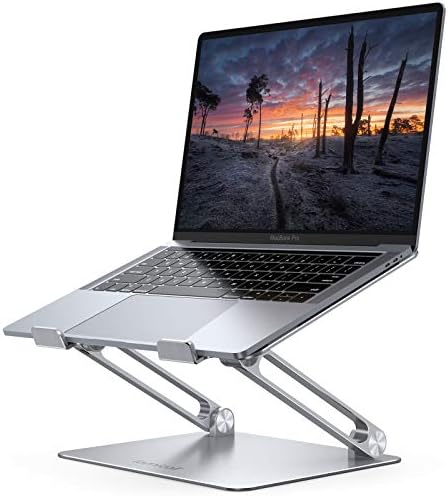
- Wide Compatibility: The laptop stand for desk is compatible with all laptops from 10″ up to 17.3″, including popular mod…
- Adjustable & Portable Design: The laptop riser can be easily adjusted to comfortable height and angle based on your actu…
- Upgrade Large Base: Made of high-quality aluminum alloy, the larger heavier base greatly improves the stability of the n…
- Ergonomic Design: The MacBook air pro stand holder works as a raiser to elevate the laptop screen to your eye level. The…
- Heat Dissipation: The multiple ventilation holes offers better ventilation and more airflow to cool your laptop and prev…
If you use a laptop as your main machine, your neck is almost certainly paying the price. Looking down at a screen all day puts real strain on your spine.
The Lamicall Adjustable Laptop Stand is one of the most recommended laptop stands on Amazon and frequently shows up in Reddit desk setup posts. It is made of aluminum, folds flat for travel, and lifts your laptop to eye level. You will need a separate keyboard and mouse when using it — which, paired with the Logitech MX Master 3S and the Keychron K2, makes for an incredible ergonomic desk setup.
This is one of the best ergonomic desk accessories for long work hours that you can buy for under $30.
Pros:
- Improves posture immediately
- Portable and foldable
- Fits laptops from 10″ to 17.3″
- Aluminum build feels premium
- Very affordable
Cons:
- No built-in cable management
- Requires a separate keyboard and mouse
- Some wobble on heavier laptops
Want more options? Browse our Best Laptop Stand for Home Office: 15 Ergonomic Stands for more picks at every price point.
The Second Half: More Must-Have Desk Accessories Reddit Recommends
8. Under-Desk Cable Management Tray — The Upgrade That Makes Your Desk Look Professional
![[Upgraded] Large Under Desk Cable Management Tray, Cinati Cable M...](https://m.media-amazon.com/images/I/41H9ZKynlxL._AC_.jpg)
- Oxford Fabricraded Storage Design – Unlike most other cable management boxes made of metal, this wire organizer features…
- Extra Large Containment – The 28.4 inch oversize under desk cable management easily accommodates power extension cords, …
- Unique Design Management – Our cable management tray fits desk thicknesses ranging from 0.4 to 2.4 inches, ensuring comp…
- Effortless Cable Organization – Unlike traditional screw mounting methods, our under desk storage simplifies installatio…
- What You Will Get – Upgrade to a large cable management net mounting kit (Dimensions: 28.4″L x 4.3″W x 4.7″H) along with…
You know that horrible tangle of cables under your desk? The one you pretend is not there? A desk cable management tray fixes that permanently.
Reddit’s r/battlestations community is obsessed with clean cable routing. The most recommended solution is a simple under-desk cable tray that mounts to the bottom of your desk and hides your power strips, chargers, and extra cable lengths out of sight.
Brands like Scandinavian Hub and CCCEI make well-reviewed, affordable options on Amazon. This one change alone makes your entire workspace look intentional, clean, and professional — which matters a lot on video calls.
Here is how to set up a clean cable system in three steps:
- Mount the cable tray to the underside of your desk near the back edge.
- Gather all loose power bricks and cable slack and zip-tie them neatly.
- Route device cables down the back of the desk legs and into the tray.
Pros:
- Makes desk look clean instantly
- Hides power strips and excess cable slack
- Easy to install — no tools needed for some models
- Very affordable (under $30 most models)
- Improves airflow under the desk
Cons:
- May not fit very thick desks
- Cable trays can be hard to access once full
- Cheap plastic models crack over time
For a complete breakdown, see our Best Cable Management for Desk: 17 Desk Organizers article.
9. Desk Shelf or Monitor Riser — Extra Space Above and Below Your Screen

- Elevate Your Workspace: Our versatile monitor stand with stackable legs offers the ideal ergonomic solution. Adjust the …
- Height Matters: Customize your viewing experience with three height options: 2.87 inches, 4.25 inches, and 4.9 inches. F…
- Clutter-Free Desk: Say goodbye to desk clutter, the space under the stand measured 11.6 x 11 x 4 inches (LxWxH) can acco…
- Stay Steady: No more wobbling or slipping. Our stand features non-skid feet, ensuring stability and preventing any unwan…
- Built to Last: Crafted from durable ABS plastic, our stand can support weights of up to 22 pounds (10kg). It’s perfect f…
A desk shelf or monitor riser might sound boring. But it is one of the most impactful aesthetic desk accessories you can add to a workspace.
It lifts your monitor to a better viewing height. It creates storage space underneath for notebooks, small items, or a keyboard. And when it is a nice wood or metal shelf like the ones made by Grovemade, it makes the desk look like a magazine photo.
Reddit users on r/macsetups and r/desksetup love the Grovemade Desk Shelf for premium builds. For budget setups, the Amazon Basics Height Adjustable Monitor Riser gets consistent praise too.
Pros:
- Raises monitor to proper eye level
- Creates storage space below the monitor
- Improves desk organization significantly
- Available in every price range
- Looks great in photos and on calls
Cons:
- Premium wood options can be expensive
- Takes up some of the desk footprint
- Not compatible with monitor arms (pick one or the other)
Check out our roundup of the Best Monitor Stand for Desk: 15 Ergonomic Monitor Risers for more picks.
10. Headphone Stand — A Small Touch That Makes a Big Difference

- 【Sturdy and Elegant】Headphone stand is made of high-quality walnut wood, one-piece design, no assembly required. The Ome…
- 【Multi-Scenario Use】This wood headphone stand great for desk, TV cabinetmm, home, office, recording studio, bedroom or n…
- 【Wide Compatible】 Wooden headphone stand fits most headphones with a headband width within 5.7In/ 14.5cm and device heig…
- 【Protect Headphone】 The part of this headphone holder where the headphone is placed is curved. The smooth wooden surface…
- 【Unique Appearance Design】 SAMDI headset stand is researched and designed according to Omega’s appearance. Elegant and p…
If you use over-ear headphones, where do you put them when they are not on your head? Most people just lay them on the desk, where they take up space and look messy.
A headphone stand fixes that. It takes up almost no desk space, keeps your headphones safe from scratches, and adds a nice visual element to the desk setup. Reddit users on r/headphones recommend them as an easy, low-cost upgrade for any workstation.
Simple aluminum stands from brands like Samdi and Brainwavz are popular picks that cost under $35.
Pros:
- Keeps headphones safe and accessible
- Adds a clean design element to the desk
- Very affordable
- Takes up minimal desk space
- Works with virtually all over-ear headphones
Cons:
- Very large headphones may not balance well
- Wooden stands can scratch cheaper headphone finishes
- Not useful if you use earbuds
11. Under-Desk Footrest — The Ergonomic Upgrade You Didn’t Know You Needed
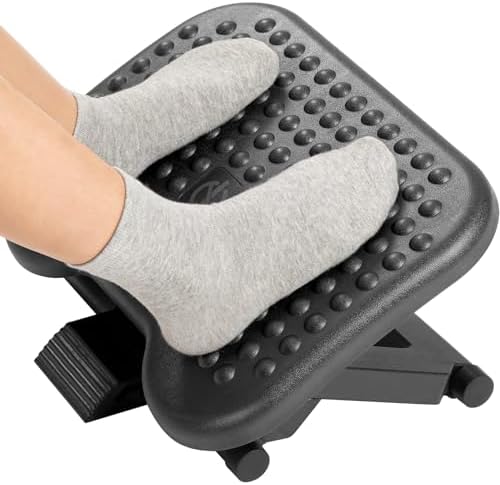
- Ergonomic Office footrest – Helps to improve posture by keeping your feet and legs elevated. Rest your legs in your offi…
- Adjustable Height – Height is manually adjustable to 3 different positions: 4.3″ , 5.5 “, 6.7” (11cm/14 cm/17cm). Super …
- Easy Angle Adjustment – Tilts -30°- +30°to support your legs at your preferred angle. The Angle can’t be fixed, which ro…
- Massage Textured Surface – Comes with a large non-skid surface (17.13″ X 13.19″), free-floating platform texture made up…
- Pre-Assembled For Use- This adjustable foot rest is pre-assembled for immediate use. Non slip feet enhances overall stab…
Here is a desk comfort accessory that does not get nearly enough attention: a footrest for your desk.
If your feet are dangling slightly above the floor, or if you sit for more than four hours a day, your lower back and legs are taking unnecessary strain. A good footrest supports your feet, improves your posture, and can actually reduce fatigue in a big way.
Reddit users on r/WFH recommend the ErgoFoam Adjustable Footrest and the HUANUO Adjustable Footrest as top picks. Both are soft, adjustable, and comfortable enough for all-day use.
Pros:
- Reduces lower back and leg fatigue
- Improves overall sitting posture
- Adjustable height on most models
- Some models include a massage surface
- Affordable (many under $30)
Cons:
- Takes up under-desk space
- Not needed if your chair height is already correct
- Can slide on hard floors without a good base grip
For more picks, see our Best Footrest for Home Office: 12 Ergonomic Footrests for Remote Work.
12. Memory Foam Wrist Rest — Your Wrists Will Thank You
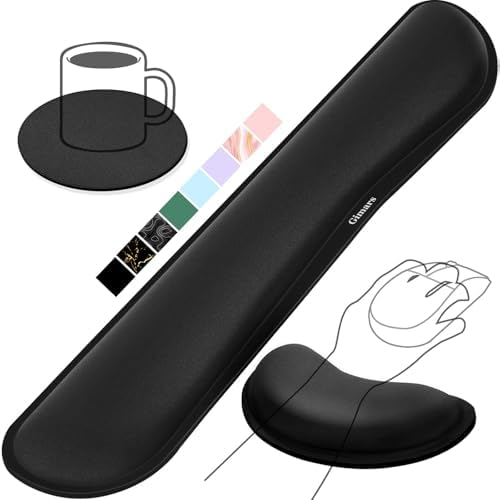
- 【1.2″ULTRA THICK MEMORY FOAM】 Upgraded memory foam is softer, more comfortable, and supportive, with a slow rebound. The…
- 【ERGONOMIC DESIGN】 Our wrist rest is ergonomically designed to elevate your wrists, and with grooves that fit perfectly …
- 【BUILT TO LAST】 The wrist rests features a 3-layer design for durability. The rubber base stays firmly in place on most …
- 【NON-SLIP BACKING & STICKERS】 The wrist pad’s bottom is made of a super non-slip natural rubber, which adheres securely …
- 【WATERPROOF & STAIN-RESISTANT】 The top spandex fabric is water-resistant and stain-resistant, making it easy to clean; s…
You type hundreds of thousands of words each year. Your wrists feel every one of them. A wrist rest gives your hands a place to rest between keystrokes and can reduce the tension that builds up in your forearms and wrists over time.
Reddit’s ergonomics community is split on wrist rests — some say you should never rest your wrist while typing, only between sessions. Either way, having one on the desk is broadly recommended for anyone logging long hours at a keyboard or mouse.
The Gimars Memory Foam Keyboard and Mouse Wrist Rest Combo is one of the most bought and reviewed sets on Amazon, and it consistently gets strong marks from productivity-focused desk users.
Pros:
- Reduces wrist fatigue during typing sessions
- Memory foam molds to your wrist shape
- Usually sold as a keyboard + mouse combo set
- Very affordable (under $20 for most sets)
- Non-slip base on quality models
Cons:
- Can get warm during summer use
- Some foam degrades in quality after a year
- Cover fabric can fray with heavy daily use
13. Adjustable Phone Stand — Keep Your Phone Visible Without the Clutter

- 3-in-1 Designed for Apple Devices: A one-stop wireless charging solution for your iPhone, Apple Watch, and AirPods.
- Anker 15W Ultra-Fast Charging: Experience the speed of 15W ultra-fast power for your iPhone 14/13/12 series through Appl…
- Always Ready for Travel: Anker 15W 3-in-1 MagSafe charger easily fits in your palm or pocket, thanks to its foldable and…
- Adjustable Viewing Angle Up to 60°: Conveniently switch between landscape or portrait mode for a comfortable view—all wh…
- What You Get: Anker 15W 3-in-1 MagSafe Charger, 30W charger, 5 ft (1.5 m) USB-C to USB-C cable, welcome guide, 18-month …
Your phone sits face-down on the desk, you miss notifications, or it is propped up in some awkward angle that blocks workspace. A dedicated phone stand for your desk fixes that.
Reddit users on r/iPhone16Pro and r/reactnative frequently recommend having a dedicated phone stand on the desk, especially for video calls, two-factor authentication prompts, and keeping an eye on messages without touching the phone.
The Lamicall Gooseneck Phone Stand and the basic Anker MagSafe-compatible stands are top picks. The Anker 3-in-1 MagSafe stand is especially popular for Apple users who want to charge their phone, AirPods, and Apple Watch all at once.
Pros:
- Keeps phone visible and hands-free at all times
- Reduces desk clutter compared to laying phone flat
- Charging stands do double duty
- Works for video calls, maps, and two-factor auth
Cons:
- MagSafe versions only work with compatible iPhones
- Budget stands tip easily on heavier phones
- Takes up desk space (small, but it adds up)
14. Monitor Light Bar — Better Lighting Without Screen Glare

- No Blue Light Hazard & Flicker-Free Lighting: Certified to meet the IEC/TR 62778 and IEC/EN 62471 standards, Quntis moni…
- No Screen Glare & Space Saving: The innovative asymmetrical optical design only illuminates your desk area, enhancing im…
- Auto-Dimming & Stepless Dimming: The built-in ambient light sensor continuously monitors the surrounding brightness and …
- Close to Natural Light & Ultra-High Ra98 Color Rendering Index: Our computer light bar features 78 high-quality LED bead…
- Masterful Illumination, Empowering Eye Care: Quntis monitor reading lamp surpasses normal desk lamps by providing except…
The last item on this list is one that surprises people when they try it. A monitor light bar clamps on top of your screen and shines downward onto your desk. It lights up your workspace without creating glare on your monitor.
Reddit users on r/homeoffice frequently mention monitor light bars as the most underrated desk gadget they have added to their setup. Brands like BenQ ScreenBar and Baseus are the top names, and multiple users say it changed how comfortable long night-time work sessions feel.
It is not just aesthetic. It is a genuine workspace essential that reduces eye strain and makes typing easier when ambient light is low.
Pros:
- Zero glare on monitor
- Lights the desk without harsh overhead lights
- Looks clean and minimal
- Auto-brightness on premium models
- Easy clip-on installation
Cons:
- Premium models (BenQ) cost $100+
- Budget versions have inconsistent build quality
- Does not work well with curved monitors on some models
How to Build the Perfect Desk Setup With These 14 Accessories
Now that you know what to buy, it helps to think about order. You do not need all 14 things at once. Here is a simple way to build up your setup over time:
Start with the ergonomics first:
- Get the monitor arm or monitor riser to fix your screen height.
- Add the footrest if your feet are not flat on the floor.
- Pick up the wrist rest if you type heavily every day.
Then upgrade your core tools:
- Swap to the mechanical keyboard for better typing comfort.
- Switch to the ergonomic mouse for better wrist health.
Then clean up the desk:
- Lay down the large desk mat.
- Install the cable management tray underneath.
- Add the headphone stand, phone stand, and wireless charger.
Finally, add the power tools:
- Set up the Stream Deck for your most repeated workflows.
- Install the monitor light bar for better evening sessions.
This step-by-step order means you get the biggest comfort improvements first, then the aesthetics, then the productivity boosts.
Build your best home office setup over time. You do not have to buy everything today. Even one or two of these upgrades will make a noticeable difference right away.
What Reddit Says You Should Avoid
Not all desk accessories are worth it. Here are a few things that come up as overrated or unnecessary in Reddit threads:
Expensive cable clips that fall off after a week— go with velcro ties or a proper tray insteadDecorative organizers that look good but hold nothing useful— function first, then formVery cheap monitor arms under $20— these are not safe for your monitor and tend to sagDesk accessories in “set” form— matching sets look nice but often include items you will never use
The community’s general rule is: buy fewer things, but buy the right things. A clean desk with five excellent tools beats a cluttered desk with twenty mediocre ones.
“Less is more. A clean desk is a productive desk. Buy one great thing instead of three okay things.” — Reddit user, r/Workspaces
Quick Reference: All 14 Products at a Glance
| Product | Best For | Approx. Price |
|---|---|---|
| Ergotron LX Monitor Arm | Freeing up desk space | $149–$219 |
| Logitech MX Master 3S | Ergonomic daily driving | ~$99 |
| Keychron K2 Keyboard | Typing comfort + clean setup | ~$89–$99 |
| Large Desk Mat | Clean aesthetic, surface protection | $15–$40 |
| INIU Wireless Charger | Cord-free phone charging | ~$17 |
| Elgato Stream Deck MK.2 | Workflow automation | ~$149 |
| Lamicall Laptop Stand | Better posture for laptop users | ~$25 |
| Cable Management Tray | Hiding cables under the desk | ~$15–$25 |
| Monitor Riser / Desk Shelf | Eye-level screen + extra storage | $20–$150 |
| Headphone Stand | Keeping headphones off the desk | ~$15–$25 |
| Under-Desk Footrest | Reducing leg and back fatigue | ~$25–$40 |
| Memory Foam Wrist Rest | Supporting wrists during typing | ~$12–$20 |
| Phone Stand | Keeping phone visible and hands-free | ~$10–$30 |
| Monitor Light Bar | Glare-free task lighting | $30–$109 |
Conclusion
The best desk accessories according to Reddit are not the fanciest or the most expensive things on the market. They are the ones that solve real problems — a sore neck, a cluttered cable situation, a phone you can never find, a wrist that aches by noon.
Every product on this list has been recommended, discussed, and battle-tested by thousands of real desk setup enthusiasts across Reddit. Whether you work from home, in an office, or both, even a few of these picks will make your daily work life more comfortable and more enjoyable.
Start with one. Try it for a week. Then come back for the next one.
About the Author: This article was researched and written by Abu Blessings, a workspace productivity writer with hands-on experience reviewing home office gear and desk setups. All product picks are based on real Reddit community feedback and verified Amazon ratings.
Keep Exploring Great Desk Setup Ideas:
- Best Office Accessories 2026: 22 Must-Have Desk Items for a Productive Workspace — a broader list for anyone building from scratch
- Best Home Office Accessories 2026: Workspace Essentials — top picks for remote workers at home
- Best Desk Accessories for Home Office: 23 Must-Haves — a deep dive on home-specific gear
- Top Home Office Accessories to Buy on Amazon: 19 Highly-Rated Picks — all available with Prime shipping
- Best Ergonomic Desk Accessories for Long Work Hours — focused on comfort and health
- Best Monitor Stand for Desk According to Reddit: 11 Highly Recommended Desk Risers — if you want to go deeper on monitor setup
- Best Cable Management for Desk According to Reddit: 13 Popular Cable Organizers — for those ready to fix the cable chaos
- Best Footrest for Office Desk: 15 Ergonomic Footrests — more footrest options for all budgets
- Best Home Office Tech Accessories: 14 Gadgets That Boost Productivity — for tech-forward desk setups
- Best Home Office Setup Accessories: 15 Items That Transform Your Workspace — full setup transformation guide