
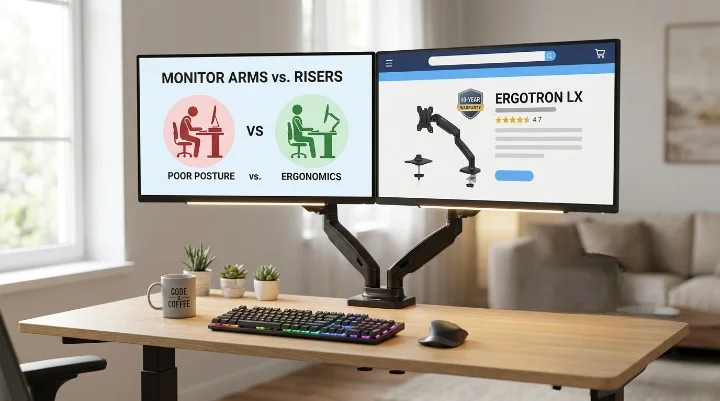

Best Adjustable Monitor Stand for Desk shoppers want more than extra height in 2026. They want less neck pain, more desk space, smoother movement, and a setup that still feels great after a long day of work, gaming, calls, and late-night tabs. In this guide, I use “monitor stand” in the modern way. I mean adjustable desk-mounted arms too, because they give the best posture gains for most people.
- I explain why static risers are losing ground to full-motion arms.
- I break down clamp types, VESA fit, weight limits, and tension systems.
- I review 7 real Amazon products you can actually buy.
- I show who each pick fits best, from coders to gamers to standing-desk users.
- I include a fast comparison table, pros and cons.
- I end with setup tips, buying advice, and a short FAQ answers.
Quick answer: If you want the safest long-term buy, get the Ergotron LX. If you want the best budget-value move, get the HUANUO FlowLift. If you run a huge curved panel, look hard at the WALI heavy-duty ultrawide arm.
Why an Adjustable Monitor Arm Matters More in 2026
A fixed riser lifts a screen. That helps a bit. A true arm does far more. It lets you move the screen up, down, in, out, left, right, and sometimes into portrait mode. That means your monitor can match your body instead of your body bending to match the monitor.
This matters because bad monitor placement causes bad habits fast. You lean in. Your chin juts out. Your shoulders rise. Then the ache starts. OSHA-style monitor guidance still points to a sweet zone. The monitor should sit about 20 to 40 inches from your eyes, with the top of the screen at or a bit below eye level. That setup cuts strain on your neck, eyes, and upper back. Source
A good arm also helps your desk work harder. Pull the screen close when you edit. Push it back when you sketch. Swing it aside when you need paper space. Raise it when your standing desk goes up. Lower it when you sit back. That range is what a static stand cannot do.
There is also the issue of “bounce.” Cheap arms may hold the screen, but they wobble when you type, shift, or bump the desk. That is why payload and stability matter more than raw lift height. A monitor that fits the weight limit on paper can still feel bad if the arm lacks good joints, good springs, or a solid clamp.
And yes, price matters. But so does life-cycle value. A $35 arm that sags after a year is not cheaper than a premium arm that works for a decade. Some brands now back that claim with fatigue tests, longer warranties, or both. That is where the better picks start to separate from the pack.
The Anatomy of a High-Performance Monitor Stand
When you shop, start with the mount. Most arms use a C-clamp or a grommet base. A clamp is faster. A grommet is cleaner and often better when your desk edge is blocked or weak. Ergotron’s desk-mount guide says a standard clamp is the common choice, while grommet mounts make sense when edge mounting is not ideal. Source
Next comes desk material. Solid wood is easy. Thick laminate is often fine. Thin particle board can crack or flex. Glass is a special case. If your desk feels hollow, add a reinforcement plate before you clamp anything heavy. A strong arm on a weak desk is still a weak setup.
Now check the tension system. Gas spring arms feel smooth and easy. They shine when you adjust often. Mechanical spring arms can feel firmer and often last well under heavier use. Pole mounts are less fancy, but they are stable and great for stacked screens or tall sit-stand layouts.
Then look at VESA. Most people need 75x75mm or 100x100mm. That is the pattern on the back of the monitor. Some newer screens use recessed mounting areas, so the arm may need spacers. Always check the back of your monitor before you buy. Never guess here.
Finally, check reach, height, and cable routing. A good arm should not just hold the screen. It should let the screen float where you need it. Think of it as light touch and later firm support. If your cables pull tight when the arm moves, the setup is not done right.
Technical Comparison Table
| Product | Best For | Screen Size | Weight Capacity | Mechanism | Standout Trait |
|---|---|---|---|---|---|
| Ergotron LX | Long-term premium value | Up to 34″ | 7 to 25 lbs | Constant Force | 10-year warranty |
| HUANUO FlowLift | Best value | 13″ to 32″ | 4.4 to 19.8 lbs | Gas spring | Great price-to-performance |
| WALI GSM001XL | Heavy curved screens | 13″ to 49″ | Up to 33 lbs | Gas spring | Built for ultrawides |
| ASUS ROG Ergo AAS01 | Clean premium gaming desks | Recommended up to 34″ | 3 to 11.5 kg flat | Mechanical spring | Sleek hidden cable path |
| VIVO STAND-V011 | Tall and stacked layouts | 13″ to 32″, ultrawide to 38″ | 22 lbs | Pole mount | 39″ center pole |
| North Bayou G60 | Budget heavy-duty pick | 27″ to 45″ | 11 to 33 lbs | Full-motion heavy-duty arm | Big-screen value |
| Humanscale M10 | Eco-premium offices | Heavy multi-screen setups | Up to 48 lbs total with crossbar | Weight-comp spring | Living Product Certified |
Top 7 Ergonomic Picks for 2026
1. Ergotron LX Monitor Arm

- Broad compatibility: Fits single screens up to 34 inches diagonal and 7 to 25 pounds; compatible with VESA patterns 75×7…
- Versatile mounting options: Includes two-piece desk clamp and grommet mount to fit a variety of desk types; desk clamp a…
- Improved comfort: Easily raise your monitor up to 17.3 inches above your worksurface with 13 inches of lift; find your b…
- Sleek and modular design: Designed with aesthetics in mind to enhance your workspace, built-in cable management creates …
- Built to last: Extensive quality testing ensures your monitor stays stable and secure; Ergotron products set the standar…
The Ergotron LX is the pick I trust most when someone says, “I want to buy once and stop thinking about it.” It supports monitors up to 34 inches and 7 to 25 pounds, uses Ergotron’s Constant Force motion tech, and carries a 10-year warranty. Official specs list 13 inches of lift, 360 degrees of pan, up to 75 degrees of tilt, and VESA 75x75mm or 100x100mm support. Amazon also shows strong user proof, with a 4.7 rating from more than 10,800 reviews and a current price around $184.
What makes the LX special is not one big flashy feature. It is the feel. The arm moves with very little effort, then stops where you leave it. No drift. No panic. No cheap hinge feel. That matters if you shift between writing, coding, reading, and video calls all day. It is also one of the few arms I can call “safe boring.” That is praise. It just works, year after year.
If you run a huge 49-inch curved panel, move up to the Ergotron HX family instead of forcing the LX to do a bigger job. Ergotron’s HX line is made for up to 49-inch heavy ultrawides and 20 to 42 pounds. That is the right path for giant gaming panels.
Pros
- Best mix of smooth motion and long life
- Strong warranty
- Great cable control
- Works well with standing desks
- Resale value stays high
Cons
- Price is high
- Not the right fit for the heaviest 49-inch curved monitors
- Premium feel may be overkill for casual users
2. HUANUO FlowLift Single Monitor Mount

- Great Adaptability: This HUANUO single monitor arm fits 13-32 inch monitors, holds 4.4-19.8 lbs, suitable for VESA patte…
- Full Adjustable: This PC monitor stand can remain completely stable at any angle without any extra work. Compared with o…
- 80% Sturdier Than Others: At HUANUO, we focus on improving the strength and stability of our single monitor stand. The s…
- Installed In 3 Minutes: The 1-piece design monitor arm simplifies the installation, so all necessary hardware is include…
- Two mounting options : You may choose to use either a C-clamp or grommet mount. For best results, make sure your table m…
If you want the best mix of low price and real daily comfort, the HUANUO FlowLift is hard to beat. This arm fits 13 to 32 inch monitors, supports 4.4 to 19.8 pounds, and uses a gas spring design. On Amazon, it sits around $35.99 with a 4.6 rating and about 15,900 reviews. That kind of sales history matters because it shows the arm is not some random short-run listing.
HUANUO’s own site shows how the brand frames its single-arm line. It leans hard into value, setup ease, and a long enough warranty window to make budget shoppers feel okay. That is exactly where the FlowLift lands. It is not magical. It is just practical. The arm is smooth enough for most home office use, the clamp is easy to fit, and the motion range is plenty for normal work and light gaming. HUANUO also promotes up to a 5-year warranty across its line, while Amazon listing data for FlowLift family products shows a 3-year manufacturer warranty on related models.
This is the arm I suggest to first-time buyers. It gives you the core ergonomic win without making your wallet cry. You do give up some polish. The joints do not feel as refined as Ergotron. The cable clips are fine, not fancy. The life span may not match the premium class. Still, for the money, it punches well above its weight.
Pros
- Best value for most people
- Easy first install
- Smooth enough for daily use
- Great for students, remote workers, and small offices
- Huge review count
Cons
- Less refined than premium arms
- Best with lighter monitors
- Finish and cable clips feel basic
3. WALI Heavy-Duty Ultrawide Monitor Arm GSM001XL

- Keep Your Desk Organized: By lifting screen off the desktop, this single monitor arm opens up valuable space for your ke…
- Wide Compatibility: WALI ultrawide monitor arm is designed to fit most flat or 1000R curved LCD/LED screens up to 49″, m…
- Full Motion for Ergonomic Comfort: WALI heavy duty monitor mount allows to extend your screen out by 21.57″ and raise th…
- Engineered for Lasting Performance: This adjustable monitor stand features wider VESA head and tighter-fitting VESA pane…
- Two Ways to Install: We offer two desk mounting options: C-clamp mounting for desks 0.39″–3.15″ thick, or grommet base m…
Some monitor arms talk big. This one actually wants the hard job. The WALI GSM001XL supports ultrawide monitors from 13 to 49 inches and up to 33 pounds, with VESA 75x75mm and 100x100mm support. WALI also says the arm has passed 20,000-plus fatigue tests, which it links to about 10 years of daily adjustment. The product includes both C-clamp and grommet mounts for desks from 0.39 to 1.77 inches thick.
On Amazon, the WALI ultrawide arm sits around $52.98, holds a 4.4 rating, and has more than 17,000 reviews. That is rare in the heavy-screen class, where good options often cost much more.
This is the arm I like for big curved gaming screens when the Ergotron HX price feels too steep. It has more muscle than grace. The movement is fine, but not silky. The look is more tool than art. That is okay. The goal here is control. If you run a 34-inch or 49-inch curved display and want better posture without dropping premium money, this is one of the strongest value buys on the page.
Pros
- Great for big curved and ultrawide screens
- Strong value in the heavy-duty class
- Clamp and grommet included
- Good fit for gaming desks
- Tested for repeat movement
Cons
- Less elegant motion than top premium arms
- Not the prettiest pick
- Desk strength matters a lot here
4. ASUS ROG Ergo Monitor Arm AAS01
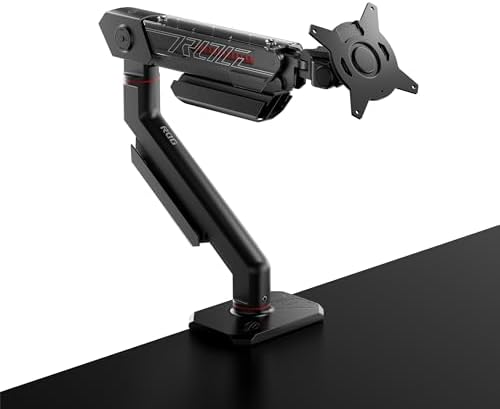
- Wide-ranging compatibility: Accommodates up to 39-inch monitors weighing 6.6–23.35 pounds, and works with VESA 100 x 100…
- Full range of motion: A mechanical spring system allows for height, tilt, and swivel adjustments
- Easy to set up and reliable: Installation is quick, and stringent durability testing in the design phase, including a 10…
- Up to 39-inch monitors, supporting flat monitors with a maximum weight of 23.35 pounds (11.5 kg) or curved monitors weig…
The ASUS ROG Ergo arm is for people who care about the desk as a whole. Not just the screen. The whole scene. ASUS lists a recommended display size up to 34 inches in the spec sheet, though some marketing copy pushes higher size talk when weight and shape still fit. The arm supports flat displays from 3 to 11.5 kg, curved displays from 3 to 8.5 kg, uses VESA 100x100mm, and gives +80° to -25° tilt, 360° pivot, 360° pan, a 32 cm lift range, and 63.72 cm max extension. Clamp range is 10 to 80 mm.
Amazon shows the ROG Ergo AAS01 at about $249 with a 4.6 rating from 151 reviews. That places it squarely in premium territory.
Why buy it? Simple. It looks great. It has strong cable management. It fits gaming setups that need clean lines, dark finishes, and less visible clutter. It uses a mechanical spring, which many users like for steady support and firm feel. This is not the cheapest path to good posture. It is the stylish one. If your setup is on camera, or if you hate ugly hardware, this arm earns its keep.
Pros
- Premium look
- Integrated cable routing
- Strong motion range
- Good choice for sleek gaming desks
- Firm mechanical support
Cons
- High price
- Best value drops if looks do not matter to you
- Recommended size in official specs is more modest than some ads suggest
5. VIVO Extra Tall Single Monitor Desk Mount STAND-V011
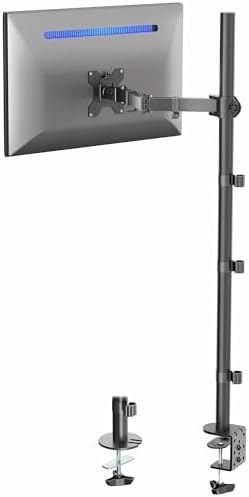
- Extra Tall Pole Monitor Mount: The 39” center pole allows you to adjust the monitor between sitting and standing positio…
- Ultrawide Compatibility: This single-arm mount fits screens that weigh up to 22 lbs with VESA 75x75mm or 100x100mm backs…
- Articulation and Height Adjustment: Adjustable arm offers +90° to -90° tilt, 360° swivel, 360° rotation, and height adju…
- Drill-Free Mounting: This product secures to your surface of choice up to 4″ thick via a heavy-duty C-clamp, or use the …
- Easy Installation: Mounting your monitor is a simple process with a detachable VESA bracket plate. We provide a step-by-…
This is the weirdly smart pick. The VIVO STAND-V011 is not the most glamorous arm here, but it solves a problem many standard arms do not solve well. Height. Real height. VIVO lists a 39-inch pole, 22-pound capacity, support for 13 to 32 inch screens and ultrawides up to 38 inches, plus +90° to -90° tilt, 360° swivel, 360° rotation, and height travel along the center pole.
On Amazon, it costs about $43.99, holds a 4.5 rating, and has more than 20,100 reviews. That is strong proof for a niche design.
Why does the tall pole matter? Because standing desks, vertical stacks, and deep workstations need height more than fancy float. A normal low-range arm may feel great while seated, then fall short when you stand. The VIVO gives you a better chance to keep the monitor in your line of sight through both positions. It is also a great pick for coders or writers who use portrait mode for docs, chat, or long pages.
This is a more manual style solution. It is not a feather-touch gas arm. It is a strong pole system. That means less wow, but often more stability in tall setups. Cheap shortcuts don’t cut it when your screen sits high.
Pros
- Great for standing desks
- Excellent for tall portrait setups
- Simple and stable
- Nice price
- Huge user base
Cons
- Less fluid than gas-spring arms
- More industrial look
- Not my first pick for constant in-and-out movement
6. North Bayou G60 Heavy-Duty Monitor Arm

- ① HEAVY DUTY COMPATIBLE: The monitor arm is suitable for mounting most HEAVY BIG screens 27″-45″ in size and 11lbs to 33…
- ② FULLY ADJUSTABLE: Tilt angles +15° to -60°, Swivel angles ±90°and 360° Rotation, Max upright 11.2″(285mmm) and max ext…
- ③STURDY & STABLE CONSTRUCTION: Arm stand with both C-Clamp mounting and Grommet Mounting are available(Desk thickness 0….
- ④ERGONOMIC: Improve your overall well being by creating most comfortable viewing angle for work or gaming- Enjoy the fre…
- ⑤INSTALLATION: Comes with detailed instructions and all the necessary hardware,Pls DON’T adjust the tension screw withou…
North Bayou has built a quiet fan base by doing one thing well. It makes arms that cost less than the big names but often feel better than you expect. The G60 is the current big-screen option I can verify on Amazon, where it is listed around $39.90 with a 4.5 rating from 243 reviews. It supports 27 to 45 inch big screens with an 11 to 33 pound range.
If you shop worldwide, you may also see the NB G40. Search results show the G40 is designed for 22 to 40 inch screens with a 3 to 15 kg load range and VESA 75x75mm or 100x100mm support. That makes it a close cousin in spirit, just a different size lane.
This pick is for the buyer who wants real movement, solid support, and a fair price. It is not premium furniture. It is value hardware. That is why I like it. If HUANUO feels too light for your bigger display, and WALI feels a bit too specialized, NB sits in a nice middle lane. It is also a strong answer for people who want to test the heavy-duty class before paying premium-brand money.
Pros
- Good value for bigger screens
- Better weight range than many budget arms
- Nice step-up pick from entry-level models
- Good choice for mixed work and gaming
Cons
- Fewer reviews than the top sellers
- Brand support can vary by region
- Finish is more functional than fancy
7. Humanscale M10 Monitor Arm

- Fully compatible with traditional desks and sit/stand workstations alike.
- Built to hold heavier equipment, a strong triple crossbar allows M10 to hold up to three monitors or 48 pounds – all whi…
- Featuring innovations like Humanscale’s patented Weight-Compensating Spring Technology and Smart Stop functionality.
- M10 enables the personalization and flexibility needed for today’s evolving workplaces.
- It offers quick, simple installation and industry-leading flexibility thanks to patent-pending Quick Release joints that…
The Humanscale M10 is the most office-grade product in this roundup. It is built for heavier gear, has optional triple-monitor support up to 48 pounds with the crossbar, uses Humanscale’s weight-comp spring tech, and includes features like Smart Stop and top-to-bottom cable management. The brand also says the M10 is Living Product Certified and designed to be climate, water, and energy positive.
Amazon shows single-arm M10 variants starting around $463.53, while Humanscale’s own site lists M10 models starting at $459. That is a lot of money. No way around it.
So why include it? Because there is a real buyer for this. If you want a premium office arm with a clean look, heavy-duty headroom, sustainability claims that go beyond green paint, and a brand that has lived in serious workspaces for years, the M10 makes sense. It also fits buyers who care about BIFMA-level thinking, long-term office furniture quality, and environmental story as much as raw price.
This is not the best value pick. It is the smart premium pick for design-led offices, exec desks, and anyone who wants a product that feels like part of a whole ergonomic system.
Pros
- Premium office build
- Strong eco story
- Heavy-duty options
- Clean cable path
- Great for upscale workspaces
Cons
- Very expensive
- Overkill for most home users
- Better suited to office budgets than casual setups
Which One Should You Buy?
If your goal is long life, smooth motion, and low regret, buy the Ergotron LX. It is the safest answer for most serious users. If your goal is pure value, buy the HUANUO FlowLift. If your monitor is massive, buy the WALI or jump up to the Ergotron HX family.
If you care about looks as much as motion, the ASUS ROG Ergo is the nicest visual fit. If you use a standing desk or want a tall portrait layout, the VIVO STAND-V011 makes more sense than a lower-range gas arm. If you want premium office design and a strong sustainability story, Humanscale M10 is your luxury lane.
This is where Best Adjustable Monitor Stand for Desk searches often go wrong. People chase the cheapest arm with the biggest number on the box. Do not do that. Match the arm to your screen weight, your desk strength, and how often you adjust. That is how you win.
Ergonomic Science: 20/20/20 Rule and Better Screen Placement
The best arm still fails if the screen sits in the wrong spot. OSHA-style monitor guidance says a comfortable viewing distance is usually 20 to 40 inches from the eye to the screen. The top of the monitor should be at or slightly below eye level, and the center of the screen should normally sit 15 to 20 degrees below horizontal eye level. Source
For day-to-day comfort, use the 20/20/20 rule too. Every 20 minutes, look 20 feet away for 20 seconds. It is simple. It works. Add a blink or two. Dry eyes hate long screen sessions.
If you use a standing desk, keep the monitor moving with the desk. That sounds obvious, but many people forget it. They raise the desk, then stare down at the same old screen height. Your monitor arm should let you keep the same eye line whether you sit or stand.
For coders, portrait mode can be a huge win. For gamers, fast tilt and swivel matter more. For designers, stability matters most because even small drift feels awful when you work with fine detail. One arm does not fit every job.
Installation and Troubleshooting Tips
Here is the fast fit check before you buy:
- Check monitor weight without guessing. Use the bare monitor weight if you will remove the stock stand.
- Check VESA size on the back.
- Check desk thickness and material.
- Check whether you need clamp or grommet mounting.
- Check the arm’s true weight range, not just screen size.
Cable routing matters more than people think. A bad cable path fights the arm. Leave a gentle loop. Do not pull DisplayPort or power cables tight. Let the arm move through its full arc first, then clip the cables in place. If motion feels stiff after routing, your cables are too tight.
Tension setup is also key. Use the Goldilocks method. Tighten until the monitor floats. If it rises by itself, back off a bit. If it sinks, add a touch more tension. Small turns beat big ones.
If your desk is thin or soft, add a support plate. If you use glass, do not clamp a heavy arm to it unless the desk maker clearly says it is safe. If your screen wobbles, the problem may not be the arm. It may be the desk.
Buying Guide: Pick the Right Arm for Your Work Style
For gamers: Go for WALI, ASUS, or Ergotron HX/LX depending on monitor size. You want easy tilt, firm hold, and enough range for relaxed play or upright focus.
For coders and writers: Look at VIVO for height or Ergotron for portrait freedom. A monitor that rotates well can change how you read long pages.
For office users: HUANUO is the easy win. It gives you the best comfort jump for the least money.
For creatives: Stability beats low price. Pick Ergotron or Humanscale. You want a screen that stays put when you nudge the desk.
For big ultrawides: Do not gamble. Buy the right class of arm. WALI heavy-duty or Ergotron HX make much more sense than a light arm with brave marketing.
And remember this. Best Adjustable Monitor Stand for Desk does not mean “best-looking arm” or “cheapest arm.” It means the arm that fits your monitor, your desk, your posture, and your daily rhythm.
FAQ
What is the best adjustable monitor stand for desk use in 2026?
For most people, the best overall pick is the Ergotron LX because it blends smooth motion, strong support, and long-term value. Budget buyers should look at the HUANUO FlowLift. Heavy ultrawide users should look at the WALI GSM001XL or Ergotron HX.
Is a monitor arm better than a fixed monitor riser?
Yes, for most setups. A riser gives height only. A monitor arm gives height, depth, tilt, swivel, and rotation. That helps you place the screen where your eyes and neck want it.
How high should my monitor be?
The top of the monitor should sit at or a bit below eye level, and the screen should sit about 20 to 40 inches from your eyes.
Are gas spring monitor arms worth it?
Yes, if you adjust often. Gas spring arms feel smooth and quick. Pole mounts or mechanical arms can be better when you want extra firmness or tall stacked setups.
Can a monitor arm damage a desk?
Yes, if the desk is weak, thin, hollow, or glass without proper support. Always check desk thickness, material, and clamp limits first. Source
Final Verdict
Best Adjustable Monitor Stand for Desk buyers should think of this as a health buy, not just a desk buy. The Ergotron LX wins on long life, motion, and trust. The HUANUO FlowLift wins on value. The WALI wins for big curved screens. The VIVO solves tall setups. The ASUS ROG Ergo wins on looks. The NB G60 gives budget heavy-duty muscle. The Humanscale M10 is the premium eco-office pick. Pick the arm that matches your monitor and desk, install it well, and your neck will thank you.
Related reads:
Best Monitor Stand for Desk 2026: 11 Top-Rated Risers for Better Posture,
Best Monitor Arms 2026,
Best Dual Monitor Arms for Desk,
Best Monitor Stand for Small Desks,
Best Monitor Stand for Glass Desks,
Ergotron Monitor Arm Buying Guide: LX vs. LX Pro vs. HX,
Ergotron LX vs Humanscale M2.1: Which Premium Monitor Arm Wins?, and
14 Best Home Office Tech Accessories 2026: Gadgets That Boost Productivity.