
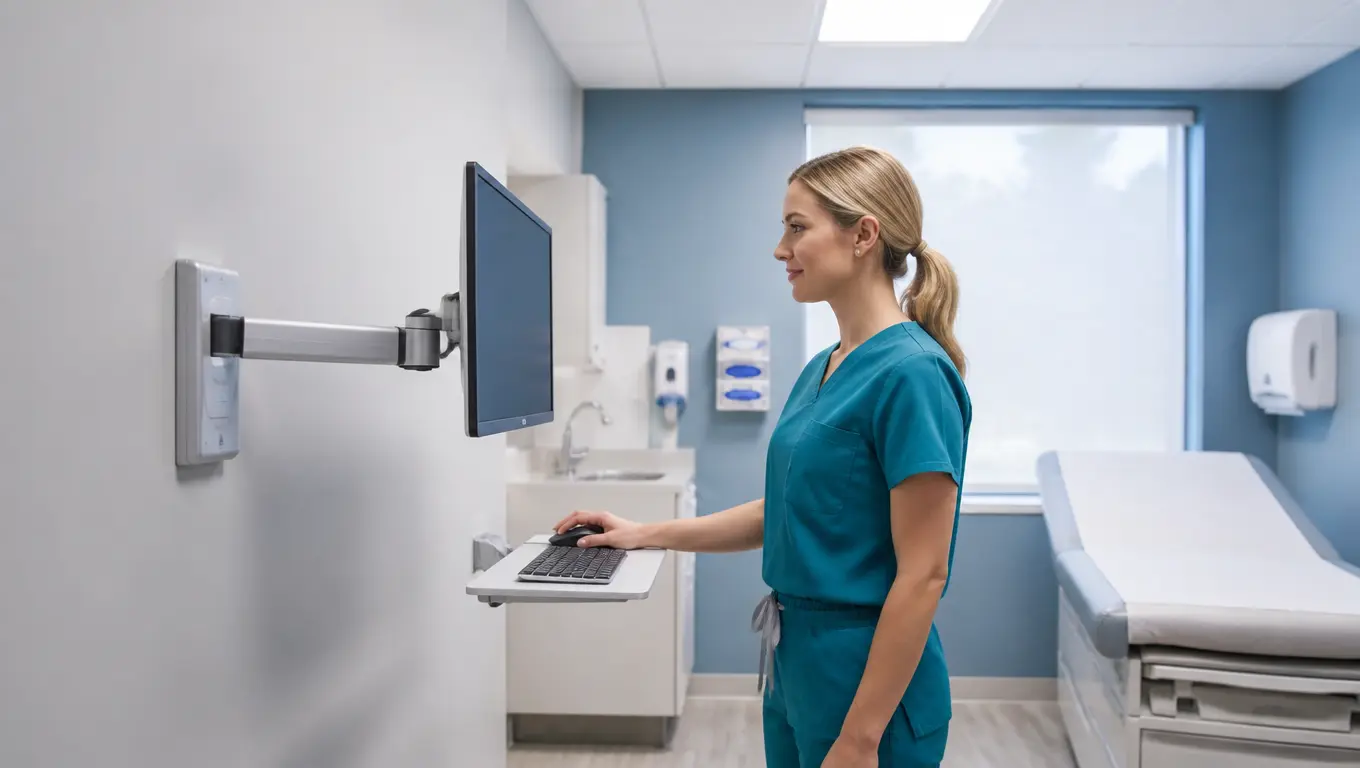

The Ergotron LX Wall Mount in healthcare is the quiet hero of many busy exam rooms. It turns a bare wall into a charting station in about 30 minutes. It lifts a heavy monitor with one finger. It keeps keyboards off counters and far from germs. Nurses use it for point of care (POC) documentation. Doctors use it to show scans face to face. Telehealth visits get better, too, because the camera sits at patient eye level. This guide covers everything you need to pick, install, and love one.
Here is what you will learn in the next few minutes:
- Why exam rooms and triage bays are always short on floor space
- The main Ergotron LX Wall Mount models and how they differ
- Real Amazon products with live prices, ratings, pros, and cons
- Wall mounts vs medical carts, desk mounts, and budget arms
- A simple install guide for drywall and wood studs
- How to match an arm to your clinic’s budget and workflow
- Fast answers to the questions buyers ask most
- More guides to help you build a cleaner, safer clinical workspace
Why Exam Rooms and Triage Bays Eat Their Own Desks
Exam rooms are small. Like, really small. A typical room holds a bed, a cart, a sink, a stool, and maybe three feet of open floor. Add a computer desk and you lose the last usable corner. Nurses chart standing up. Doctors write notes on their thighs. That is not fine, and it is not rare.
Triage is even harder. Triage bays see a steady stream of patients. Each one needs a quick check, a blood pressure read, and a note in the EHR. The computer has to be right there, at the point of care. But a cart in the middle of a triage bay blocks stretchers. A desk eats floor space that a stretcher needs to turn. The answer is to go up. A wall mounted computer workstation for triage puts the screen right where the work happens, with zero footprint on the floor.
There is also the germ problem. Desks and carts have flat tops, and flat tops collect cups, gloves, and trash. Disinfectant wipes are great, but they cannot reach every corner. A wall mounted monitor arm floats above the mess. You can clean all sides of it. That is huge for infection control, and it is why wipeable, chemical-resistant surfaces matter so much in clinical gear. Polyester powder-coat finishes on these arms survive daily scrubs that would ruin a normal desk.
Then there are the backs. Clinicians bend all day. They lean over counters to read screens. They twist sideways to find a mouse. A wall mount brings the screen to eye level, so the neck stays straight. The Ergotron Constant Force technology holds the monitor at the exact height you set, and it does not drift. You get real clinician ergonomics without the gym membership. For staff who chart dozens of patients a shift, that comfort is the difference between a good day and a sore one.
And finally, the money. Medical carts usually cost $1,500 to $4,000 each, and they break. A wall mount costs a few hundred dollars and lasts for years. Clinics are catching on. Decentralized nursing means charting happens everywhere, so the mounts go everywhere too. If you want to compare the full spectrum of medical-grade mounting hardware, our breakdown of Ergotron Medical OEM vs GCX hospital mounts shows how the big players stack up before you spend a nickel.
Meet the Ergotron LX Wall Mount Family
There is not just one Ergotron LX Wall Mount. There are several, and each solves a different problem in the clinic. Here is the family tree, in plain English.
The Classic: LX Wall Monitor Arm (45-243-026)
This is the arm most people picture. It holds monitors from 7 to 25 lbs, which covers most 24-inch and 27-inch clinical displays, and it handles screens up to 34 inches. It is VESA 75 x 75 mm and 100 x 100 mm compliant, so it fits nearly every modern monitor. The vertical lift spans about 20 inches (51 cm), with 75° of tilt and 360° of pan. You can spin the screen toward the patient, then back to the keyboard, all day long. It mounts to wood studs or concrete with the included hardware.
The Stand-Up Friend: LX Sit-Stand Wall Arm
This one slides like a hospital bed rail. It carries 14 to 30 lbs and supports monitors up to 49 inches. The whole arm rides on a wall track, so you can raise it for standing documentation and drop it for sitting. That is a welcome feature for clinicians who rotate between tasks. The official demo video shows the full motion range in about a minute.
The Pivot: LX HD Wall Mount Pivot
This is the flat, low-profile option. It holds 0 to 50 lbs and suits monitors under 4 inches of display depth. Its superpower is portrait mode. You can flip the screen 90° to read a full chart page or a tall image, which doctors love for radiology review. It folds almost flat against the wall when the room is empty. That is a dream for space-constrained patient exam rooms.
The Workspace: LX Wall Keyboard Arm
A monitor alone is not a workstation. The LX Wall Keyboard Arm adds a 35-inch extension arm with a tray for a keyboard and mouse. Pair it with a monitor arm and you have a complete charting station on the wall. It is the closest thing to a medical cart alternative that still takes up zero floor.
The New Cousin: LX Pro Wall Arm
Ergotron recently updated the design with the LX Pro wall arm. It shares the same DNA but adds a sleeker profile and refined cable routing. If you want to see the difference before you buy, the official LX Pro Wall Monitor Arm installation and adjustment walks through it in about two minutes. We also compared the whole LX line against the heavy-duty HX series in our Ergotron LX vs HX comparison.
Real Products: Pros and Cons
These are live Amazon listings verified for this guide. Prices change, so treat them as a starting point. Ratings and review counts come straight from the product pages.
1. Ergotron LX Single Monitor Arm, VESA Wall Mount (Polished Aluminum)
Price: $299.99 | Rating: 4.6/5 from 553 reviews
This is the best-selling wall arm in the LX family, and the numbers back it up. 553 buyers gave it 4.6 stars. It handles monitors up to 34 inches in the 7 to 25 lb range. The polished aluminum finish looks clean in a modern clinic and wipes down easily.
What is great:
- Constant Force motion: one finger moves a 25 lb monitor
- 20 inches of vertical travel with no sag over time
- Full swivel and tilt for face-to-face patient interaction
- Concealed cable management keeps cords off the wall
- Built to pass load and cycle testing for daily clinical use
What is not:
- Premium price tag, about $300
- No keyboard tray included
- Polished aluminum shows fingerprints until you wipe it
- Single monitor only
“4.6 stars across 553 verified Amazon reviews, and it still holds the Amazon’s Choice badge. That is the kind of long-run proof clinics can trust.”

- Broad compatibility: Fits single screens up to 34 inches diagonal and 7 to 25 pounds; compatible with VESA patterns 75×7…
- Installation flexibility: Includes arm, extension, wall mount base with theft deterrent anchor holes for cable locks, an…
- Large range of motion: Find the most comfortable and ergonomic fit with 25.7 inches of horizontal extension and 13 inche…
- Sleek and sturdy: Enhances the look of your workstation with adjustable positioning to help boost productivity; neatly c…
- Built to last: Extensive quality testing ensures your display stays stable and secure; Ergotron products set the standar…
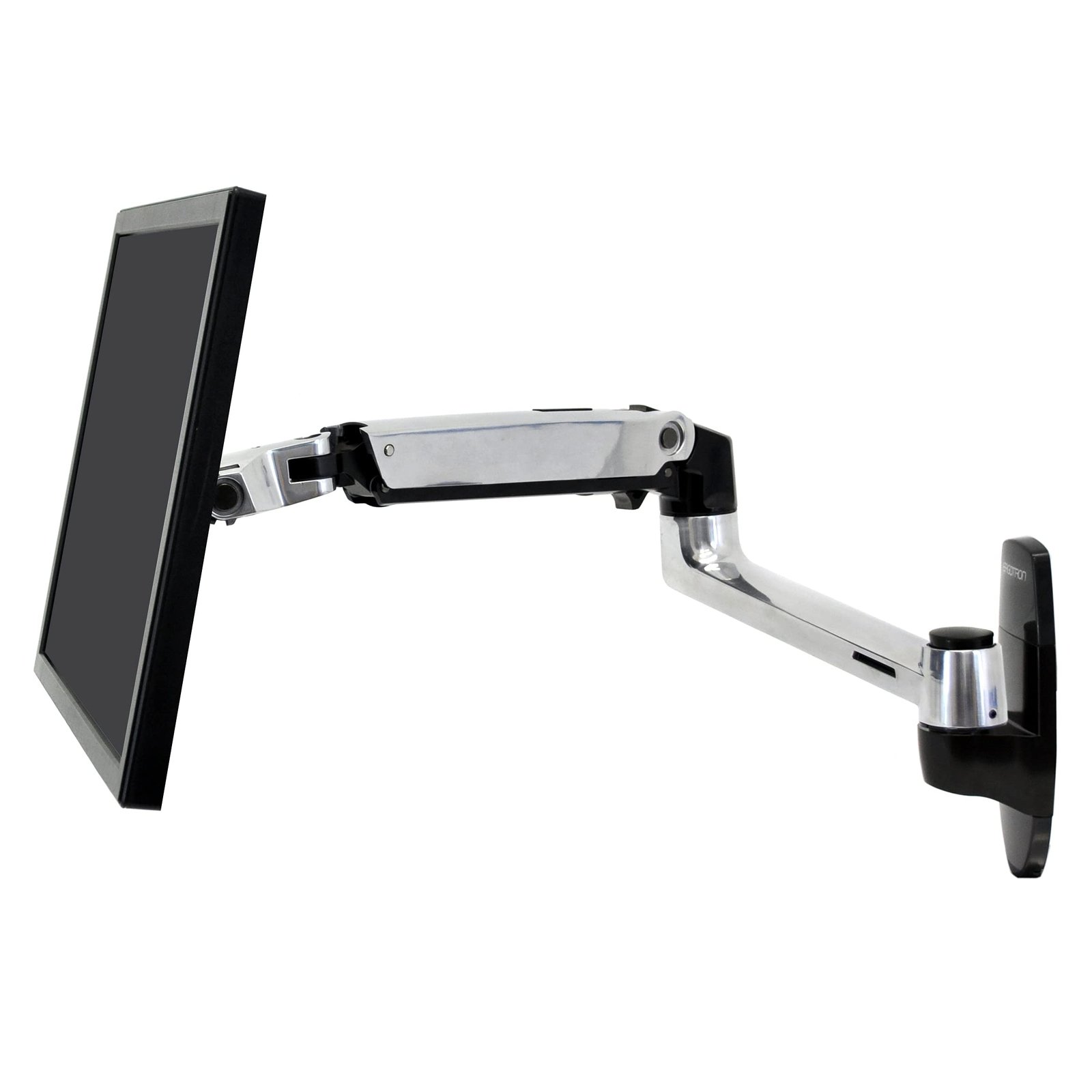
2. Ergotron LX Single Monitor Arm, VESA Wall Mount (Matte Black)
Price: $234.99 | Rating: 4.6/5 from 111 reviews
This is the same famous LX arm in matte black, and it is the value pick of the family. Same 7 to 25 lb capacity. Same 34-inch monitor support. Same VESA 75 x 75 and 100 x 100 compliance. The matte finish hides scuffs better than polished metal, which matters in a busy nurse station.
What is great:
- $65 cheaper than the polished version for the same core arm
- Matte finish hides fingerprints and scratches
- Identical motion quality and 20-inch lift range
- Fits tight spots with a compact wall plate, great for small triage rooms
What is not:
- Still a single-monitor arm
- No keyboard tray in the box
- Matte paint can chip if you drop a heavy monitor during install

- Broad compatibility: Fits single screens up to 34 inches diagonal and 7 to 25 pounds; compatible with VESA patterns 75×7…
- Installation flexibility: Includes arm, extension, wall mount base with theft deterrent anchor holes for cable locks, an…
- Large range of motion: Find the most comfortable and ergonomic fit with 25.7 inches of horizontal extension and 13 inche…
- Sleek and sturdy: Enhances the look of your workstation with adjustable positioning to help boost productivity; neatly c…
- Built to last: Extensive quality testing ensures your display stays stable and secure; Ergotron products set the standar…
3. Ergotron LX HD Sit-Stand Wall Arm
Price: $399.00 | Rating: 4.3/5 from 68 reviews
This is the heavy-duty sit-stand champion. It carries 14 to 30 lbs and supports monitors up to 49 inches, so it can handle the big displays some departments use. The wall glide rail lets clinicians slide the whole screen up and down about 20 inches. Sit to chart. Stand to talk. The screen follows.
What is great:
- True sit-stand range on a wall, no desk needed
- Holds heavy monitors up to 49 inches and 30 lbs
- Frees floor space completely, perfect for tight exam rooms
- Great for telehealth setups where the camera must match your height
What is not:
- The most expensive option here at $399
- Wall rail install takes a bit longer than a single plate
- Overkill if you only chart sitting down

- Compatible with large monitors: Fits single screens up to 49 inches diagonal and 14 to 30 pounds; screen depth may affec…
- Multiple mounting options: Attaches directly to sturdy vertical surfaces, including wood studs; also attaches to Wall Tr…
- Sit or stand: Easily adjust your workstation between sitting and standing with 20 inches of lift; extends 33.5 inches fr…
- Sleek wall arm: Places screens or digital signage where you need it for each project and creates more workspace; folding…
- Built to last: Extensive quality testing ensures your monitor stays stable and secure; Ergotron products set the standar…
Watch the official feature video: LX Sit-Stand Wall Monitor Arm, top features
4. Ergotron LX Wall Keyboard Arm (35-Inch Extension)
Price: $299.99 | Rating: 4.3/5 from 122 reviews
A monitor arm holds the screen. This arm holds your hands. It swings a keyboard and mouse tray up to 35 inches off the wall, so you can type in a neutral position with your elbows at 90°. Pair it with any LX monitor wall arm and you have a full point of care workstation without a single leg on the floor.
What is great:
- Real typing comfort, neutral wrist and elbow angles
- 35-inch extension reaches from wall to lap easily
- Folds flat against the wall when the room is empty
- Shares the same finish and build quality as the monitor arms
What is not:
- No monitor support, you need a second arm
- Price adds up when you buy the full set
- Tray has a weight limit, heavy scanners are not its friend

- Complete your workspace: Large 17.5 x 9.5-inch keyboard tray comfortably fits full sized keyboards; retractable mouse tr…
- Multiple mounting options: Includes LX arm, extension, keyboard and mouse tray, wall mount base, mouse holder, wrist res…
- Large range of motion: Provides 13 inches of lift and up to 35 inches of extension; prevent wrist pain or injury with 80…
- Sleek and sturdy: Enhances the look of your workstation while providing a stable typing platform suitable for data entry…
- Built to last: Extensive quality testing ensures your keyboard arm stays stable and secure through rigorous daily use; E…
5. Budget Pick: MED02 Medical Wall Mount Workstation
Price: $169.99 | Rating: 4.6/5 from 27 reviews
Not every clinic can drop $300 per room. This medical wall mount workstation does the monitor-plus-keyboard job for less. It fits 17 to 35 inch screens, folds flat against the wall, and even includes a scanner holder and a sliding mouse pad. It is a smart choice for budget conscious clinics that still want a wall mounted computer workstation.
What is great:
- Half the price of an LX monitor plus keyboard set
- Folding design saves space in small exam rooms
- Built-in scanner holder and mouse pad
- Medical-grade design meant for daily disinfection
What is not:
- Generic brand, not Ergotron build history
- Fewer reviews, so long-term durability is less proven
- Less motion range than the LX arms
- No sit-stand option

- Large Integrated Sliding Mouse Pad: The wall mount workstation features a spacious sliding mouse pad that can be extende…
- Foldable Keyboard Tray: The keyboard tray is foldable, allowing you to easily adjust its height and position according t…
- Gas Spring Monitor Arm: The monitor arm allow monitor screen height to be adjustable. It can rotation screen, tilt and s…
- Medical Grade Materials: The workstation is made of medical-grade materials, making it safe and hygienic for use in medi…
- Convenient Scanner Access: Both sides of scanner access promote serviceability and efficiency
Wall Mount vs the Other Options
vs Medical Carts
Carts are mobile, and that is their only real win. You can wheel one from room to room. Everything else favors the wall. A cart eats 2 to 4 square feet of floor, needs charging, gets moved and stolen, and blocks stretcher traffic. A wall mount costs a fraction, never needs a battery, and cannot be in the way. For fixed charting spots, the wall mount wins on cost, space, and infection control. Want the full cart-versus-mount math? Our guide to the best medical wall monitor mounts compares the top options head to head.
vs Desk Mounts
An LX desk mount and an LX wall mount share the same arm guts. The wall version adds the vertical rail plate and uses wall anchors instead of a desk clamp. Which one you pick depends on your room. If the room has a solid desk to clamp to, the desk mount is fine. If the room does not, or if the desk is shared, the wall mount is the only answer. Triage bays and exam rooms rarely have desks worth keeping, so the wall wins again.
vs Humanscale and Budget Arms
Humanscale makes lovely arms with a similar price tag. Cheaper arms cost $40 and wobble. The Ergotron LX sits in the sweet spot: it costs more than junk and less than premium designer gear, and it has decades of hospital installs behind it. The dual-arm question is worth a look too: our Ergotron LX vs Amico clinical exam room mount guide shows how the LX compares when you need patient-facing flexibility in exam rooms.
How to Install It the Right Way
Mounting the arm is a 30-minute job for one person. Here is what you need, in order.
- Tools to gather:
- One drill with a 3/16-inch bit for pilot holes
- One Philips screwdriver
- One 4 mm hex key, which ships in the box
- One stud finder, trust us, do not skip it
- Skill level: beginner, seriously, anyone can do this
- Time: 30 to 45 minutes for one mount
Stud vs Drywall
The LX ships with hardware for wood studs and concrete. Mount into a stud whenever you can. It is stronger and the arm will not pull free under a heavy load. No stud where you need it? Use heavy-duty drywall anchors rated for the monitor weight, then keep the arm within its 7 to 25 lb comfort zone. A 27-inch clinical monitor usually weighs 8 to 12 lbs, so even anchor mounts are safe. If you hit a metal stud or concrete, use the included toggle and masonry hardware instead.
Cable Management
The arm hides cables inside its channels, which is a relief in a clinical setting. Power and display cables run from the wall plate, through the arm, and out near the monitor. No loops, no tape, no strain on ports. Keep the cable path above the disinfectant wipe zone and you will never peel sticky residue off the wall again. If you are also tidying the rest of the clinic, our best cable management for desk roundup covers trays, clips, and raceways that keep cables out of sight everywhere else.
Video Walkthrough
Watch the official install before you touch a drill. It is three minutes and it shows every step:
How to install the Ergotron LX monitor arm, tutorial
Want proof of the motion range before you buy? This short clip shows exactly how low the wall arm can go:
How to Pick the Right One for Your Clinic
Match the Weight First
Weigh your monitor. Check its VESA pattern (the four screw holes on the back). Most clinic screens are 75 x 75 or 100 x 100, and the LX covers both. Then check the arm’s capacity, 7 to 25 lbs for the classic LX, 14 to 30 lbs for the HD sit-stand. Never hang a 30 lb screen on a 25 lb arm. That is the whole math.
Match the Screen Size
Up to 34 inches and one monitor? Pick the classic LX. Bigger screen, sit-stand workflow, or a heavy 4K clinical display? Go HD sit-stand. Need portrait mode for chart review? Add the LX HD Pivot. Two monitors? The LX line runs dual-arm setups, but for the full picture of side-by-side alignment, read our Ergotron LX monitor arm review first.
Match the Workflow
Ask who uses the station. One doctor with a fixed routine? A simple LX arm is enough. Rotating staff with different heights? The sit-stand model saves their necks. Telemedicine room? Wall mount the camera and screen at eye level, and keep face-to-face interaction clear. That one choice upgrades every video visit.
Match the Budget
- Under $200: the MED02 folding workstation
- Around $235: LX wall arm in matte black
- Around $300: LX wall arm in polished aluminum, or add the keyboard arm
- Around $400: LX HD sit-stand, the premium pick
For a broad view of every mount worth buying this year, our best monitor arms 2026 guide ranks the whole market, desk and wall mounts together.
FAQ
Is the Ergotron LX wall mount good for a hospital exam room?
Yes. It is one of the most common wall mounts in clinics because it saves floor space, holds clinical monitors in the 7 to 25 lb range, and survives daily cleaning. Nurses chart at it, doctors show images on it, and rooms stay open.
What is the Ergotron LX wall mount monitor weight capacity?
The classic LX wall arm takes 7 to 25 lbs. The LX HD sit-stand takes 14 to 30 lbs. The LX HD pivot handles 0 to 50 lbs for thin, deep-mounted displays. Always match capacity to your actual monitor weight.
What VESA patterns does the Ergotron LX wall arm support?
It supports VESA 75 x 75 mm and 100 x 100 mm, which fits almost every monitor under 34 inches sold today. Check the four screw holes on the back of your screen before you buy.
Does the Ergotron LX wall mount work with dual monitors?
The LX family includes dual-arm builds, but they are heavier and need more wall space. For most exam rooms, one wall arm plus one screen is enough. If you truly need two, plan the stud spacing first.
Can you mount it on drywall without a stud?
Yes, with rated drywall anchors and a monitor on the lighter end of the range. A stud mount is always stronger. For concrete or metal studs, use the hardware included in the box.
Does the sit-stand arm really help clinicians?
It helps a lot for shared stations. Tall and short staff chart in comfort, and the screen rises out of the way when the room needs to be cleaned or opened up for a patient.
Is it good for telemedicine?
Very good. The wall mount parks the camera and screen at patient eye level, which makes video visits feel more human. The clean cable path also keeps the camera view tidy.
Final Verdict
If you run an exam room, a triage bay, or a tiny consultation space, the Ergotron LX Wall Mount is one of the smartest purchases you can make. It costs like a medical device. It does not cost like a medical device. It costs like good office gear, and it outlasts carts that cost five times as much. Buy the classic LX arm for most rooms, add the keyboard arm where people type all day, pick the sit-stand model for shared stations, and use the MED02 when the budget is tight. Your floors will clear up, your staff will thank you, and the wipes will finally have nowhere to hide.
The math is simple. One wall, one arm, and a screen at the right height beats a cart, a desk, and a tired neck, every single shift. Buy the right arm once, and it outlives three carts.
Related reads to help you next:
- Ergotron vs GCX: Best Patient-Facing Wall Mounts for Dental and Medical Clinics
- Ergotron LX vs Amico: Best Space-Saving Wall Mounts for Clinical Exam Rooms
- Ergotron LX vs HX: Which Mount Wins for Ultrawide Monitors
- 7 Benefits of the Ergotron LX: Why This Ergonomic Arm Is Worth the Money
- Ergotron Monitor Arm Buying Guide: LX vs LX Pro vs HX
The Author
This guide was researched and written by Abu Blessings LinkedIn.