
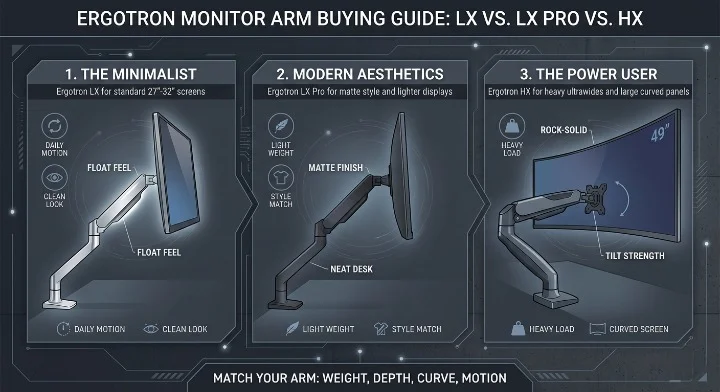

Ergotron Monitor Arm Buying Guide: LX vs. LX Pro vs. HX starts with one simple truth: the right arm is not the one with the flashiest box, but the one that matches your monitor’s weight, depth, curve, and how often you move it each day. Ergotron places the LX in the sweet spot for many 27-inch to 34-inch screens, the LX Pro as a newer matte option for 4 to 22 lb monitors up to 34 inches, and the HX as the heavy-duty pick for large displays up to 49 inches and 20 to 42 lbs.
- If you use a normal 27-inch or 32-inch work monitor, the LX is often the smart buy.
- If you want a newer matte look and lighter support range, the LX Pro makes more sense.
- If you run a 49-inch ultrawide, the HX is the safe answer.
- If your desk sits against a wall, rear clearance matters more than most buyers expect.
- If your monitor droops or pops up, tension tuning is the fix.
- If you own a deep curved screen, tilt strength matters as much as weight support.
- If you hate cable mess, plan for longer cables before you mount anything.
- If you want the short answer, buy for weight first, then depth, then screen size.
Quick answer for skimmers
If you want the short version, here it is. Buy the LX for most office monitors. Buy the LX Pro if you want that same general class with a newer matte finish and support for lighter screens. Buy the HX if your display is huge, deep, heavy, or curved enough to bully lesser arms. Buying the biggest arm “just in case” is not always smart. Big arms cost more, weigh more, and ask more from your desk.
Your monitor arm should feel boring in the best way. It should simply hold the screen where you leave it.
Ergotron Constant Force technology: why these arms cost more
Cheap monitor arms often look good for six months. Then they drift, sag, squeak, or lose that smooth feel. A lot of bargain arms rely on gas springs. Think of the gas spring like a car trunk strut or a balloon with pressure inside. It works, until it slowly stops working as well. Ergotron leans on its Constant Force system, which is the core reason these arms feel smoother and tend to last longer under daily movement. Ergotron also says its monitor arms use load and cycle testing, and the LX line passes a 10,000-cycle motion test.
That 10,000-cycle figure sounds dry, but it matters. Move your screen three times a day. Raise it for focused work. Push it back for calls. Pull it forward for editing. At that pace, you are asking a lot from an arm over years. A long cycle test does not mean magic. It does mean Ergotron built these arms for repeat motion, not just for a nice first week. That is why people keep paying more for them. They buy once and stop thinking about the arm.
The feel is the part specs do not show well. A good arm should move with one hand and stop where you leave it. No slow sink. No springy rebound. No tiny panic when you tilt a big display and wonder if gravity is about to win. That “floating screen” feel is the real product here. The metal, the clamp, and the finish are only the shell.
Ergotron LX and Ergotron LX Pro: the daily drivers
The LX is the classic pick because it covers the part of the market where most people live. Ergotron lists the LX for monitors up to 34 inches and 7 to 25 lbs, with VESA 75 x 75 mm or 100 x 100 mm support. That is the sweet spot for common office screens, many ultrawides, and a lot of creator displays. If your monitor sits in that range, the LX usually feels like the right-size tool.
The LX Pro shifts the story a bit. Ergotron lists it for screens up to 34 inches too, but with a lighter weight band of 4 to 22 lbs. That matters. A lot of newer 27-inch and 32-inch monitors are thin and light. The LX Pro makes more sense for those. It also comes in matte finishes that hide prints and blend into darker desk setups better than polished metal does. If your desk style matters, this is not fluff. You will look at the arm every day.
Here is the plain-English split. The standard LX feels like the “tune it to your setup” arm. The LX Pro feels like the “clean desk, clean look, less fuss” arm. If you swap screens a lot, or you sit near the top of the weight range, I still lean LX. If your screen is lighter and your desk has a matte black theme, the LX Pro feels easy to love.
Material choice changes the vibe too. Polished aluminum on the LX has that classic, bright, studio look. Matte black feels quieter. It disappears into the desk. Polished metal tends to age well when it gets touched a lot. Matte finish tends to hide fingerprints better. Neither is wrong. One says “Apple store.” The other says “blackout cockpit.”
This is where a lot of buyers trip. They shop by screen size only. That is a trap. A 34-inch monitor can be light and easy, or weirdly deep and heavy. A curved panel changes balance. A thick gaming shell changes leverage. A monitor arm does not “feel” width alone. It feels the total load and where that load sits in space.
The hidden physics that decide if you will love your arm
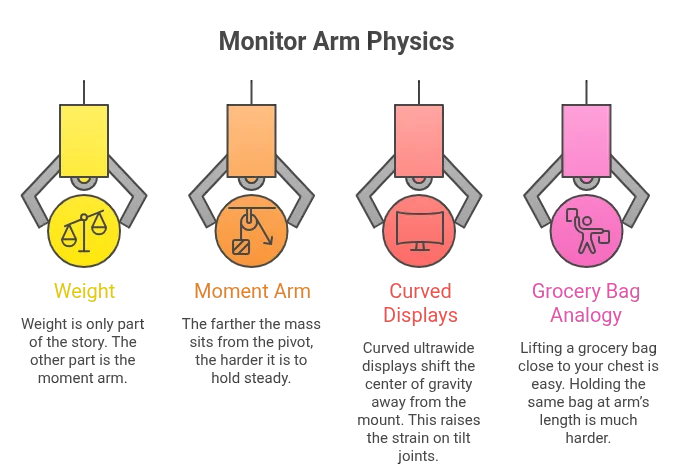
This Ergotron Monitor Arm Buying Guide: LX vs. LX Pro vs. HX gets easier once you think in physics, not marketing. Weight is only part of the story. The other part is the moment arm. In simple words, the farther the mass sits from the pivot, the harder it is to hold steady. That is why some deep curved displays cause trouble even when the listed weight seems fine.
A curved ultrawide shifts the center of gravity away from the mount. That raises the strain on tilt joints. Put simply, the screen acts “heavier” than the scale says because the mass sits farther out. This is why a monitor that technically fits a spec sheet can still feel wrong on a weaker tilt mechanism. It is also why Samsung Odyssey G9 owners keep running into the tilt problem on normal arms.
To make that idea simple, imagine lifting a grocery bag close to your chest. Easy enough. Now hold the same bag at arm’s length. Same bag. Much harder. That is your monitor arm problem. The monitor did not gain weight. The leverage changed.
Ergotron HX: the heavy lifter
The HX is where Ergotron stops pretending all monitors are alike. Ergotron lists the HX for displays up to 49 inches and 20 to 42 lbs. Search results from Ergotron also note BIFMA level 2 certification based on the arm’s low environmental and social impact. Amazon product data for the HX listing also shows support for VESA 75 x 75 mm, 100 x 100 mm, and 200 x 100 mm patterns on the standard pivot model.
If the LX is a quiet sedan, the HX is a truck. It is built for large screens, heavy shells, and the kind of setups that make normal arms tap out. The feel is less “feather light float” and more “rock-solid control.” That is not a flaw. With a 49-inch ultrawide, rock-solid is what you want. The wrong arm on a huge screen does not feel elegant. It feels nervous.
Using a standard LX on a monster 49-inch display is like putting small sedan tires on a loaded truck. It may line up on paper for five seconds. Then the first big tilt or the first time you pull the screen forward, you feel the mismatch. The arm may not fail in a movie-style snap. But the experience will be bad. Droop, bounce, weak tilt, and clamp stress are the real dangers.
The HX also asks more from your desk. This is the desk tax nobody talks about enough. A heavy arm with a big screen puts strong force into the desk edge. If your desk top is flimsy, hollow, or wobbly, the arm cannot save it. The better the arm, the more honest it becomes about the quality of your desk.
The tilt pivot problem, and why G9 owners should care
A lot of 49-inch curved monitors are not just heavy. They are deep. That depth pushes the center of gravity out and makes the tilt joint do much more work. Ergotron sells the HX Heavy-Duty Tilt Pivot for this exact reason. Search results for that product note 20 to 42 lb support and call out deep curved monitors, with Amazon noting it was built to support 1000R curved displays like the Samsung 49-inch Odyssey G9.
If you own a G9, Neo G9, or another deep 49-inch curve, the heavy-duty tilt is not a fun extra. It is often the difference between “this feels premium” and “why is my screen slowly face-planting.” People fixate on arm height and reach. Tilt strength is the part that actually saves the setup.
Comparative UX table: the human-first view
Below is the real-world table I wish more brands would publish.
| Feature | LX | LX Pro | HX |
|---|---|---|---|
| Best vibe | Floating, easy, one-finger feel | Clean matte, office-ready, lighter feel | Rock-solid, industrial, no-nonsense |
| Best for | Coding, writing, office work, 27″ to 34″ | Light 27″ to 34″ screens, clean desk builds | Gaming ultrawides, editing, 38″ to 49″ displays |
| Weight range | 7 to 25 lbs | 4 to 22 lbs | 20 to 42 lbs |
| Screen size | Up to 34″ | Up to 34″ | Up to 49″ |
| VESA support | 75×75, 100×100 | 75×75, 100×100 | 75×75, 100×100, 200×100 on standard HX Amazon listing |
| Desk tax | Normal sturdy desk | Normal sturdy desk | Very sturdy desk helps a lot |
| Install pain | Easy | Easy | Heavier parts, more effort |
| Who should skip it | Owners of giant heavy curves | Buyers with heavier 34″ monitors | People with light office screens and weak desks |
That table tells the real story. The LX and LX Pro are not “worse” than the HX. They are lighter, simpler, and better matched for the monitors most people use. The HX is better only when your screen gives it a real job to do.
Ergotron LX Monitor Arm, Matte Black

- Broad compatibility: Fits single screens up to 34 inches diagonal and 7 to 25 pounds; compatible with VESA patterns 75×7…
- Versatile mounting options: Includes two-piece desk clamp and grommet mount to fit a variety of desk types; desk clamp a…
- Improved comfort: Easily raise your monitor up to 17.3 inches above your worksurface with 13 inches of lift; find your b…
- Sleek and modular design: Designed with aesthetics in mind to enhance your workspace, built-in cable management creates …
- Built to last: Extensive quality testing ensures your monitor stays stable and secure; Ergotron products set the standar…
Pros
- Best all-around pick for office users
- Smooth movement and great range
- Strong fit for many 27-inch and 32-inch monitors
- Clean cable routing inside the arm
- Large review base on Amazon
Cons
- Not the right tool for giant 49-inch ultrawides
- Some very light screens may need careful tuning
- Polished finish versions show the arm more
Ergotron LX Pro Premium Monitor Arm, Matte Black
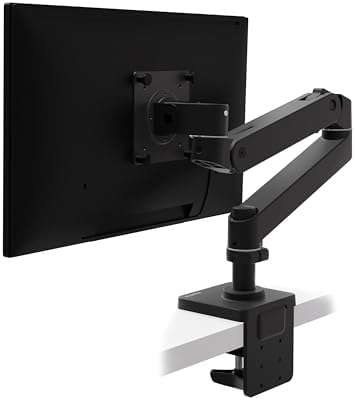
- Broad compatibility: Fits single screens up to 34 inches diagonal, 4 to 22 pounds and up to 3.6 inches deep; compatible …
- Versatile mounting options: Includes two-piece desk clamp to fit a variety of desk types; desk clamp attaches to desks 0…
- Elevate comfort: Easily raise your monitor up to 18.3 inches above your worksurface with 13 inches of lift; find your be…
- Sleek and modular design: Designed with aesthetics in mind to enhance your workspace, improved built-in cable management…
- Built to last: Extensive quality testing ensures your monitor stays stable and secure; Ergotron products set the standar…
Pros
- Matte black finish looks sharp
- Better fit for lighter modern displays
- Good pick for neat home office builds
- Newer branch of the LX line
- Same core Ergotron feel many buyers want
Cons
- Lower top weight than the standard LX
- Fewer long-term Amazon reviews than the LX
- Less room for heavier screens near the edge
Ergotron HX Premium Heavy Duty Monitor Arm, Matte Black

- Support ultrawides: To use with the Samsung 49-inch Odyssey G9, the separate accessory HX Heavy Duty Tilt Pivot (98-540-…
- Broad compatibility: Fits large, single screens up to 49 inches diagonal and 20 to 42 pounds; compatible with VESA patte…
- Multiple mounting options: Includes arm, extension, monitor pivot, mounting hardware; two-piece desk clamp for surface e…
- Comfortable working: Offers full monitor motion with 11.5 inches of lift, screen rises 17.8 inches above your desktop; c…
- Stylish and functional: Sleek design with heavy duty capacity allows easy positioning of large monitors; low-profile cla…
Pros
- Made for big, heavy displays
- Stronger feel with less wobble
- Better fit for large ultrawides
- More VESA flexibility on the standard listing
- Worth it if screen shake drives you crazy
Cons
- Costs much more
- Heavier install
- Can expose a weak desk fast
Ergotron HX HD Premium Heavy Duty Gaming Monitor Arm, Matte Black

- Compatible with the latest ultrawides: Fits large, single screens up to 49 inches and 28 to 42 pounds like the Samsung O…
- Everything you need: Includes arm, extension; HD pivot, mounting hardware, two-piece desk clamp for surface edges 0.4 to…
- Freedom to move: Offers full range of motion with 11.5 inches of lift, screen rises 17.8 inches from the worksurface; cu…
- Immersive views: Gives gamers and office professionals flexibility to move large, curved screens to the best location; r…
- Built to last: Extensive quality testing ensures your display stays stable and secure; Ergotron products set the standar…
Pros
- Best fit for 1000R heavy curved monitors
- Includes the heavy-duty pivot idea out of the box
- Great for Samsung G9 style setups
Cons
- Overkill for normal office monitors
- Higher cost than the standard HX
- Not needed unless your monitor is deep and hard to tilt
The buyer’s troubleshooting guide nobody gives you
The hidden desk depth issue gets buyers all the time. If you want the monitor pushed far back, the “elbow” of the arm needs room behind the desk. A good rule is to expect roughly 4 to 6 inches of rear clearance for easier folding and push-back. If your desk sits flush against a wall, check the arm’s rotation stop options. A 180-degree stop can save your wall and keep the setup sane. A 360-degree range sounds cool until your screen kisses drywall.
Then there is bounce. People blame the arm, but the desk is often the real culprit. Here is the physics in plain words: the farther the arm extends, the more it turns tiny desk vibrations into visible screen shake. Type hard. Tap the desk. Lean on the edge. The arm amplifies that motion because the monitor sits at the end of a lever. So yes, a heavy-duty arm helps. But the desk still matters. If you want less shake, shorten the arm, move the clamp closer to the desk leg, or upgrade the desk.
Cable mess is its own little horror film. The LX hides cables inside the arm. The HX uses a cable channel path. Both look great only if your cables are long enough. Buy cables about 2 feet longer than you think you need. Short cables pull tight when you raise the screen, and then you lose the smooth feel you paid for. A clean setup dies fast when one DisplayPort cable starts tugging the monitor down.
VESA mount basics: 75 x 75 vs 100 x 100 vs 200 x 100
Most normal computer monitors use VESA 75 x 75 mm or 100 x 100 mm. Ergotron’s VESA guide says these are common for displays under about 30 lbs, usually with M4 screws. Mid-size displays may use 200 x 100 mm, which matters more once you step into the HX world or larger screens. If your monitor does not match the plate on the arm, the arm is not “almost compatible.” It is incompatible until an adapter fixes that gap.
This matters more than people think. Many buyers see “supports up to 49 inches” and stop reading. But the bolt pattern matters. The back shape matters. The shell depth matters. In some cases the HX may need an adapter or a different plate setup for larger display backs. Read the mount pattern first. Then buy the arm.
Tension tuning: the art of the hex key
Ergotron Monitor Arm Buying Guide: LX vs. LX Pro vs. HX is not complete without the least sexy but most useful skill: tension tuning. Your goal is neutral buoyancy. That means the monitor stays where you place it. Not rising. Not sinking. Just staying put.
If your monitor pops up by itself, the lift tension is too high. Back it off a bit. If your monitor droops, the tension is too low. Add a bit. Make tiny changes. Test. Repeat. Do not crank wildly and hope. One quarter-turn at a time is the calm way to do this.
There is also a second setting people mix up all the time. Lift tension is not the same as swivel or tilt friction. Lift tension manages up and down support. Friction manages how loose or firm side and tilt motion feels. If the screen holds height but feels too floppy when you pan it, that is not a lift problem. That is a friction feel problem.
Here is a simple setup order:
- Mount the arm to the desk.
- Attach the monitor with the right VESA pattern.
- Connect cables with slack.
- Set lift tension until the monitor stays put.
- Fine-tune tilt and swivel feel last.
That order saves time. It also saves your mood.
Which arm should each kind of buyer get?
If you are the minimalist, get the LX. It gives you the clean “floating screen” look, enough support for most work displays, and the kind of motion that makes a desk feel open. If your setup is a 27-inch or 32-inch monitor, a laptop stand, and a clean pad on a wood desk, the LX feels right at home.
If you want the matte finish and your screen is lighter, get the LX Pro. It is the tidy one. It hides fingerprints better. It feels aimed at home office buyers who care about looks, cable order, and easy daily use. It is also a smart fit if your screen falls under the LX Pro’s lighter support band and you do not need extra headroom.
If you are the power user, get the HX. Video editors. sim racers. gamers with 49-inch ultrawides. people who hate wobble. buyers with deep curved panels. That is HX land. The HX does not try to be cute. It tries to hold a heavy thing still. And that makes it the best answer for the right person.
FAQs
Is the Ergotron LX strong enough for a 34-inch monitor?
Usually, yes. The LX is listed for up to 34 inches and 7 to 25 lbs. The key is not width alone. Check the real monitor weight and depth too.
Is the Ergotron LX Pro better than the LX?
Not for everyone. The LX Pro is better for lighter screens and buyers who want the matte, newer look. The LX often gives you more top-end weight room.
Is the Ergotron HX worth it?
Yes, if your screen is large, heavy, or deep enough to punish weaker arms. No, if you use a light office monitor. Then it is just more cost and more metal than you need.
Do I need the HX heavy-duty tilt pivot?
If you use a deep 49-inch curved display, very likely yes. That is the use case Ergotron and Amazon both call out for the HD pivot style.
Why does my monitor arm wobble when I type?
Because the arm is a lever. The more you extend it, the more it shows desk vibration. A better desk, shorter reach, and tighter setup help.
Can I use these arms with any monitor?
No. You need the right VESA pattern, the right weight range, and enough clearance for the back shell and cables.
Final verdict
In this Ergotron Monitor Arm Buying Guide: LX vs. LX Pro vs. HX, the smartest move is to match the arm to the real job. The LX is the best all-rounder. The LX Pro is the neat value play for lighter screens and matte desk setups. The HX is the one you buy when you never want to watch a giant ultrawide shake again. If your monitor is normal, do not overbuy. If your monitor is a beast, do not underbuy. That one choice decides whether your desk feels calm or cursed.
Conclusion
Ergotron Monitor Arm Buying Guide: LX vs. LX Pro vs. HX comes down to this: buy the LX for most work screens, buy the LX Pro for a lighter matte-friendly setup, and buy the HX when your monitor is heavy enough to make weaker arms beg for mercy; once you match weight, depth, VESA pattern, and desk strength, the right pick gets obvious fast, and the wrong pick becomes easy to avoid.
Related reads
- Ergotron LX Monitor Arm Review: Is It Still Worth It in 2026?
- Ergotron HX Monitor Arm Review: The Best Mount for Ultrawide Monitors
- Ergotron LX vs Humanscale M2.1: Which Premium Monitor Arm Wins?
- 7 Benefits of the Ergotron LX: Why This Ergonomic Arm is Worth the Money
- Best Monitor Arms 2026
- Best Monitor Stand for Small Desks
- Best Dual Monitor Stand for Desk Against Wall
[…] Ergotron LX Monitor Arm Review: Is It Still Worth It in 2026? […]