
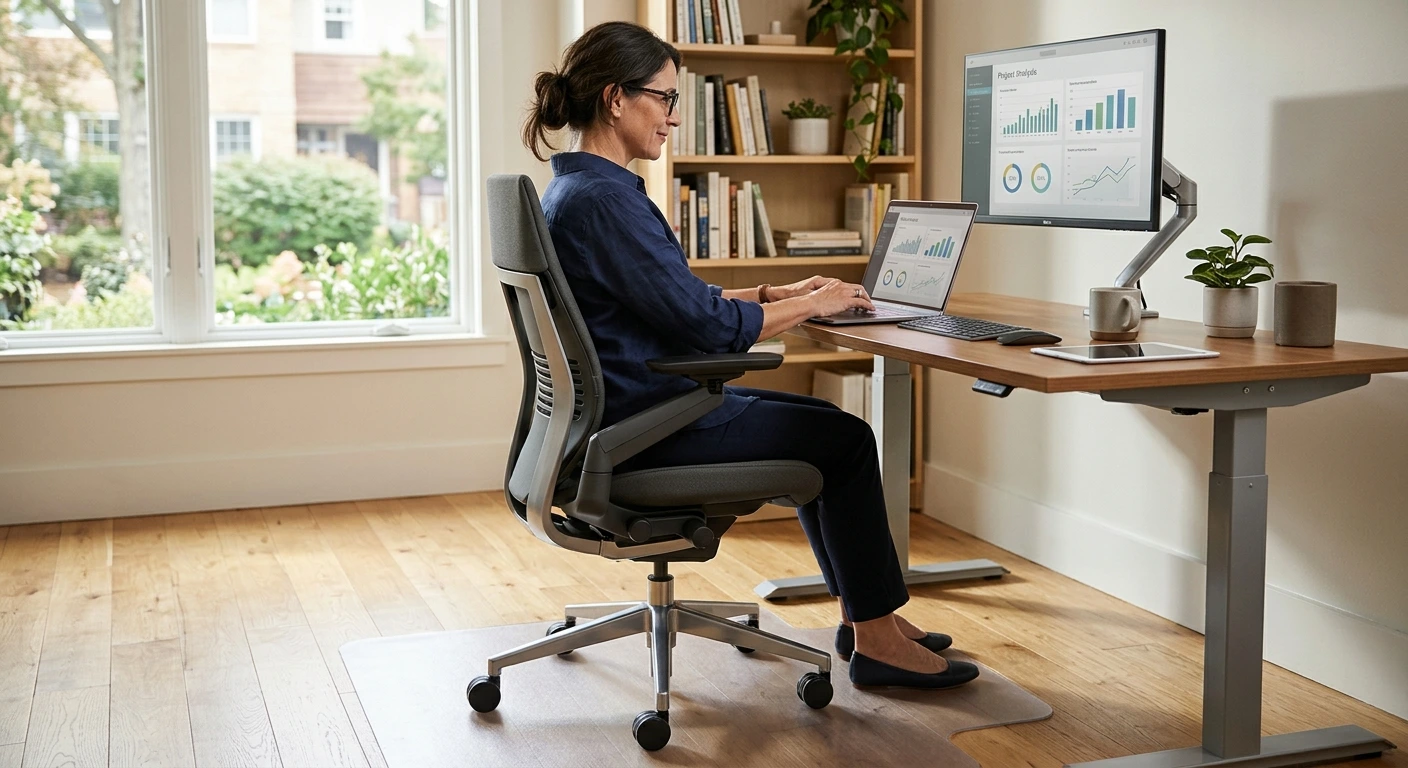

Steelcase Gesture chair shoppers all hit the same wall. The chair costs a lot, and the options look confusing. You see wrapped backs, shell backs, carpet casters, hard floor casters and a long list of fabric names. Then you find Amazon versions in colors like Coconut Yellow and Blue Jay. This guide clears all of that up. You will learn what the Gesture does well, who should skip it, and how to pick the right setup. We also cover new, factory-return and used buying, plus how to keep your warranty safe. And if the price makes you wince, we finish with smart ways to get good support for less.
- The Gesture shines for people who shift positions a lot and use phones, tablets or laptops all day.
- Its 360-degree arms and recline settings are the main reasons people pay more for it.
- Carpet casters suit carpet. Hard floors need hard floor casters or a chair mat.
- The headrest is an extra option, so decide early if you want one.
- Factory-return and pre-owned chairs can save money, but warranty terms matter a lot.
- The Leap suits people who sit upright and want strong lower back control.
- Cheaper chairs can work well if they cover the key adjustments.
Why You Can Trust Our Steelcase Gesture Recommendations
We built this shortlist to solve the exact problems real Steelcase Gesture buyers face. Instead of confusing you with endless technical jargon, we focus on the choices that matter most: clear configuration options, floor compatibility, and color selection.
- Verified Amazon Listings: We link directly to real, highly rated versions on Amazon. You can buy the exact chairs you read about without guessing.
- Perfect Floor Matching: Every pick details the specific floor type it suits. This ensures your new premium chair rolls smoothly in your exact workspace.
- Vibrant Style Options: Our curated selection covers six unique color choices. You can choose from classic, professional grays or bold pops of yellow, orange, and blue. All featured models are optimized for carpeted floors
Steelcase Gesture Guide: Is It Worth the Price?
Here is the short answer. The Gesture is worth it if you sit for long hours and move around a lot while you work. It is not worth it if you sit for an hour a day or only need a basic seat. The chair costs more than most home office chairs. That money goes into adjustment, build and a design made for long days.
The maker says the Gesture is designed for a variety of users and postures. That is the big idea behind it. Most chairs assume you sit straight and type. Real people do not sit like that. You lean back on calls. You hunch over your phone. You curl up with a tablet. The Gesture tries to support you in all of those spots, not just one.
Think about value per year, not the price tag on day one. A cheap chair that sags after two years costs you again and again. A well-built chair can last many years. When you spread the cost over that time, the gap shrinks. It does not vanish, but it gets smaller than it first looks.
Still, no chair fixes a bad setup. If your desk is too high, your shoulders will ache in any chair. Pair the Gesture with a desk you can adjust. Our guide to the best ergonomic standing desk picks can help you match the two. A great chair and a good desk work as a team.
Simple rule: fit the chair to your body first, then fit the desk to the chair.
Who the Steelcase Gesture Is Best For (and Who Should Skip It)
The Gesture is a great fit if you:
- Work at a desk six or more hours a day.
- Switch between typing, phone use and reading on a tablet.
- Like to lean back during calls or while thinking.
- Want arms that move to support you in odd positions.
- Plan to keep a chair for many years.
You should skip it if you:
- Only sit at your desk now and then.
- Have a tight budget and other home office needs first.
- Love a deep, soft lounge seat.
- Want a mesh back for airflow in a hot room.
- Need a strong headrest every time and do not want to hunt for that option.
Body size, typing and gaming posture
Fit matters more than brand. Sit with your feet flat and your knees at about hip height. You should fit two or three fingers between the seat edge and the back of your knee. If you are very tall or very short, try to sit in a Gesture at a dealer or office first. Seat depth and arm reach decide how well it fits you.
For typing, keep your elbows close to your sides and bent at about a right angle. The Gesture arms can slide in close and hold your forearms. For gaming, many people lean back with a controller. The recline and arms work well for that. If you game with a mouse and keyboard, sit more upright, like you would to type. Laptop users should raise the screen to eye level. Our list of the best laptop stands for home office setups can help with that.
Key Ergonomic Features: 360-Degree Arms, Seat Depth, Lumbar and Recline
360-degree arms
The arms are the star. The maker lists 360-degree arms, and they are the main reason many people buy this chair. They swing in, out and around. You can tuck them close for typing. You can swing them forward to hold your elbows while you text. You can push them out of the way if you want to sit cross-legged. Few chairs give your arms this much freedom.
Seat depth
Seat depth lets you slide the seat forward or back. This matters a lot. If the seat is too deep, it presses behind your knees. If it is too shallow, your thighs lack support. Most Gesture setups let you adjust it. Set it so the seat holds your thighs but leaves a small gap behind your knees.
Lumbar support
The maker describes a contoured back. That shape follows the curve of your spine. Steelcase also offers adjustable lumbar as an add-on for the Gesture line. If you have lower back pain, think hard about that add-on. If your back feels fine, the contoured back alone may be enough.
Recline and back lock
The maker lists a full recline range with three settings and an upright back lock. In plain terms, you can lock the chair straight up for focused work. Or you can let it lean back and choose how far. The three settings give you control without endless fiddling. Lean back for calls. Lock upright for deep work.
Gesture Configurations Explained: Back Style, Casters, Fabric and Frame
This is where most buyers get lost. Steelcase sells the Gesture in many setups. Each choice changes the look or how the chair fits your room. Here is what each one means.
Wrapped back vs shell back
A wrapped back has fabric pulled around the whole back, front and rear. It looks softer and more like home furniture. A shell back has fabric on the front and a hard shell on the rear. The shell is easier to wipe clean and handles bumps from behind. Comfort from the front is the main thing you feel, so pick based on looks and how rough your space is. Got kids or pets? The shell back may hold up better on the outside.
Hard floor vs carpet casters
Casters are the wheels. Carpet casters are made to roll on carpet. Hard floor casters are softer and grip smooth floors better. Here is the answer to a common question: should you choose hard floor or carpet casters? Match them to your floor. That is the whole rule.
If you put carpet casters on wood or tile, the chair can roll too easily. It can also scuff the floor over time. If you need steelcase gesture hard floor casters, pick a version built for hard floors. Or keep carpet casters and add a chair mat. A mat protects the floor and gives the wheels a steady surface. If your desk area mixes rug and wood, a mat is the easy fix. Planning a full desk setup? Our picks for an office desk with drawers pair well with a rolling chair.
Fabric lines and colors
Steelcase names its fabrics in lines, and each line comes in many colors. On Amazon, you mostly see the color name, like Graphite Gray or Tangerine Orange. Think about how the fabric will look after years of use. Bright and light colors show stains faster. Grays hide dust, lint and small marks better.
Over time, any fabric chair shows wear in the same spots. The front edge of the seat rubs the most. The arm pads take daily contact too. Watch for pilling, those tiny fuzz balls on the surface. A fabric shaver removes them in minutes. Vacuum the seat now and then with a brush tool. Blot spills right away instead of rubbing them in. Small habits like these keep the chair looking newer longer.
Frame and base colors
The frame and base color are often separate choices from the fabric. A dark frame looks bold and hides scuffs. A light frame looks clean and airy. Neither changes comfort. Pick the one that suits your room and your desk.
Steelcase Gesture Options on Amazon
Below are six versions of the Steelcase Gesture chair on Amazon. All of them are set up for carpet floors. The main difference is color. Pick the color you will still like in five years, then plan for your floor.
1. Gesture in Graphite Gray (Carpet Floors)
This version suits people who want a calm, grown-up look that blends into most rooms. Gray works with wood desks, white desks and black desks alike. It is a smart pick for shared spaces or video calls where you want the chair to stay in the background. It comes with carpet casters and carries the BIFMA LEVEL label, a furniture sustainability certification.
Pros
- Graphite Gray fits almost any decor
- Gray hides lint and light marks well
- Carpet casters roll well on carpet
- BIFMA LEVEL sustainability label
Cons
- Carpet casters can scuff hard floors without a mat
- A big spend for a home office chair
- Muted color may feel plain to some

- Ergonomic Chair Design: The Gesture chair by Steelcase is expertly designed to redefine the relationship between you and…
- Comfortable Desk Chair for Extended Use: The Gesture chair is designed for a variety of users and postures, ideal for th…
- Premium Office Furniture Features: This chair includes wheels for carpet, 360-degree arms, a contoured back that fits yo…
- High-Quality Chair for Desk: The Gesture chair boasts a full recline range with three settings, an upright back lock, an…
- Better Design, Better Comfort, Better Choice: Our high performance seating helps you do your best work; we offer a broad…
2. Gesture in Licorice (Carpet Floors)
Licorice is for buyers who want a classic office chair color with a fun name. It suits a sleek home office or a gaming corner. If you prefer a chair that looks serious and stays out of the way, this is a strong choice. It rolls on carpet casters and carries the BIFMA LEVEL label.
Pros
- Classic Licorice color suits most setups
- Carpet casters for carpeted rooms
- BIFMA LEVEL sustainability label
- Part of the well-known Gesture line
Cons
- Needs a mat or caster swap for hard floors
- Premium cost compared with basic chairs
- Pet hair can stand out on some fabric colors

- Ergonomic Chair Design: The Gesture chair by Steelcase is expertly designed to redefine the relationship between you and…
- Comfortable Desk Chair for Extended Use: The Gesture chair is designed for a variety of users and postures, ideal for th…
- Premium Office Furniture Features: This chair includes wheels for carpet, 360-degree arms, a contoured back that fits yo…
- High-Quality Chair for Desk: The Gesture chair boasts a full recline range with three settings, an upright back lock, an…
- Better Design, Better Comfort, Better Choice: Our high performance seating helps you do your best work; we offer a broad…
3. Gesture in Coconut Yellow (Carpet Floors)
Coconut Yellow is for people who want their chair to add some cheer. It works well in a bright home office or a creative studio. The maker lists wheels for carpet, 360-degree arms, a contoured back, and a full recline range with three settings and an upright back lock. If you want full Gesture function with a happy pop of color, this one fits.
Pros
- 360-degree arms for many postures
- Full recline range with three settings
- Upright back lock for focused work
- Contoured back follows your spine
- Bright color adds personality
Cons
- Light colors show stains sooner
- Carpet wheels are not ideal on bare floors
- Bold color may not suit every room

- Ergonomic Chair Design: The Gesture chair by Steelcase is expertly designed to redefine the relationship between you and…
- Comfortable Desk Chair for Extended Use: The Gesture chair is designed for a variety of users and postures, ideal for th…
- Premium Office Furniture Features: This chair includes wheels for carpet, 360-degree arms, a contoured back that fits yo…
- High-Quality Chair for Desk: The Gesture chair boasts a full recline range with three settings, an upright back lock, an…
- Better Design, Better Comfort, Better Choice: Our high performance seating helps you do your best work; we offer a broad…
4. Gesture in Tangerine Orange (Carpet Floors)
Tangerine Orange suits buyers who like bold design and want energy in their space. It looks great in modern rooms with white or wood desks. The maker says the Gesture is designed for a variety of users and postures. It lists wheels for carpet, 360-degree arms, a contoured back, a full recline range with three settings and an upright back lock.
Pros
- Eye-catching Tangerine Orange color
- 360-degree arms move with you
- Three recline settings plus upright lock
- Carpet wheels for carpeted rooms
Cons
- Bright fabric can show wear and spills
- Needs a chair mat on hard floors
- Strong color can be hard to match later

- Ergonomic Chair Design: The Gesture chair by Steelcase is expertly designed to redefine the relationship between you and…
- Comfortable Desk Chair for Extended Use: The Gesture chair is designed for a variety of users and postures, ideal for th…
- Premium Office Furniture Features: This chair includes wheels for carpet, 360-degree arms, a contoured back that fits yo…
- High-Quality Chair for Desk: The Gesture chair boasts a full recline range with three settings, an upright back lock, an…
- Better Design, Better Comfort, Better Choice: Our high performance seating helps you do your best work; we offer a broad…
5. Gesture in Blue Jay (Carpet Floors)
Blue Jay is for people who want color without going as loud as orange or yellow. Blue feels calm and still adds character. It suits a home office where you want a little style on camera. This version has carpet casters and carries the BIFMA LEVEL label.
Pros
- Blue Jay adds color in a calm way
- Looks good on video calls
- Carpet casters for carpeted floors
- BIFMA LEVEL sustainability label
Cons
- Carpet casters can mark hard floors
- Premium price for a home setup
- Colored fabric can be harder to match with other furniture

- Ergonomic Chair Design: The Gesture chair by Steelcase is expertly designed to redefine the relationship between you and…
- Comfortable Desk Chair for Extended Use: The Gesture chair is designed for a variety of users and postures, ideal for th…
- Premium Office Furniture Features: This chair includes wheels for carpet, 360-degree arms, a contoured back that fits yo…
- High-Quality Chair for Desk: The Gesture chair boasts a full recline range with three settings, an upright back lock, an…
- Better Design, Better Comfort, Better Choice: Our high performance seating helps you do your best work; we offer a broad…
6. Gesture in Nickel Gray (Carpet Floors)
Nickel Gray is another neutral pick for buyers who want a clean, quiet look. It works well in shared homes, rentals or any room where you may change the decor later. The maker lists wheels for carpet, 360-degree arms, a contoured back, a full recline range with three settings and an upright back lock. Choose this if you want full function and a color that ages gracefully.
Pros
- Neutral Nickel Gray blends in anywhere
- 360-degree arms for typing and phone use
- Full recline range with three settings
- Upright back lock for focus
Cons
- Carpet wheels need a mat on hard floors
- A big investment for light use
- Neutral look may feel plain to some

- Ergonomic Chair Design: The Gesture chair by Steelcase is expertly designed to redefine the relationship between you and…
- Comfortable Desk Chair for Extended Use: The Gesture chair is designed for a variety of users and postures, ideal for th…
- Premium Office Furniture Features: This chair includes wheels for carpet, 360-degree arms, a contoured back that fits yo…
- High-Quality Chair for Desk: The Gesture chair boasts a full recline range with three settings, an upright back lock, an…
- Better Design, Better Comfort, Better Choice: Our high performance seating helps you do your best work; we offer a broad…
Gesture With or Without a Headrest
Does the Gesture come with a headrest? Not by default. Steelcase offers the headrest as an add-on for the Gesture line. If you want a steelcase gesture with headrest, pick a version that names the headrest in its specs. The versions above focus on color and carpet casters.
So do you need one? It depends on how you sit. If you lean far back for long calls, a headrest helps your neck relax. If you sit upright most of the day, you may never touch it. Many people find the tall back gives enough support without one. Be honest about your habits. If you recline for hours, get the headrest. If you mostly type, save the money.
Why Steelcase Is Expensive and Where to Find Savings (New, Factory Return, Used)
Why is Steelcase so expensive? A few reasons stack up. These chairs are made for offices where people sit all day, every day. They have many moving parts for adjustment. The design work behind them is serious. Steelcase also backs its chairs with a warranty, and that costs money to support. You pay for a chair meant to last, not one meant to be replaced.
That said, you do not always have to pay full price. Here are your main paths.
Buying new
New gives you a fresh chair, every option you want and the full Steelcase warranty. It costs the most. Watch for a steelcase gesture sale around big shopping events. Prices shift, so check the current price on Amazon and compare with the Steelcase store.
Factory return or open box
Factory-return chairs were sent back, then checked and resold. They often look close to new. They cost less than new. Ask what warranty comes with them, since it can differ from a brand new chair.
Pre-owned
Used office furniture dealers sell many Steelcase chairs from offices that closed or upgraded. This is often the cheapest way into a Gesture. Look closely at the seat fabric, the arm pads and how smoothly the chair rises and lowers. Ask the dealer about the original warranty. In many cases, it does not pass to a second owner.
Warranty and authenticity
Third-party sellers can be fine, but be careful. A chair from an unknown seller may not carry a valid warranty. Here is the right mindset: buy from whoever is cheapest buy from a seller you trust. Look for chairs sold by Steelcase or an authorized dealer when you can. Ask the seller in writing if the warranty applies. Keep your receipt and the order details. If a deal looks far too good, treat it as a warning sign.
The steelcase gesture price makes sense when you buy new from a trusted source and keep the chair a long time. Used makes sense when you accept some risk for a big saving.
Gesture vs Leap vs Series 1: Which Steelcase Should You Buy?
The steelcase gesture vs leap question comes up a lot. Both are top Steelcase chairs, but they suit different people. The Leap is known for a back that flexes with your spine and adjustable lower back firmness. It is a great match for people who sit upright and type most of the day. The Gesture shines for people who move around, recline and use devices. Its arms are far more flexible.
The Series 1 is the budget steelcase office chair. It has fewer adjustments and a simpler design. It still gives good support for many home workers. If you want the Steelcase name without the Gesture cost, start here. The Amia sits between them. It is a solid, simpler chair with built-in lower back support.
Here is a quick way to choose:
- Pick the Gesture if you shift a lot, use a phone or tablet often, or recline on calls.
- Pick the Leap if you sit upright, type all day and want fine lower back control.
- Pick the Amia if you want simple, steady support at a middle price.
- Pick the Series 1 if budget comes first and your needs are basic.
Cheaper Ergonomic Chair Alternatives on Amazon
Are there good cheaper alternatives to the Steelcase Gesture? Yes. You will not get the same arms or build, but you can get solid support. The trick is to look for the right adjustments and ignore flashy extras.
When you shop budget ergonomic chairs on Amazon, look for these:
- Adjustable seat height so your feet rest flat.
- Adjustable seat depth for proper thigh support.
- Lower back support you can move up or down.
- Arms that move up, down, and ideally in and out.
- A recline lock so you can sit upright or lean back.
- Casters that match your floor.
Skip chairs that sell on looks alone, like racing seats with lots of stitching and few real adjustments. Also consider a used Series 1 or Gesture from a dealer. That can beat a new budget chair on build. And remember that your desk matters too. A height-adjustable desk can ease strain as much as a pricey chair. See our list of the best standing desk picks on Amazon for ideas.
Final Verdict and Buying Checklist
The Steelcase Gesture chair is a strong buy for people who sit long hours and move around a lot. Its 360-degree arms, contoured back and full recline range with three settings set it apart. It is not the right chair for everyone. Light users, mesh lovers and tight budgets have better options. Before you buy, run through this list:
- Decide if you sit long enough each day to justify the cost.
- Think about how you sit: upright typing, leaning back, or a mix.
- Match casters to your floor, or plan for a chair mat.
- Choose wrapped or shell back based on looks and wear.
- Pick a color that hides wear and suits your room for years.
- Decide on the headrest and lumbar add-ons now, not later.
- Choose new, factory-return or used based on budget and risk.
- Buy from Steelcase or an authorized dealer to protect the warranty.
- Set your desk and screen height to match the chair.
The Bottom Line
The Gesture earns its high price for the right person: someone who works long days, changes positions often and wants a chair that keeps up. Pick your color, match your casters to your floor and decide on the headrest before you order. Buy from a trusted seller so your warranty stays safe. If the cost is too much, a used Steelcase or a well-chosen budget chair with the key adjustments will still treat your back well. Check the current price on Amazon, compare your options, and choose the setup that fits how you really sit.
About the author: Connect on LinkedIn