
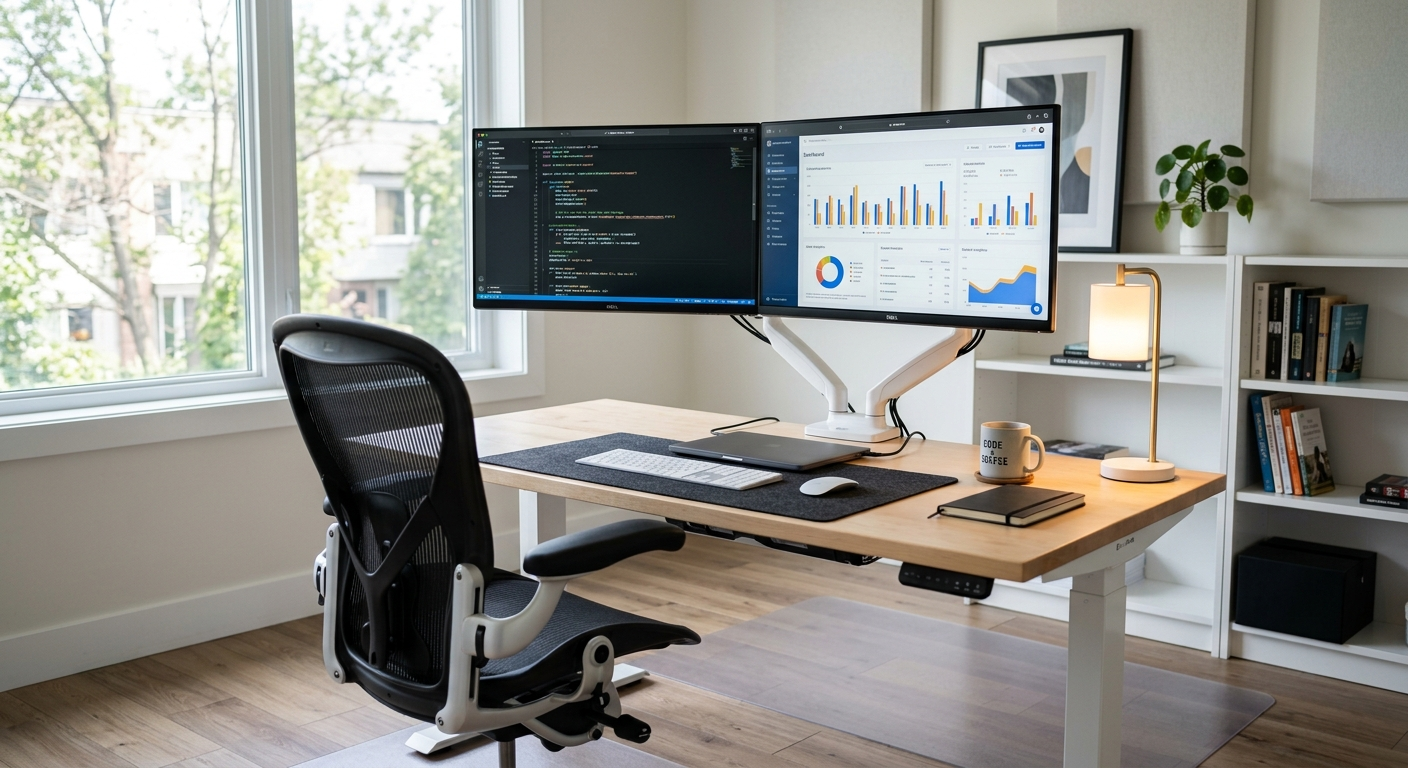

Best standing desk guides love fancy brands, but plenty of solid picks are easy to buy on Amazon. You don’t need a showroom budget to stand while you work. You need a desk that fits your room, holds your gear, and doesn’t shake when you type. This guide keeps things short and honest. Each pick gets a clear “who it’s for” line, plus pros and cons and the trade-offs that matter. We also cover sizing, wobble, noise, and whether a converter makes more sense than a full desk. Here is what this guide covers:
- Seven desks, each picked for a clear job: overall, budget, drawers, gaming corners, L-shape, big dual-monitor setups, and converters.
- A quick-pick list so you can find your match fast.
- A sizing guide based on your room, monitor count, and chair space.
- Plain talk on one-piece vs. spliced tabletops, wobble, and motors.
- A head-to-head look at electric desks vs. converters.
- Answers to common questions about standing time, durability, and cheap desks.
Our Top Picks at a Glance
Short on time? Here’s the quick version. Pick the line that sounds like you, then jump to that section.
- Best overall: FLEXISPOT EN1 One-Piece Standing Desk, 48″ x 24″, with 4 memory presets and a 176 lb capacity.
- Best budget pick: GTPLAYER Small Standing Desk 28″ W × 16″ D desktop adjusts across a 29.6″–44.2″ height range.
- Best with drawers: HUANUO 48″ x 24″ Electric Standing Desk with 2 drawers and 4 preset heights.
- Best simple black desk for gaming corners: ErGear 48″ x 24″ Height Adjustable Electric Standing Desk.
- Best L-shaped desk: Casaottima 63 Inch L Shaped Electric Standing Desk in white.
- Best for big dual-monitor setups: FEZIBO 71″ x 37″ Large Electric Standing Desk with a 1″ thick desktop.
- Best converter: VIVO Manual Height Adjustable Standing Desk Converter with a 32″ top.
How We Picked These Desks
I’ll skip the pleasantries. I spent hours digging through technical specs, tearing apart product listings line by line, and vetting a mountain of long-term owner reviews so you don’t have to. Every desk on this list earned its spot — and plenty of “bestseller” models got cut.
Why so ruthless? Because standing desk shoppers keep getting burned by the same three things:
- Wobble and long-term durability. A desk that sways at full height — or dies in year one — is dead to me. I only kept picks with massive review counts and recent owners reporting they still hold up, not one angry post.
- Fit for YOUR space and workflow. A tiny apartment corner and a dual-monitor gaming den are not the same problem. Every pick here has one clear job — compact roller, full-size electric, L-shaped command center — so nothing on this list is filler.
- Specs that actually match the job. Lift capacity, memory presets, tabletop size, frame type — I cross-compared them brand by brand, so you don’t discover the mismatch after you’ve built the thing.
The result: seven desks that cover every budget, space, and setup — from a ~$60 pneumatic roller to a 71-inch electric beast.
Scroll down, find your match, and order it today.
Best Overall Electric Standing Desk: FLEXISPOT EN1
This is the desk for most people working from home. It suits anyone who wants one solid, flat top for a laptop plus one or two monitors. If you don’t know where to start, start here.
The big draw is the one-piece desktop. Many cheap desks use two boards joined in the middle. This one doesn’t, so you get a smooth surface with no center seam. It also has 4 memory presets, so you can save your sitting and standing heights. The listing calls it stable and quiet, and it rates the frame for 176 lbs.
Pros
- One-piece desktop with no seam down the middle.
- 4 memory presets for quick height changes.
- 176 lb weight capacity handles monitors, a PC, and more.
- Maple top with a white frame looks bright and clean.
- Listed as built for dual monitors.
Cons
- 48″ x 24″ is fine for two smaller monitors but tight for two big ones.
- Like most desks with this footprint, expect some sway at full height.
- Maple and white won’t match a dark room.

- ONE-PIECE. NO SEAMS: A seamless desktop creates a smooth, uninterrupted workspace with no split lines to distract, makin…
- SPACIOUS WORKSPACE FOR PRODUCTIVITY: Room for laptops, monitors, and accessories, giving writers, coders, or content cre…
- HEAVY-DUTY STABILITY & STRENGTH: Supports up to 176 lbs, giving office workers, architects, and gamers a steady, secure …
- SIT OR STAND. YOUR CALL: Smooth electric height adjustment (28.9″–46.5″) with 4 memory presets keeps remote workers and …
- QUICK & EASY ASSEMBLY: Simplified setup with fewer steps and less lifting, ideal for busy professionals or first-time st…
Best Budget Standing Desk: GTPLAYER
The GTPLAYER Small Standing Desk is a compact, mobile sit-stand workstation built around a smooth pneumatic (gas-spring) lift — so height changes take seconds, need no power outlet, no motor, and no cranking, and run silently enough to use beside a sleeping person or on a call. The 28″ W × 16″ D desktop adjusts across a 29.6″–44.2″ height range, which covers a low bedside/sitting position all the way up to full standing height, and supports a hefty 132 lbs — enough for a large laptop plus a monitor, or a full spread of gear as an overbed/bedside table.
Four 360° casters let you roll it from couch to bed to office and lock it in place, and the whole unit weighs only about ~20 lbs, so it’s easy to reposition with one hand while staying anchored once loaded. It’s aimed squarely at small spaces — dorms, apartments, bedrooms, couch-side setups — where a full-size standing desk won’t fit. Assembly is required but ships with clear instructions and all hardware. Buyers of this desk family describe the frame as “heavy and well-anchored, so there’s no noticeable shake even at standing height with a heavy monitor setup,” with a clean, modern finish.
Pros
- Effortless, silent height adjustment — the pneumatic lift glides from sitting to standing in seconds with no motor noise and no power cord, a big advantage over cheap electric desks that whir and need an outlet.
- Genuinely strong load rating — 132 lbs is more than most mobile carts in this class; it can handle a monitor + laptop + accessories without flexing.
- True overbed/bedside versatility — the height range (29.6″–44.2″) clears a bed or couch and rises to full standing height, so it doubles as a laptop cart, reading table, or projector stand.
- Compact footprint — 28″ × 16″ slots into tiny rooms, beside a sofa, or next to a bed where a full desk can’t go.
- Mobile but stable — 360° wheels with locks, and reviewers report no wobble at standing height even with heavy gear loaded.
- Budget price with options — around $59–66, in multiple colors, with a larger 32″ × 18″ version (~$100) and lockable- or hidden-wheel variants.
- Easy setup — assembly is straightforward with clear instructions included.
Cons
- Small work surface — 28″ × 16″ fits a laptop or one monitor comfortably, but a full desktop battlestation won’t fit; measure your keyboard + mouse + monitor setup first.
- No height memory — pneumatic means you re-adjust manually every time you sit or stand; electric desks with preset buttons are more convenient for frequent sit-stand switching.
- Manual repositioning while loaded — unlike a motorized lift, you’ll steady the desktop with your hand as it rises; loading it unevenly makes one-hand adjustment fiddly.
- Casters can creep — unlocked wheels roll on hard floors, so you need to engage the locks (on lockable variants) before typing or leaning on it.
- Practical capacity is spec-dependent — 132 lbs is the ceiling for the frame, but stability is best when the load is centered; hanging a heavy monitor off the edge at max height is asking for wobble.
- Assembly required — you’ll spend 20–30 minutes with an instruction sheet out of the box.

- Adjustable Height with Pneumatic Lift: Effortlessly adjust the bedside table height from 28″ to 41″ with the built-in pn…
- Convenient Mobility with Lockable Wheels: Designed with 2 Lockable wheels and 2 regular swivel wheels, this overbed tabl…
- Versatile Use Anywhere: The Small Standing desk perfect for use over beds, sofas, recliners, or as a portable workstatio…
Best Desk with Drawers: HUANUO 48″ Electric
This one is for people who hate clutter. It suits anyone who needs a spot for pens, chargers, and notebooks without adding a separate cabinet. It’s a smart choice for small rooms where floor space is precious.
You get 2 drawers built in, plus 2 hooks for bags or headphones. It has 4 preset heights, so switching between sitting and standing is quick. The title also says it works with C-clamp mounts, which means monitor arms are on the table.
Pros
- 2 drawers keep small stuff off the desktop.
- 2 hooks for headphones or a bag.
- 4 preset heights for fast switching.
- C-clamp mount compatible for monitor arms.
Cons
- Drawers under the top can bump your knees if you sit close.
- Drawers add weight that moves up and down with the desk.
- Black only, per the title.

- Efficient Desktop Organization: The electric standing desk maximizes organization with two desktop drawers to store item…
- Compatible with C-Clamp Mounting: Our computer desk with drawers is designed with an extended 2.36″ rear platform edge, …
- Flexible Height Adjustment: The sit stand desk features a flexible height range from 27.5″ to 46.4″ tall, allowing you t…
- Smart, Functional Features: The curved ergonomic edges of the rising desk make working around the tabletop more comforta…
- Smart, Functional Features: The curved ergonomic edges of the rising desk make working around the tabletop more comforta…
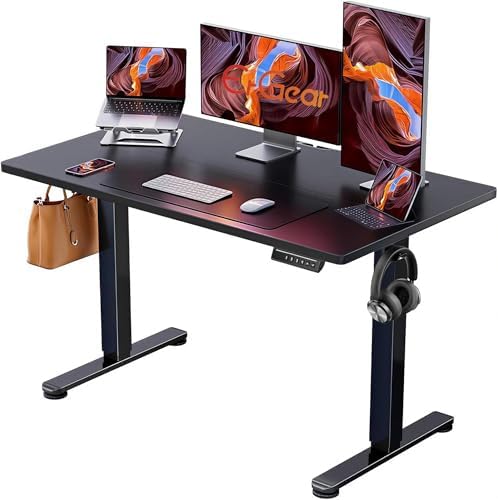
Best Simple Black Desk for Gaming Corners: ErGear 48″
This desk is for gamers and anyone who likes a dark, low-key setup. It suits a bedroom battle station with one monitor, a keyboard, and a mouse pad. It also works fine as a plain work desk.
The title is short: electric height adjustment, 48″ x 24″, black. That’s it. Sometimes that’s all you need. Pair it with a large mouse pad, like one from our list of durable Cordura fabric mousepads, and you’re set.
Pros
- Electric height adjustment for long gaming sessions.
- Black finish blends with RGB gear and dark rooms.
- 48″ x 24″ fits a one-monitor setup with room for a mouse.
Cons
- The title doesn’t list capacity or presets, so check the details.
- Tight for a tower PC on top plus two monitors.
- Not a dedicated gaming desk with extras like cup holders.
- Electric Height Adjustable Standing Desk for Comfortable Work – Switch effortlessly between sitting and standing with th…
- Powerful Motor with Memory Presets – Equipped with a quiet, powerful lift motor, this sit stand desk allows seamless adj…
- Exceptional Stability Steel Frame – Built with a heavy-duty alloy steel frame and aerospace-grade lifting columns, this …
- Easy Assembly & Low-VOC Materials – Designed with low-VOC materials to help reduce indoor emissions and create a healthi…
Best L-Shaped Standing Desk for Big Setups: Casaottima 63″
This is for people who need two work zones. It suits someone who codes on one side and takes notes or video calls on the other. It also fits a corner nicely, which frees up the middle of the room.
The L shape gives you way more surface than a straight 48″ desk. The 63 inch length is solid, and the electric lift raises the whole thing. White keeps it from feeling bulky in a small space.
Pros
- L-shaped layout gives two work areas.
- 63 inch length handles monitors plus paperwork.
- Electric lift for the full desk.
- Fits neatly into a room corner.
Cons
- L-shaped desks take longer to put together.
- Bigger and heavier, so moving it later is a chore.
- Make sure the L faces the right way for your corner before you order.

- Designed for home office and corner setups, this electric L-shaped standing desk supports both sitting and standing work…
- Electric height adjustment from 28.4″ to 45.7″ allows you to easily switch between sitting and standing positions using …
- Large L-shaped desktop provides ample space for multiple monitors, laptops, or gaming setups, making it a practical choi…
- Reinforced frame and stable lifting system help keep the desk steady at different heights
- Reversible L-shaped design lets you install the return on the left or right side to fit your room layout, and clear inst…
Best Large Desk for Dual Monitors: FEZIBO 71″ x 37″
This is the big one. It suits anyone with two large monitors, a laptop on the side, and maybe speakers too. If your desk always feels crowded, this fixes that.
At 71″ x 37″, it’s much wider and deeper than a standard 48″ x 24″ desk. That extra depth lets you push monitors back to a comfy viewing distance. The 1″ thick desktop is a real plus for clamping monitor arms.
Pros
- 71″ wide fits two large monitors side by side.
- 37″ deep lets you sit farther from your screens.
- 1″ thick desktop feels sturdy and holds clamps well.
- Black finish suits gaming and work setups.
Cons
- Needs a big room, plus space for your chair behind it.
- Wide, deep tops can sway more at full height.
- Heavy boxes, so plan for a helper.

- 【Extra-Large Desktop Workspace】The 71″ x 37″ computer desk offers well-organized zones for monitors, PC towers, printers…
- 【Rock-Solid Stability】Built with integrated dual crossbeam and thickened & extended alloy steel frame, this adjustable d…
- 【Powerful Motor & Smart Controller】Equipped with a high-performance motor, this stand up desk adjusts smoothly from 28.3…
- 【3-Piece 1″ Thickened Desktop】Crafted from FSC-certified wood, the 3-piece, 1-inch-thick desktop is scratch-resistant & …
- 【7-Step Fast Assembly】The desktop and frame split in 2 packages for safe delivery. Most components come pre-assembled fo…
Best Standing Desk Converter: VIVO Manual 32″
This is for people who already own a desk they like. It suits renters, shared offices, and anyone who wants to try standing before buying a whole new desk. It sits right on top of your current desk.
It’s manual, so there’s no motor and no plug. The 32″ top holds a laptop or one monitor plus a keyboard. Pair it with a good adjustable monitor stand if your screen still sits too low.
Pros
- No new desk needed.
- Manual lift means no cords or motor noise.
- 32″ top fits a laptop or a single monitor setup.
Cons
- 32″ is too small for two big monitors.
- Adds bulk to your desk, even when lowered.
- Your keyboard and screen move together, which can hurt ergonomics.

- Create Instant Active Standing – VIVO’s desk riser provides on-demand standing throughout the day for the freedom to get…
- Space Efficient 31.5″ Surface – The top surface measures 31.5” x 15.7”, which maximizes space while still providing room…
- Strong 33 lbs Lift Assist – Go from sitting to standing in one smooth motion using the innovative simple touch height lo…
- Very Minimal Assembly – This riser is almost ready to go right out of the box! Place on your existing desk, attach the k…
- We’ve Got You Covered – Sturdy, high-grade steel design is backed with a 3-Year Manufacturer Warranty and friendly tech …
How to Choose a Standing Desk: Size, Stability, Motor, and Tabletop
Here’s the honest truth. The best standing desk for you is the one that fits your space and your gear. Fancy features matter less than size and stability. Let’s walk through what counts.
Size: Match the Desk to Your Room and Monitors
Start with your monitors. A 24″ monitor is roughly 21 inches wide. Two of those fit on a 48″ desk with a little room to spare. Two 27″ monitors are each about 24 inches wide, so you’ll want 55 inches or more. That’s where a desk like the FEZIBO shines.
Depth matters too. A 24″ deep desk works for laptops and smaller screens. For big monitors, deeper is better, so your eyes aren’t too close. Around 30 inches or more feels much roomier.
Now check the room. Leave about 3 feet behind the desk for your chair to roll back. Measure doorways and hallways too. Here’s a simple rule:
- Small bedroom or nook: 48″ x 24″ desk or a converter.
- Spare room: 48″ to 63″ desk, or an L-shape in the corner.
- Dedicated office: 60″ or wider with extra depth.
Our old advice was this: buy the biggest desk you can fit. Better advice is to buy the desk that leaves you room to move.
Stability and Wobble
Every standing desk sways a bit at full standing height. That’s just physics. Tall desks, deep tops, and fast typing all add to it. Wider, heavier desks usually feel steadier side to side but can rock front to back.
You can cut the wobble a lot with a few habits. Tighten all bolts after the first week. Keep heavy items centered over the legs. Push the desk close to a wall if you can. A thick top, like the FEZIBO’s 1″ desktop, also helps your clamps stay put.
Motor and Noise
Electric desks hum when they move. Most people hear it for a few seconds, then forget it. If you share a room or make calls, look for listings that mention quiet operation, like the FLEXISPOT EN1. Manual converters make no motor noise at all.
Weight capacity matters for the motor too. Add up your gear: monitors, arms, PC, speakers. Stay well under the listed limit so the motor isn’t working at its max every day.
Tabletop: One-Piece vs. Spliced
A spliced top is two boards joined in the middle. It ships in a smaller box and costs less to make. But you get a seam, and some people feel it under their mouse or wrists. A one-piece top has no seam and usually feels flatter and stiffer.
If you use a mouse in the middle of your desk or plan to clamp a monitor arm in the center, a one-piece top is worth it.
Thickness counts too. Thin tops can flex under heavy arms or crack around clamps. Check the thickness before buying monitor arms. Not sure about arms at all? A simple riser works great. See our guide to the best monitor stands for your desk.
Assembly, Cables, and Memory Presets
Plan for about an hour or two for a basic 48″ desk. L-shaped and large desks take longer. A second person makes flipping the frame much easier. Use the included tools, but a power drill on low speed saves your wrists.
Cables are the part people forget. When the desk rises, every cord needs slack. Run them through a cable tray or tie them along one leg. Leave a loose loop near the floor so nothing yanks loose.
Memory presets are a huge quality-of-life upgrade. Here’s how to set them on most desks:
- Sit in your chair and lower the desk until your elbows rest at about 90 degrees.
- Press the “M” or memory button, then press preset 1 to save sitting height.
- Stand up and raise the desk until your elbows are at about the same angle.
- Press “M” again, then preset 2 to save standing height.
- Test both buttons and adjust if your shoulders feel tight.
The exact buttons vary, so check your manual. Once it’s set, one tap does the work.
Electric Desk vs. Converter: Which Is Right for You?
This comes down to what you already own and how you work. A full electric desk replaces your current desk. A converter sits on top of it. Both get you standing, but they feel very different.
Pick a full electric desk if you have room for a new desk, use two monitors, or switch heights several times a day. The motor makes changes easy. Your whole workspace moves together, and your legs stay free underneath.
Pick a converter like the VIVO if you rent, share a desk, or just want to test standing first. It’s simpler and has no motor. The trade-off is space and ergonomics. Your keyboard and screen sit close together, so your screen may end up too low. A laptop stand for your home office can help raise the screen.
Quick gut check: if you’d use it every day, get the full desk. If you’re curious but unsure, start with a converter.
Standing Desk FAQs
What is the best standing desk for most people?
For most home offices, the FLEXISPOT EN1 is the best standing desk to start with. It has a one-piece top, 4 memory presets, and a 176 lb capacity. The 48″ x 24″ size fits most rooms. If you need drawers, more space, or an L-shape, pick from the other options above.
Are cheap standing desks from Amazon worth buying?
Yes, for many people. A budget desk will raise and lower your work just fine. The trade-offs usually show up in tabletop thickness, a spliced top, or a bit more wobble. Read recent reviews and look for comments about the motor and frame after months of use. A big review count gives you more to go on.
What size standing desk do I need for dual monitors?
Two 24″ monitors fit on a 48″ wide desk. Two 27″ monitors need about 55 to 60 inches. If you add a laptop or speakers, go wider still. Deeper desks, around 30 inches or more, help you keep big screens at a comfy distance.
Is a standing desk converter better than a full electric desk?
Not better, just different. A converter is great for renters and first-timers. A full electric desk is better for daily switching, dual monitors, and clean ergonomics. If you have the room, most people end up happier with a full desk.
How long should I stand at a standing desk each day?
Start slow. Try standing for 30 minutes at a time, then sit for a while. Mixing it up through the day is the goal, not standing all day. Comfy shoes or an anti-fatigue mat make a big difference. If you have health concerns, ask your doctor.
Do standing desks wobble at full height?
Most do, at least a little. It’s usually more noticeable for tall users and on deep or wide desks. Tighten the bolts, center heavy items over the legs, and keep the desk near a wall. Those steps cut most of the shake.
How long do standing desks last, and what about warranty?
A well-built frame can last for years if you stay under the weight limit. The motor and control box are the parts that usually fail first. Check each listing for warranty details on the frame and motor. Save your receipt and register the desk if the brand asks you to.
What should I add to my new desk?
A cable tray, a monitor riser, and a good mouse pad are smart first buys. For more ideas, browse our list of the best desk accessories according to Reddit.
Final Thoughts
Finding the best standing desk doesn’t have to be hard. Go with the FLEXISPOT EN1 if you want a safe all-around pick. Choose the GTPLAYER or ErGear for a simple, budget-friendly desk, and the HUANUO if you want drawers. Grab the Casaottima for a corner setup or the FEZIBO for big dual monitors. Already love your desk? The VIVO converter lets you stand without starting over. Measure your room, add up your gear, and check the current price on Amazon before you order. Then set your presets, tidy your cables, and enjoy working on your feet.
About the author: Connect on LinkedIn