
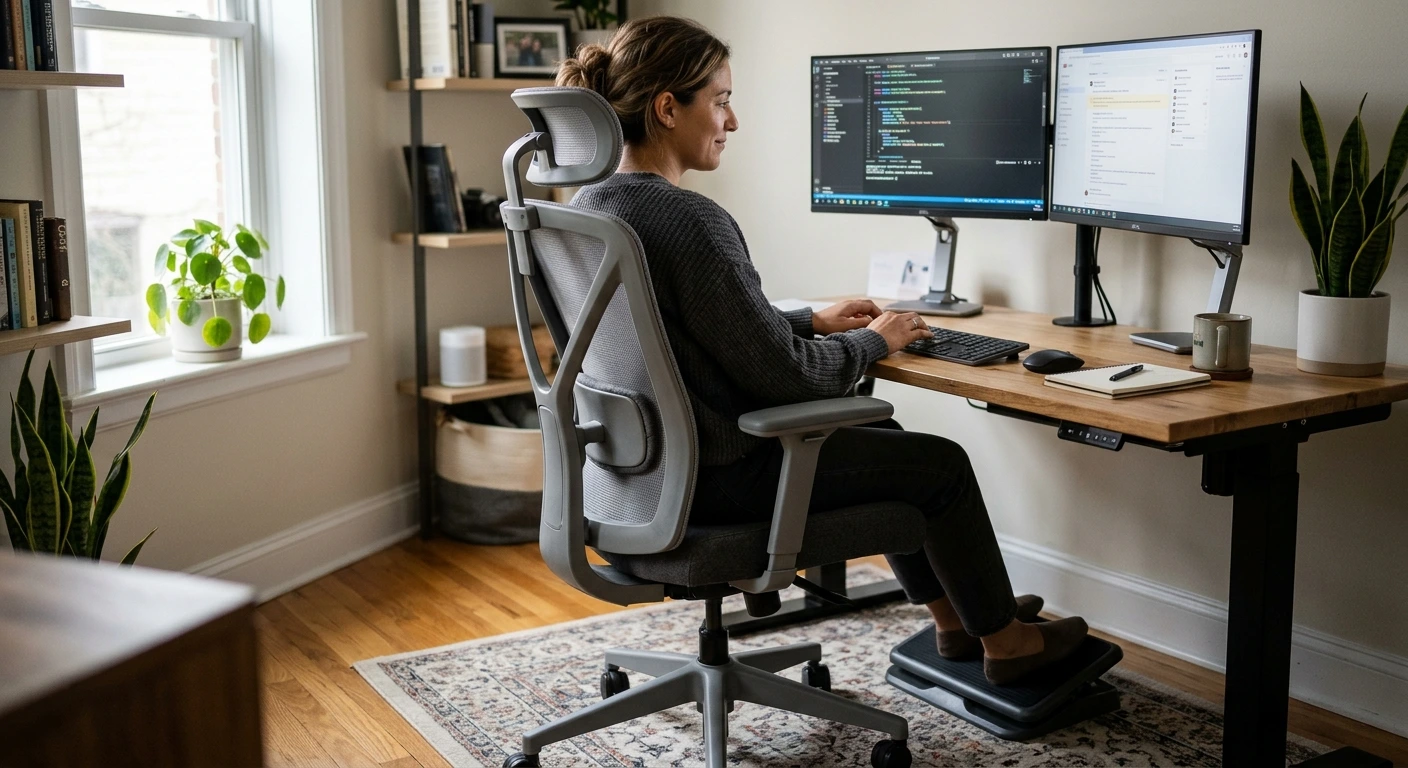

Best ergonomic office chair for back pain searches usually turn up pricey big-name chairs that most of us will never buy. That doesn’t help when your lower back aches by lunch and you work from a spare room. So this guide sticks to chairs you can find on Amazon for a home office. You’ll learn which features help a sore back and which ones are just fancy labels. You’ll get clear picks by need, from long work days to big and tall frames. You’ll also learn how to set up your chair so it does its job. A good chair won’t fix everything. But the right one, set up well, can make your day feel a lot better.
- A short checklist of chair features that help back pain: lumbar support, seat depth, tilt, armrests and seat cushion.
- Seven Amazon chairs sorted by need: best overall, quiet rolling, footrest, long hours, big and tall, and budget.
- Plain talk on what terms like 3D and 5D really mean.
- Honest notes on what a lower-cost chair can and can’t do.
- A step-by-step setup guide, plus tips for sciatica and sitting posture.
- Answers on standing desks, getting used to a new chair, and more.
How We Chose These Ergonomic Office Chairs
We skipped the corporate office catalogs to bring you a shortlist built around real solutions for real buyers. If you are dealing with a sore lower back, long 10-hour workdays, a bigger frame, or a tight budget, these picks were curated specifically for you.
To make our final cut, every chair on this list had to pass three strict, non-negotiable rules:
- Targeted Lower Back Relief: Every selection features dedicated, adjustable lumbar support, an ergonomic curved backrest, or both to eliminate workday fatigue.
- True Adjustability: We only chose chairs that bend to your body—not the other way around—focusing on customizable armrests, smooth tilt mechanisms, and deep recline angles.
- Built for the Home Office: These are highly rated, space-conscious Amazon favorites designed for everyday home aesthetics and easy DIY assembly.
Whether you need a heavy-duty frame supporting 330 to 500 pounds, a breathable mesh seat, a plush foam cushion, or a built-in footrest for midday breaks, you will find your match below.
Quick Picks: Best Ergonomic Office Chairs for Back Pain on Amazon
- Best overall: High Back Ergonomic Mesh Chair with Headrest and 90-120° Tilt Lock
- Best for quiet home offices: CleverSeat Ergonomic Office Chair
- Best with footrest: ELABEST X100 Ergonomic Mesh Office Chair
- Best for long hours: Ergonomic Office Chair for Long Hours, 4″ Molded Foam Cushion, 350 LBS
- Runner-up for long hours: Ergonomic Office Chair for Long Hours and Back Pain, 3.5″ Cushion, 330 LBS
- Best big and tall: 500lbs Big and Tall Office Chair with Adjustable Lumbar Support
- Best Budget Pick for Adjustability: ProtoArc EC200 Pro Ergonomic Office Chair with Headrest
What Makes an Office Chair Good for Back Pain
Your lower spine has a gentle inward curve. When you sit for hours, that curve tends to flatten. Your pelvis tips back, your shoulders roll forward, and your back muscles work overtime. A good chair holds that curve in place so your muscles can relax. Here’s what to look for.
Lumbar Support: Height and Depth
This is the big one. Lumbar support is the push your chair gives to the small of your back. It needs to sit at the right height, right in the curve above your belt line. It also needs the right depth, meaning how far it pushes forward. Too little push and you slump. Too much and it feels like a fist in your back.
The best office chair for lower back pain lets you change at least one of these. Height is the most common. Depth is less common on lower-cost chairs, so it’s a nice bonus when you find it. An inflatable lumbar pad is another way to get depth control. You pump it up or let air out until it feels right.
Seat Depth
Seat depth is how far the seat runs from front to back. When you sit all the way back, you want two to four fingers of space between the seat edge and the back of your knees. A seat that’s too deep pushes you forward, away from the lumbar support. A seat that’s too short leaves your thighs without support. Tall people need deeper seats. Shorter people need shallower ones, or a cushion behind the back.
Tilt and Recline
Sitting bolt upright all day is hard on your spine. A slight lean back, around 100 to 110 degrees, takes load off your lower discs. A tilt lock lets you hold that angle. Recline lets you lean further back for breaks. Some chairs add a footrest so you can rest with your legs up, which many people with back pain find soothing.
Armrests
Armrests take weight off your shoulders and upper back. That matters more than you’d think, because tight shoulders often pull on your whole spine. Look for armrests that move up and down at least. Flip-up arms are handy too. They let you slide close to your desk, so you don’t lean forward to reach your keyboard.
Seat Cushion and Mesh
A seat that’s too soft lets you sink, and your pelvis tips back. A seat that’s too hard creates pressure points under your sit bones. Dense, thick foam is a good middle ground. Mesh seats breathe well and stay cool, but they feel firmer. Thickness matters on foam seats. A 3.5 or 4 inch cushion usually holds up better than a thin pad.
What 3D, 4D and 5D Really Mean
Chair makers love these labels. They just count the ways a part can move. A 3D armrest might go up and down, forward and back, and turn in or out. A 5D armrest adds a couple more moves, like flipping up. A 3D lumbar support might move up, down and in or out.
Here’s the honest truth. Pick the chair with the most D’s. Pick the chair whose adjustments fit your body. A chair with simple height-adjustable lumbar can beat a 5D chair if the lumbar lands in the right spot on your back.
A Note for Sciatica
If you need an office chair for sciatica, watch two things. First, the front edge of the seat. A hard front edge can press on the back of your thighs, where the sciatic nerve runs. A rounded edge, often called a waterfall edge, is gentler. Second, sit evenly. Don’t keep a wallet in your back pocket, and don’t cross your legs. Both tip your pelvis and can make nerve pain worse. You can review detailed ergonomic guidelines in this guide on sitting and working with sciatica If your leg pain is sharp, spreading or getting worse, see a doctor. A chair helps with comfort, but it can’t treat a nerve problem.
Best Overall Ergonomic Chair for Back Pain
High Back Ergonomic Mesh Chair with Headrest and Tilt Lock
This high-back mesh chair covers a lot of ground. It has a headrest, flip-up arms, a wide cushion and a 90-120° tilt lock. The maker says it supports four points of your body: head, back, hips and hands, along with lumbar support. The seat is larger than many chairs, so it fits a wide range of body types. The specs even calls it a big and tall chair.
The flip-up armrests fold up 45°, so you can push the chair in close when you’re not using it. Both the back and seat are mesh, which keeps air moving. The maker also offers a 3 year warranty and says setup is easy.
This chair suits most home office workers with lower back pain who want one chair that does it all. The tilt lock helps you sit at that back-friendly lean of 100 to 110 degrees. The headrest is great if your neck gets tired too. It’s also a smart pick if you share the chair with someone of a different size.
Pros
- Headrest supports your neck during long calls or breaks
- 90-120° tilt lock lets you hold a healthy lean
- Wide seat fits many body builds
- Flip-up arms fold 45° to save space
- Mesh back and seat stay cool
- 3 year warranty from the maker
Cons
- Mesh seats feel firmer than foam to some people
- Tilt stops at 120°, so it’s not for deep reclining
- High-back design takes up more room in a small office
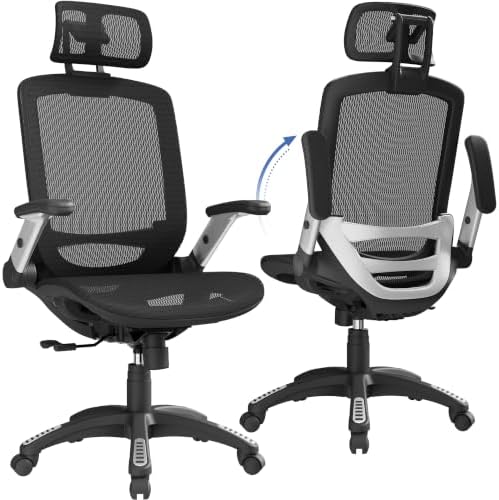
- 【ERGONOMIC OFFICE CHAIR】- The ergonomic chair provides 4 supporting points(head/ back/ hips/ hands) and a proper lumbar …
- 【COMFORTABLE MESH SEAT】- The office chair is larger than other chairs, and it could accommodate different body build. Th…
- 【ADJUSTABLE FLIP-UP ARMREST】- Folding the armrests up 45°, you can push the executive office chairs directly under the d…
- 【BREATHABLE MESH CHAIR】- The mesh back and mesh seat keep air circulation for extra comfy. High quality mesh resists abr…
- 【3 YEARS WARRANTY & EASY INSTALLATION】- All ergonomic office chairs come with 3 years warranty, so please email us direc…
Best for Quiet Home Offices
CleverSeat Ergonomic Office Chair
The CleverSeat is a mesh desk chair with a back-friendly design. The maker says it gives better sitting comfort and back support than other home office chairs, with orthopedic support built in. It has adjustable armrests and is sold as a reclining office chair. The mesh backrest lets air flow through, so you stay cool on warm days.
Its standout feature is the wheels. They’re ultra-quiet, and the maker says they give a smooth, silent roll. That sounds like a small thing. But if you work from a shared apartment, take lots of calls, or roll around a lot, quiet wheels make a real difference.
This chair suits people who work in a bedroom or living room and don’t want to wake anyone up. It’s a good fit if you share space with a partner, kids or roommates. It also works well for anyone who wants a simple mesh chair with back support and a cool backrest. Pair it with a hard floor mat on carpet for the smoothest roll.
Pros
- Ultra-quiet wheels for shared homes and calls
- Adjustable armrests take load off your shoulders
- Recline lets you lean back for breaks
- Mesh backrest keeps air moving
- Back-focused design aimed at home office use
Cons
- Mesh backs can take a few days to feel natural
- Back support claims come from the maker

- YOUR UPGRADE – CLOUVOU office chairs features ultra-quiet wheels, adjustable armrests and an orthopedic support with tar…
- BACK-FRIENDLY DESIGN – You will get superior sitting comfort and back support compared to other home office desk chairs….
- SILENCE IN MOTION – Ultra-quiet wheels give this reclining office chair a smooth, silent roll. Perfect as a home office …
- STAY COOL ALL DAY – Engineered with high quality mesh fabric this swivel chair will provide airflow through the backrest…
- THE PERFECT FIT – This versatile computer chair is a fully adjustable ergonomic desk chair built to support your body wi…
Best Chair with Footrest for Reclining Relief
ELABEST X100 Ergonomic Mesh Office Chair with Footrest
The ELABEST X100 is built for people who want to lean back and put their feet up. It has a 3-stage recline and an 18″ extendable footrest with 2 angle positions. That combo lets you take real rest breaks without leaving your desk.
The lumbar support is one of the more adjustable ones on this list. It’s a 3D lumbar with a lockable ±1.6″ depth, and it’s spring-loaded. That depth control matters, because the right amount of push is key for lower back pain. The chair also has 5D flip-up armrests with padded panels. The specs calls it a big and tall chair, and it works for gaming and executive use. The maker says its mesh gives better airflow than standard mesh.
This chair suits people whose backs feel better when they recline and lift their legs. It’s a good pick if you work long days and want short rest breaks in your chair. It also suits anyone who wants lumbar depth control without paying for a premium brand. Gamers who sit for hours will like it too.
Pros
- 18″ extendable footrest with 2 angle positions
- 3-stage recline for work, rest and breaks
- 3D lumbar with lockable ±1.6″ depth
- 5D flip-up armrests with padding
- Big and tall design in a mesh chair
Cons
- Footrest chairs need extra space behind and in front of your desk
- More moving parts means more to adjust when you first set it up
- Airflow claims come from the maker

- 【Your All-Day Comfort Solution】 Premium Ergonomic Desk Chair with Footrest featuring dynamic 3D lumbar support, 5D Flip-…
- 【Engineered with Dynamic Spinal Alignment System】3D Synchro-Tilt Lumbar(Lockable ±1.6″ depth spring-loaded auto-tracking…
- 【Smart Space-Saving Features】 5D Flip-Up Armrests with skin-friendly panels – 27% denser EVA foam padding achieves Zero-…
- 【Advanced Adjustability】 3-stage reclining mechanism pairs with an 18″ extendable footrest (2-position angle adjustment)…
- 【Breathe Easy with Premium Ventilated Mesh】The exclusive Dual-Stripe AirMesh technology offers 38% better airflow and 25…
Best for Long Hours of Sitting
If you sit eight hours or more, cushion quality matters a lot. A thin seat feels fine for an hour. By hour six, it can feel like a wooden bench. These two chairs focus on thick seats and back support for long work days.
Ergonomic Office Chair for Long Hours, 4″ Molded Foam Cushion, 350 LBS
This chair is made for people who sit most of the day. Its S-shaped backrest follows the natural curve of your spine. It also has adjustable lumbar support and a breathable mesh back. The seat is a 4″ thick, high-density molded foam cushion. The maker says it won’t flatten, which is the main worry with cheap seats.
The soft padded armrests help ease shoulder and wrist strain. You can flip them up to save space. The chair has a reinforced steel frame, tear-resistant mesh and a 350 LBS capacity.
This is the best office chair for long hours on our list if you prefer foam under you and mesh behind you. It suits remote workers, students and anyone who logs long days at a desk. The adjustable lumbar lets you find the right spot for your lower back. The 350 LBS capacity gives room for many body types.
Pros
- 4″ thick high-density molded foam seat
- Adjustable lumbar support for your lower back
- S-shaped backrest follows your spine
- Padded flip-up armrests
- Reinforced steel frame and 350 LBS capacity
Cons
- Thick foam can feel warmer than a mesh seat in summer
- The “won’t flatten” claim comes from the maker

- 【Built for Long Hours & Back Pain Relief】 Designed for those who sit most of the day, this ergonomic chair supports prop…
- 【Adjustable Lumbar Support + Breathable Mesh】 The S-shaped backrest follows the natural curve of your spine, while the a…
- 【4” Thick High-Density Molded Foam Cushion】 Enjoy all-day comfort with a supportive seat that won’t flatten. The thick m…
- 【Flip-Up Armrests for Comfort & Space Saving】 Soft padded armrests relieve shoulder and wrist fatigue. Flip them up to s…
- 【Strong, Stable & Modern Design】 Built with a reinforced steel frame, tear-resistant mesh, and durable foam, this chair …
Ergonomic Office Chair for Long Hours and Back Pain, 3.5″ Cushion, 330 LBS
This chair aims at the same buyer: someone with back pain who sits for long stretches. It has a 3.5″ cushion and a 330 LBS weight capacity. The name says it all. It’s designed for long hours and back pain.
A 3.5″ cushion is still thick for an office chair. Many basic chairs use much thinner seats. That extra padding helps spread out pressure under your sit bones and thighs, which matters when you sit all day. It’s a good choice if you like the idea of the 4″ chair above but want a second option to compare.
This chair suits people who weigh under 330 pounds and want a padded seat for long days. It works well for home workers who don’t need extras like a footrest. It’s also a good backup pick if the 4″ chair is out of stock. Pair it with a small lumbar pillow if you want extra push in your lower back.
Pros
- 3.5″ cushion for long sitting sessions
- 330 LBS weight capacity
- Designed with long hours and back pain in mind
- Simple choice without extra features to fuss with
Cons
- Slightly thinner cushion than the 4″ pick
- Lower weight capacity than the 350 and 500 pound chairs here
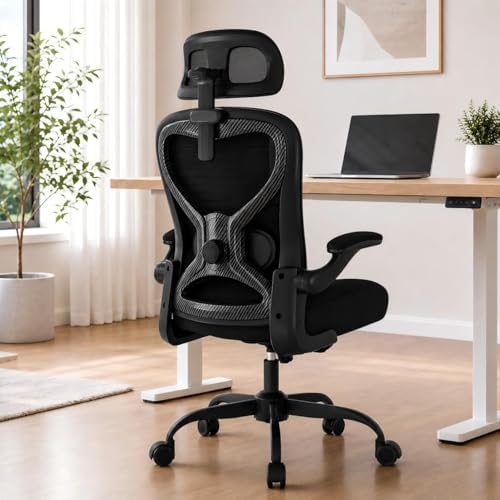
- 【All-Day Comfort for Hips and Thighs】The virgin foam seat distributes weight evenly, providing long-lasting softness and…
- 【Reliable Back and Lumbar Relief】The contoured mesh back aligns with your spine, and the dual-direction adjustable lumba…
- 【Perfect Neck and Head Support】The 3D adjustable headrest (height, depth, angle) cradles your neck and head, supporting …
- 【Flexible Armrests for Any Workspace】Flip-up armrests let you tuck the chair neatly under your desk or move freely. Idea…
- 【Relax and Recharge with Tilt & Rock】Enjoy gentle rocking that moves with your body, relieving tension and improving blo…
Best Big and Tall Chair for Back Support
500lbs Big and Tall Office Chair with Adjustable Lumbar Support
If you’re a bigger person, a standard chair can feel tight, wobbly or flat in all the wrong places. This big and tall ergonomic office chair holds up to 500lbs. It has an extra wide seat, thick armrest pads, a heavy duty base and upgraded wheels.
The lumbar support is inflatable. That’s a nice feature for back pain. You add air for more support and let it out for less. It’s a simple way to control lumbar depth. The maker, Cloomey, says the chair gives a wraparound feel. The wheels are upgraded rubber casters, which tend to roll more quietly than hard plastic ones and are kinder to floors.
This chair suits big and tall people who need real strength and room in a chair. It also suits anyone who has broken a cheaper chair before. The wide seat gives your hips space, so you aren’t pushed forward off the lumbar pad. It’s an executive style chair, so it looks at home in a home office or study.
Pros
- 500lbs weight capacity
- Inflatable lumbar support lets you set the depth
- Extra wide seat for hips and thighs
- Thick armrest pads
- Heavy duty base and rubber casters
Cons
- Executive style chairs are often bulky in small rooms
- Padded executive seats can feel warmer than mesh
- Inflatable pads may need topping up now and then

- 【𝐈𝐧𝐟𝐥𝐚𝐭𝐚𝐛𝐥𝐞 𝐋𝐮𝐦𝐛𝐚𝐫 𝐒𝐮𝐩𝐩𝐨𝐫𝐭 𝐟𝐨𝐫 𝐁𝐚𝐜𝐤 𝐏𝐚𝐢𝐧 𝐑𝐞𝐥𝐢𝐞𝐟】No need to worry about back pain due to long hours of sitting. Our execu…
- 【𝐄𝐧𝐣𝐨𝐲 𝐭𝐡𝐞 𝐔𝐥𝐭𝐢𝐦𝐚𝐭𝐞 𝐂𝐨𝐦𝐟𝐨𝐫𝐭 𝐁𝐲 𝟓𝟎𝟎𝐥𝐛𝐬 𝐁𝐢𝐠 𝐚𝐧𝐝 𝐓𝐚𝐥𝐥 𝐎𝐟𝐟𝐢𝐜𝐞 𝐂𝐡𝐚𝐢𝐫】Would you like to be held warmly by a chair? That’s righ…
- 【𝐋𝐨𝐯𝐞 𝐭𝐡𝐞 𝐔𝐧𝐩𝐚𝐫𝐚𝐥𝐥𝐞𝐥𝐞𝐝 𝐖𝐫𝐚𝐩𝐚𝐫𝐨𝐮𝐧𝐝 𝐅𝐞𝐞𝐥 𝐨𝐟 𝐎𝐟𝐟𝐢𝐜𝐞 𝐂𝐡𝐚𝐢𝐫】It is a unique feeling, a good chair, he is the one who will alwa…
- 【𝐔𝐧𝐢𝐪𝐮𝐞 & 𝐏𝐫𝐚𝐜𝐭𝐢𝐜𝐚𝐥 𝐔𝐩𝐠𝐫𝐚𝐝𝐞𝐝 𝐑𝐮𝐛𝐛𝐞𝐫 𝐂𝐚𝐬𝐭𝐨𝐫𝐬】To improve daily comfort as well as uniqueness, Cloomey has upgraded the lea…
- 【𝐒𝐩𝐚𝐫𝐞 𝐍𝐨 𝐃𝐞𝐬𝐢𝐠𝐧 𝐃𝐞𝐭𝐚𝐢𝐥𝐬 𝐨𝐟 𝐓𝐡𝐞 𝐄𝐱𝐞𝐜𝐮𝐭𝐢𝐯𝐞 𝐃𝐞𝐬𝐤 𝐂𝐡𝐚𝐢𝐫】Forget about those squeaky, thin office chairs. This home office de…
Best Budget Ergonomic Chair for Back Pain
ProtoArc EC200 Pro Ergonomic Mesh Office Chair
The ProtoArc EC200 Pro offers more adjustability than a basic budget office chair. It has adjustable lumbar support, a breathable all-mesh seat, 4D armrests, a 3D headrest and adjustable seat depth. You can also recline the chair and lock it into four positions.
That’s a useful set of features for people who spend long hours at a desk. The adjustable lumbar support lets you change the position and depth of the support around your lower back. The adjustable seat depth helps you find a better fit for your legs, while the 4D armrests give you more control over your arm position. The mesh seat is another practical feature if you prefer airflow over traditional padded upholstery.
This chair suits remote workers, programmers and home office users who want more adjustability for long sitting sessions. It’s also worth considering if lower-back support is a priority and you want to fine-tune your sitting position throughout the day.
Pros
- Adjustable lumbar support with height and depth adjustments
- Breathable all-mesh seat with adjustable seat depth
- 4D armrests for a more personalized fit
- 3D adjustable headrest for neck support
- Four recline positions for working and taking breaks
Cons
- The mesh seat may feel firmer than a traditional cushioned seat
- The multiple adjustment options may take time to dial in
- May cost more than basic budget office chairs, depending on its current price

- All-Mesh Seat with Depth Adjustment: 100% high-elastic mesh keeps air circulating, prevents overheating. Seat depth adju…
- 4D Adjustable Armrests: Full 4D: up/down, forward/back, left/right, and 30° rotation. Wider 10″×4″ PU surface reduces sh…
- Adjustable Lumbar Support: 2.36″ vertical + 0.8″ depth adjustment fills your lower back curve, preventing slouching and …
- 3D Wider Headrest: Oversized 12.8″×7.87″ headrest with 3D adjustment: height, depth, and angle. Lean back during breaks …
- 4-Stage Recline: 4 lock positions (90°-105°-120°-130°) for work, reading, calls, and breaks. Backrest and seat move toge…
How to Set Up Your Chair and Sit Properly with Back Pain
Even a great chair won’t help much if it’s set up wrong. Most people never adjust their chair after the first day. Take ten minutes and go through these steps in order.
- Set the seat height. Sit with your feet flat on the floor. Your knees should be about level with your hips or a little lower.
- Check seat depth. Sit all the way back. Leave two to four fingers of space between the seat edge and your knees.
- Place the lumbar support. Move it until it fits into the curve just above your belt line. If it has depth control, add push until you feel supported, not shoved.
- Set the tilt. Lean back to about 100 to 110 degrees and lock it there for work.
- Adjust the armrests. Your shoulders should be relaxed and your elbows bent at about 90 degrees.
- Raise your screen. The top of your monitor should be at or just below eye level. Your eyes should look slightly down.
- Bring your keyboard close. You shouldn’t have to reach forward. Reaching pulls you off your backrest.
Screen height matters more than most people think. If you look down at a laptop all day, your neck and upper back pay for it. A monitor stand that adjusts to your eye level fixes this fast. Laptop users can try one of these ergonomic laptop stands with a separate keyboard and mouse.
The best posture is your next posture. Even a perfect setup gets stiff if you hold it for hours.
So move often. Stand up every 30 to 60 minutes. Walk to get water. Roll your shoulders. Change your recline a little during the day. Small moves keep blood flowing and stop your muscles from locking up.
A few small extras help too. A footrest helps shorter people keep feet flat. A good mouse pad and wrist rest stop you from hunching. Browse these desk accessories for a home office if you want to round out your setup.
What a Budget Chair Can and Can’t Do
Let’s be honest about lower-cost chairs. They can do a lot. A chair with adjustable lumbar, a seat that fits, and armrests that move will beat a dining chair or an old couch every time. For many people, that’s enough to cut daily back pain way down.
But there are limits. Foam on cheaper chairs often softens over the first year or two. You may start to sink a little more than you did on day one. Mesh can stretch over time too. Gas cylinders on lower-cost chairs sometimes wear out sooner than premium ones. And budget chairs rarely offer every adjustment, like seat depth sliders.
Here’s how to get the most out of a budget chair. Set it up right from the start. Use a small lumbar pillow if you need more push. Add a seat cushion if the foam starts to feel thin. And keep moving through the day. A chair is one tool. Your habits do the rest.
Do Ergonomic Chairs Really Help Back Pain?
Yes, for most people with everyday lower back pain. A good chair supports your spine’s natural curve, so your muscles don’t have to work as hard. It also helps you sit closer to your desk and screen, which stops you from leaning forward. That’s often where the pain starts.
But a chair isn’t magic. It works best with good habits. That means moving often, setting up your desk right, and building core strength. If your pain comes from an injury or a disc problem, a chair can make sitting easier. It won’t heal the cause. Talk to a doctor or physical therapist if your pain lasts weeks, spreads down your leg, or wakes you at night.
There’s also no such thing as the best chair for posture correction on its own. A chair can guide you toward better posture, but you still have to sit back into it. If you perch on the front edge, even a great lumbar support can’t reach you.
Are Standing Desks Better Than Chairs for Back Pain?
Not on their own. Standing all day has its own problems, like sore feet, tired legs and a stiff lower back. The real win is switching between sitting and standing. Try standing for 15 to 30 minutes, then sitting for 30 to 60. Keep switching through the day. Your back likes change more than any one position.
If you want to try this, an ergonomic standing desk pairs nicely with any chair on this list. When you stand, use an anti-fatigue mat and wear supportive shoes. When you sit, go back to the setup steps above.
FAQs
Are ergonomic chairs good for back pain?
Yes. A good ergonomic chair supports your lower back, lets you lean back a little, and fits your body. That takes strain off your spine. Most people feel a difference when they pair the chair with good setup and regular movement.
What is the best budget office chair for back pain?
Prices on Amazon shift often, so check the current price for each pick. The ProtoArc EC200 Pro is our Best Budget Pick for Adjustability, thanks to its adjustable lumbar support, 4D armrests, adjustable seat depth, and 3D headrest. Whatever your budget, focus on three things: adjustable lumbar support, a seat that fits, and armrests you can position comfortably.
How should you sit in an office chair with back pain?
Sit all the way back so your lower back touches the lumbar support. Keep your feet flat and your knees near hip level. Lean back slightly, to about 100 to 110 degrees. Relax your shoulders and keep your screen at eye level. Then get up and move every 30 to 60 minutes.
What lumbar support features matter most for lower back pain?
Height and depth. The support must sit in the curve of your lower back, so height adjustment comes first. Depth control is next. It lets you pick how hard the support pushes. An ergonomic office chair with lumbar support that adjusts both ways, like the ELABEST X100 or the inflatable pad on the 500lbs chair, gives you the most control.
How long does it take to get used to an ergonomic chair?
Most people need one to two weeks. Your muscles are used to old habits, like slumping. A new chair may feel odd or even a bit sore at first. Start with shorter sessions and adjust a little each day. If it still hurts after two or three weeks, tweak the lumbar height or seat depth.
What’s the best chair for sciatica?
Look for a seat with a soft, rounded front edge and enough cushion to spread out pressure. A thick foam seat like the 4″ or 3.5″ picks can help. Sit evenly, skip the back-pocket wallet, and don’t cross your legs. See a doctor if nerve pain is strong or getting worse.
Does the best ergonomic office chair for back pain need a headrest?
Not always. A headrest helps most if you recline a lot or your neck gets tired. If your pain is mainly in your lower back, lumbar support and seat fit matter more. Our best overall pick and the ProtoArc EC200 Pro both include one if you want it.
The Bottom Line
You don’t need a premium brand to find the best ergonomic office chair for back pain. You need a chair that supports your lower back, fits your body and lets you lean back a little. For most people, the high-back mesh chair with the tilt lock and headrest is a great all-around pick. Long days call for the 4″ foam chair, bigger frames do best with the 500lbs chair, and footrest fans will love the ELABEST X100. If adjustability is your priority, the ProtoArc EC200 Pro gives you more ways to fine-tune your sitting position. Whatever you choose, take ten minutes to set it up right, raise your screen, and stand up often. Your back will thank you by Friday.
About the author: Connect on LinkedIn