
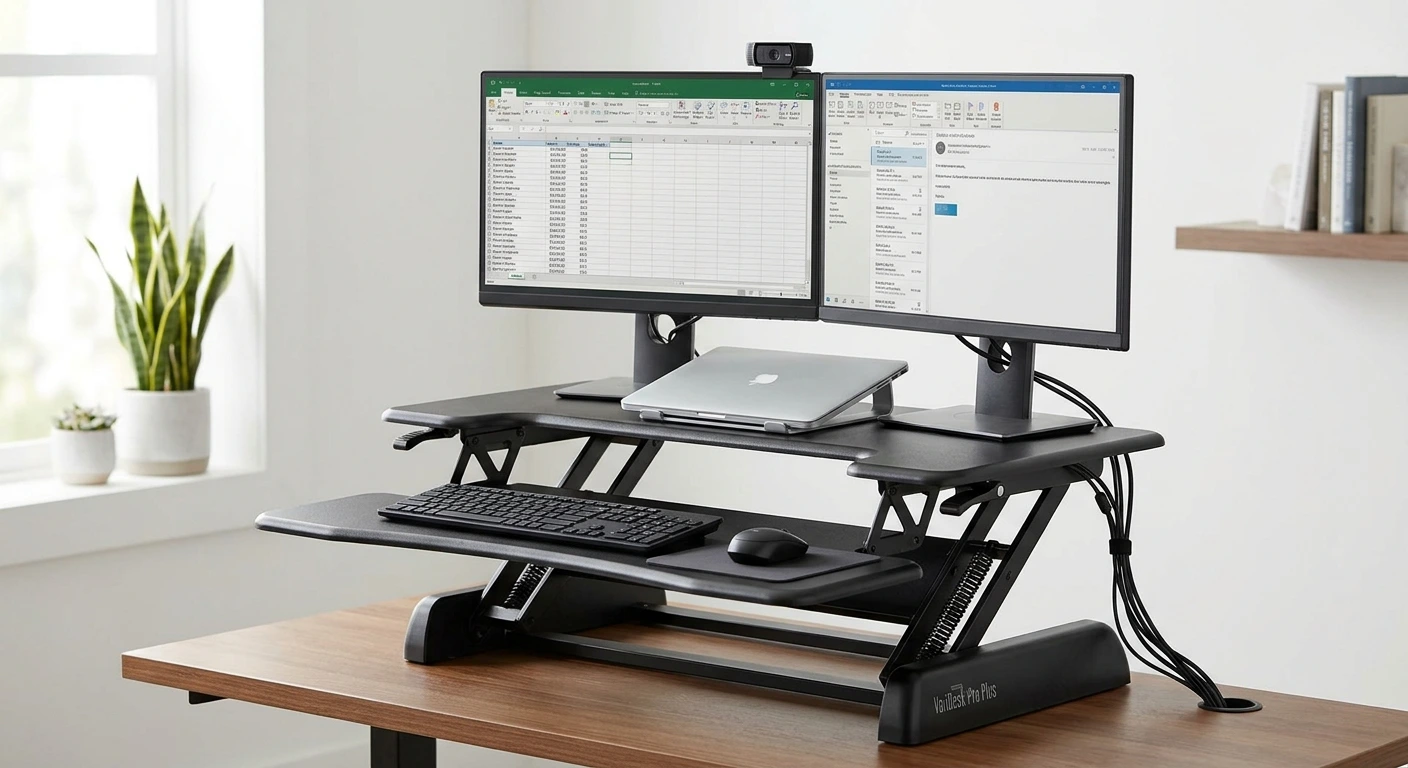

VariDesk Pro Plus 36 is one of the best-known standing desk converters you can buy. You set it on top of the desk you already own, and it lifts your work up when you want to stand. Vari dropped the “Desk” part of the brand name a while back, so Amazon now lists it as the Vari Pro Plus 36. It’s the same family of converter. In this guide, I’ll walk you through what matters before you spend your money. That means the specs, whether it fits your desk, how the spring lift works, and how to set up two monitors. I’ll also compare it to its siblings, look at the four colors, explain how to judge a used unit, and point you to other options if this one isn’t a match.
- It’s a manual, spring-assisted converter with 11 height settings and up to 17.5 inches of lift.
- It holds up to 35 lbs, so monitor weight matters more than most people think.
- The “36” means a 36-inch-wide top, which fits most standard home office desks.
- Two small monitors can work, but larger screens often need a monitor arm or a different layout.
- It comes in four colors on Amazon: Black, White, Espresso and Walnut.
- Used units can be a smart buy if you check the lift, the handles and the frame.
- If you want push-button height, an electric converter or full standing desk is a better fit.
VariDesk Pro Plus 36 Review: Quick Verdict
Here’s the short answer. The Pro Plus 36 is a solid pick for one person who wants to stand part of the day without replacing their desk. It suits a single monitor plus a laptop, or two smaller monitors. It does not suit a heavy triple-screen setup.
The big appeal is simplicity. There’s no motor, no cord and no control panel. You squeeze the handles, and springs help you lift the top. That means nothing to plug in and very little that can break.
The trade-off is space and weight. Converters like this sit on your desk and take up a big chunk of it. They also move toward you as they rise, so you need room behind your chair. If your desk is shallow or your room is tight, measure first.
My take? If you want a sturdy, no-fuss way to stand at a desk you already like, this is worth a close look. If you want a full standing desk experience, skip the converter and go bigger.
Specs at a Glance: Dimensions, Weight, Capacity and Height Range
Most pages scatter these numbers across several sections. Here they are in one spot. I’ve stuck to what I can confirm. Where I can’t confirm a number, I tell you to check the listing instead of guessing.
- Width: 36 inches. That’s where the “36” in the name comes from.
- Lift range: Up to 17.5 inches of rise above your desk surface.
- Height settings: 11 locked positions.
- Weight capacity: 35 lbs on the converter.
- Lift type: Manual, spring-assisted, with squeeze handles.
- Layout: Two levels, an upper work surface for screens and a lower tray for your keyboard and mouse.
- Converter weight: 23.65 kg (about 52 lbs), making it heavy enough to feel sturdy but manageable for placement on an existing desk.
- Depth and lowered height: 29.75″ deep and has a minimum height of 8.75″ when lowered.. Measure your desk against those numbers before buying.
- Colors: Black, White, Espresso and Walnut.
What are the dimensions of the Pro Plus 36?
The width is 36 inches. That’s the number you need most, since it tells you if it fits your desk side to side. 29.75″ deep and has a minimum height of 8.75″ when lowered. Grab a tape measure and mark those numbers on your desk with painter’s tape. It takes two minutes and saves a return.
How much does the Pro Plus 36 weigh?
It’s heavy. That’s normal for a steel converter that has to stay steady with monitors on top. Vari weighs 52 lbs (23.65 kg). Plan on two people for carrying it up stairs or lifting it onto a tall desk.
Setup and Desk Fit: What to Check Before You Buy
This is the part most reviews skip. A converter only works if your desk can handle it. Check these four things first.
Desk width
Your desk needs to be at least 36 inches wide. That’s the bare minimum. I like a little extra room on each side for a lamp, a phone or a drink. A 48-inch desk gives you breathing room. A 40-inch desk works but feels snug.
Desk depth and chair clearance
Here’s the catch with most converters like this one. When you raise the top, it doesn’t just go straight up. It moves up and toward you. So you need clear space between the front of your desk and your chair.
Push your chair back a bit when you stand, and keep the area free of clutter. If your desk sits in a narrow nook, the moving top might bump your chest or the wall behind you. Compare the listed depth to your desk depth. You want the base to sit fully on the desk, with no part hanging off the back edge.
Desk strength
Think about the total load. You have the converter, plus up to 35 lbs of gear on top. That’s a lot for a flimsy particleboard desk or a folding table. A solid desk handles it fine. A wobbly one will wobble more once everything sits up high.
Seated height
Look at the lowered height on the listing. Even at its lowest, the converter sits on top of your desk. That raises your keyboard a bit when you sit. Most people adjust their chair up a notch to match. If your chair can’t go higher, check this number closely.
Quick tip: Before you order, clear your desk and tape out the footprint. Sit in your chair and pretend to type. If it feels cramped now, it will feel cramped with a steel converter in the way.
Once it’s in place, a few small add-ons help. A cable sleeve, a desk lamp and a headphone hook keep things tidy as the top moves up and down. Our list of the best desk accessories for a home office has good options that play well with converters.
How the Height Adjustment Works (Spring Lift, 11 Settings)
This is the plain-language version of what the Pro Plus 36 manual covers. The system is manual. There’s a handle on each side of the top. Squeezing them releases the lock. A spring mechanism then helps you lift the weight, so you’re not hoisting the full load with your arms.
There are 11 set positions. The top clicks into one when you let go of the handles. You don’t get endless fine-tuning like an electric desk. You pick the step that feels closest to right.
How do I adjust the height?
- Stand in front of the converter with your feet flat and your body centered.
- Grip both side handles with your fingers on the release levers.
- Squeeze both handles at the same time to unlock the top.
- Guide the top up and toward you. The springs do much of the lifting.
- Let go of the handles when you reach a comfortable height. It locks into the nearest setting.
- To lower it, squeeze both handles again and ease the top down with steady hands.
- Release the handles at your seated height and let it lock.
How the spring lift feels
Spring lifts like this are tuned for a certain load. With a medium load, raising the top feels smooth and light. With very little on top, the springs can push up faster than you expect. With a load near the 35 lb limit, it takes more effort.
So keep a firm grip, especially when you lower it. Don’t just let go mid-move. Also keep coffee mugs off the top tier while you move it. A sudden stop can splash.
The manual in plain words
If you lost the paper manual, here’s what matters. Keep the load under 35 lbs. Squeeze both handles together, never just one. Keep fingers, cords and pets clear of the lift arms. Leave room behind your chair for the forward movement. Check that cables have enough slack to reach the highest setting. That’s really it.
Dual-Monitor Setup and Keyboard Tray Performance
This is one of the top questions people ask. Let’s get into it.
Can the Pro Plus 36 hold two monitors?
Yes, with some limits. The real question is size and weight. A 36-inch top is narrower than two large monitors placed side by side. So you need to plan your layout.
Weight is the other limit. Add up both monitors and their stands. Then add anything else that sits on the converter, like speakers or a webcam. Keep the total under 35 lbs. Monitor weights are printed in their manuals and on their product pages.
Layouts that work
- Two smaller monitors in a slight V: Angle them inward so the outer edges come forward. This saves width and puts both screens in view.
- One monitor plus a laptop: Put the monitor in the center and the laptop to one side on a stand. This is the easiest fit.
- One main monitor, one vertical: Turn the second screen sideways if its stand allows it. A tall screen takes up less width.
- Monitors on an arm: Lifting screens off the surface frees space and lets them hang past the edges.
If you go the arm route, make sure the clamp can grip the converter’s top safely, and count the arm’s weight toward the 35 lbs. Our Ergotron monitor arm buying guide explains which models suit which screens.
For the laptop-plus-monitor setup, raising the laptop to eye level helps a lot. See our picks for the best laptop stands for home office use. Pick a compact one so it doesn’t eat the top tier.
Keyboard tray height for different users
The lower tier holds your keyboard and mouse. Getting its height right matters more than screen height. Here’s a simple rule. Stand tall with your shoulders relaxed. Let your elbows bend to about a right angle. Your forearms should be level with the tray, and your wrists should stay straight.
Shorter users often find the lower settings feel right when standing. Taller users tend to need the higher steps. Since there are 11 set positions, you might land between two. If that happens, pick the lower one and wear the shoes you usually wear at your desk. A small change in shoe height makes a real difference.
For the screen, the top edge should sit at or a little below eye level. The screen should be about an arm’s length away. Because screens sit on the upper tier, their height rises along with the keyboard tray. If your eyes and elbows don’t line up well, a monitor arm or riser can fine-tune screen height on its own.
The mouse area can feel tight on a two-tier converter. A thin, smooth mousepad helps your mouse glide without adding bulk. Take a look at our guide to durable Cordura mousepads if you want one that lasts.
Pros and Cons for Daily Use
These points come from what the specs and design tell us. No hype, just what you can expect day to day.
Pros
- No motor, cord or outlet needed. Put it anywhere your desk sits.
- Spring assist makes lifting easier than a fully manual riser.
- Eleven set heights let you return to the same spot each time.
- Two-tier design separates screens from your keyboard for better posture.
- Keeps the desk you already own, so no big furniture swap.
- Four colors make it easy to match your room.
Cons
- The 35 lb limit rules out heavy screens and large dual setups.
- It’s heavy to move and takes up much of your desk surface.
- It moves toward you as it rises, so you need clearance.
- Set steps mean you can’t fine-tune height between positions.
- Adds height to your seated setup, which may mean raising your chair.
One more honest note. A converter is a full standing desk replacement a smart middle ground. It gets you standing without new furniture. But it will never feel quite as roomy as a desk whose whole top goes up and down.
Pro Plus 36 vs Pro 36 vs Essential 36 vs Pro Plus 48
Vari sells several converters with similar names. It’s easy to mix them up. Here’s how to think about each one. I’m careful here, because exact specs differ by model and version. Always compare the listings side by side before you buy.
What is the difference between the Pro 36 and Pro Plus 36?
The “Plus” marks the step-up version in Vari’s Pro line. When people compare varidesk pro 36 vs pro plus 36, the points worth checking are lift height, keyboard tray size and weight capacity. The Pro Plus 36 gives you up to 17.5 inches of lift and 11 settings. The Pro 36 gives you 17.5″ maximum height lift with 11 adjustable settings—they’re essentially the same model with only minor design updates between versions.
If you’re tall, lift range matters most. Every inch of rise helps you reach a good standing height. If you’re shorter, a smaller lift range may be plenty, and the older model could save you money.
Essential 36
The Essential line is Vari’s simpler, more budget-friendly option. Think of it as the basic version for people who want to stand without extra features. If cost is your main concern, it’s worth a look. Just compare the tray design, height steps and capacity to make sure it handles your gear.
Pro Plus 48
The varidesk pro plus 48 is the wider sibling. The 48 means a 48-inch top, so you get 12 more inches of width. That extra room makes dual monitors much easier. If you run two full-size screens, the 48 is the more natural fit.
The catch is your desk. You need a desk wide enough for a 48-inch converter, plus some side room. On a smaller desk, the 48 will feel huge. On a big desk, it’s often the better buy for dual-screen users.
Which one should you pick?
- Pick the Pro Plus 36 for one monitor plus a laptop, or two small screens, on a standard desk.
- Pick the Pro Plus 48 if you use two full-size monitors and have a wide desk.
- Pick the Pro 36 if a used or lower-priced unit fits your height and gear.
- Pick the Essential 36 if price is the top priority and your setup is simple.
Price, Colors and Whether Buying Used Is Worth It
Prices on converters shift often, so I won’t quote a number here. For the VariDesk Pro Plus 36 price, check the current price on Amazon for each color. Sometimes one color costs more or less than the others, so it pays to compare all four before you click buy.
Function is the same across colors. The choice comes down to your room, your desk and how much dust and scuffs you want to see. Here’s a look at each one.
1. Pro Plus 36 in Black
Black is the safe choice for most home offices. It blends with black monitors, keyboards and cables, so your setup looks clean and unified. It also hides small scuffs and dust better than lighter colors. If you’re not sure which color to pick, black is the one you’ll rarely regret.
Pros:
- Matches most monitors, keyboards and accessories.
- Hides dust, scuffs and cable clutter well.
- Same 36-inch width and Pro Plus design as the other colors.
- Looks at home in both modern and plain office spaces.
Cons:
- Can look heavy or dark on a light wood desk.
- Fingerprints may show in bright light.
- Shares the 35 lb limit and desk space needs of every Pro Plus 36.
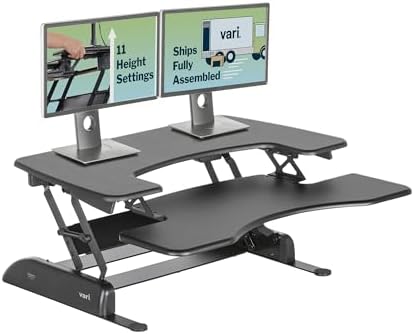
- Dual Monitor Converter: Easily turn your desk into a sit to stand desk. Our two-tier converter has a spacious upper tier…
- Built to Last: The Pro Plus 36 is the original and best-selling VariDesk, setting the quality wide stand up desk convert…
- Ergonomic Comfort: Safely raise and lower your stand up desk riser with ease. Our rowing lift and spring-assisted mechan…
- Ready to Use: No assembly needed! Your computer desk riser for standing or sitting arrives fully assembled. Place it on …
- Trusted Brand: Every time you buy a Vari product, you get quality, convenience, and a risk-free purchase you can feel go…
2. Pro Plus 36 in White
White suits bright rooms, white desks and minimal setups. It makes a large converter feel lighter and less bulky on your desk. It’s a good pick if you have white or silver gear, like a white keyboard or a light laptop. Just know that white shows dust and marks sooner, so plan to wipe it down now and then.
Pros:
- Makes a big converter look lighter and less bulky.
- Pairs well with white desks and light-colored gear.
- Fits bright, clean, minimal home offices.
- Same Pro Plus lift and two-tier layout as the other colors.
Cons:
- Shows dust, coffee rings and scuffs more easily.
- Black cables stand out against it.
- Needs the same desk depth and chair clearance as any Pro Plus 36.

- Dedicated Work Levels: 36 inches wide upper tier provides a place for computer equipment, while the lower deck holds a k…
- Spring-Assisted Manual Lift: Dual handles operate the rowing lift when you want to change height; The spring-assisted me…
- Eleven Working Positions: Select from eleven height settings to arrange the desk riser around your workstation; Keep you…
- Supported Desktop Setup: Base supports the converter on your existing work surface, allowing you to add adjustable heigh…
- Fully Assembled Converter: Pro Plus 36 arrives ready to place on a suitable desk or table; Its White finish gives your w…
3. Pro Plus 36 in Espresso
Espresso is a deep, dark brown color. It’s a great match for dark wood desks and traditional office furniture. If you work in a den or a room with wood bookshelves, it blends in better than black or white. It gives your office a warmer look while still hiding wear fairly well.
Pros:
- Blends with dark wood desks and classic furniture.
- Warmer feel than black, with similar scuff hiding.
- Good for home offices that double as living spaces.
- Same 36-inch top and spring lift as the other colors.
Cons:
- Can clash with light wood or white desks.
- Fewer accessories come in matching tones.
- The 35 lb load limit still applies, so watch monitor weight.

- Dedicated Work Levels: 36 inches wide upper tier provides a place for computer equipment, while the lower deck holds a k…
- Spring-Assisted Manual Lift: Dual handles operate the rowing lift when you want to change height; The spring-assisted me…
- Eleven Working Positions: Select from eleven height settings to arrange the desk riser around your workstation; Keep you…
- Supported Desktop Setup: Base supports the converter on your existing work surface, allowing you to add adjustable heigh…
- Fully Assembled Converter: Pro Plus 36 arrives ready to place on a suitable desk or table; Its Espresso finish gives you…
4. Pro Plus 36 in Walnut
Walnut is a warm, medium wood tone. It works well on mid-tone wood desks and in cozy, natural-looking rooms. If you want your converter to look more like furniture and less like office gear, this is the color to choose. It’s a nice middle ground between the dark espresso and the bright white.
Pros:
- Warm wood tone that looks more like home furniture.
- Pairs well with mid-tone wood desks and natural decor.
- Softer look than black for living room or bedroom offices.
- Same Pro Plus design and 11 height settings as the other colors.
Cons:
- May not match very dark or very light desks.
- Black gear on top can look a bit busy against wood tones.
- Same weight, footprint and clearance needs as any Pro Plus 36.

- Dedicated Work Levels: 36 inches wide upper tier provides a place for computer equipment, while the lower deck holds a k…
- Spring-Assisted Manual Lift: Dual handles operate the rowing lift when you want to change height; The spring-assisted me…
- Eleven Working Positions: Select from eleven height settings to arrange the desk riser around your workstation; Keep you…
- Supported Desktop Setup: Base supports the converter on your existing work surface, allowing you to add adjustable heigh…
- Fully Assembled Converter: Pro Plus 36 arrives ready to place on a suitable desk or table; Its Walnut finish gives your …
Is a used Pro Plus 36 worth buying?
Often, yes. Many companies cleared out office furniture when teams went remote. That put a lot of used converters on eBay, Facebook Marketplace and local classifieds. A used VariDesk Pro Plus 36 can be a great deal if it’s in good shape. The frame is steel and the design is simple, so there’s less to go wrong than with a motorized unit.
Still, check it in person if you can. Here’s what to look at.
- The lift: Raise and lower it through all 11 settings. It should move smoothly and lock firmly at each step.
- The springs: With a light load, the top should rise with help. If it feels dead heavy or shoots up wildly, the springs may be worn.
- The handles: Both release levers should work. Cracked or loose handles are a red flag.
- The frame: Look for bent arms, rust or loose bolts. Sight down the edges for warping.
- The surfaces: Scratches are cosmetic. Deep gouges or peeling edges may bother you later.
- Wobble: At full height, press gently on the top. A little movement is normal. A lot is not.
- The model name: Check the label so you know if it’s a Pro Plus 36, a Pro 36 or another version.
Is the used price fair? Compare it to the current price for a new unit on Amazon. A used converter should cost clearly less, since you lose the box, the return window and any warranty. If the seller wants close to the new price, buy new instead. Also bring a friend and a car that fits it. You’ll want help carrying it.
Alternatives if the Pro Plus 36 Isn’t Right for You
Maybe the 35 lb limit is too tight. Maybe your desk is too small, or you just want push-button height. That’s fine. Here are the main paths to consider, with the trade-offs for each.
Cheaper manual risers
Plenty of brands sell manual converters that look similar for less money. Many use a gas spring or spring lift with side handles, just like the Pro Plus. The trade-off is often build quality, wobble at full height and how long the springs last. Read the listed capacity and lift range closely. Also check whether it lifts straight up or moves forward, since that affects how much room you need.
Electric converters
An electric converter sits on your desk like the Pro Plus, but a motor does the lifting. You press a button, and it rises. Some models let you save favorite heights. This is great if you switch between sitting and standing many times a day.
The downsides are clear. You need an outlet nearby. There’s a motor that can fail. They’re often heavier and cost more. But if lifting by hand is a pain for your shoulders or back, electric is worth it.
A full electric standing desk
If you’re willing to replace your desk, a full standing desk is the most comfortable option. The whole surface rises. You get more room, more weight capacity and a tidier look. There’s no converter eating up your desk space.
This costs more and means getting rid of your current desk. But if you plan to stand often for years, it’s the setup most people end up happiest with.
Monitor arms and stands for better posture
Sometimes the real problem is screen height, not standing. If your neck hurts when you sit, a monitor arm or stand might fix it for much less. You can raise your screen to eye level and keep your desk as is. Our guide to the best adjustable monitor stands for your desk covers good options.
How to choose
- Want the cheapest way to stand? Look at basic manual risers.
- Want push-button height with your current desk? Go with an electric converter.
- Ready for a long-term upgrade? Get a full electric standing desk.
- Only need better screen height? Start with a monitor arm or stand.
Final Recommendation
The VariDesk Pro Plus 36 is a smart buy for one person who wants to stand at the desk they already own. It’s simple, needs no power and gives you 11 steady height settings with up to 17.5 inches of lift. It works best with a single monitor plus a laptop, or two lighter screens, as long as you stay under 35 lbs. Before you buy, measure your desk width and depth, and leave room behind your chair for the forward lift. Pick the color that matches your room, then check the current price on Amazon for all four. If you find a used unit in good shape at a fair price, grab it. And if you need more room, heavier screens or push-button control, look at the Pro Plus 48, an electric converter or a full standing desk instead. Any of those beats sitting all day.
About the author: Connect on LinkedIn